Explore product-specific spaces to ask questions, share insights, and learn best practices.
Recently active
I want to make sure I understand the Abort Smart Campaign functionality.Abort Smart Campaign can only work on Batch Campaigns, not Triggered campaigns. When a campaign is Aborted, it freezes all current members of the Smart Campaign where they are. They will stay as members of the Smart Campaign.My question is:If the Smart Campaign is run again, what happens with the “frozen” members? Will they continue moving through the flow? Will they be stuck permanently in their current step and never progress? My understanding is the latter but this isn’t expressly communicated in the documentation. If you want the frozen members to reenter the same smart campaign and go through the flow again, would you need to use the Remove from Flow step in a different Smart Campaign or can you just have them come in again in a new batch run (depending on your configuration settings)?
Currently, Adobe Analytics custom bot rules only support filtering based on User-Agent, IP Address, or IP Range. However, when modern browsers (like Chrome or Edge) send requests without Client Hints, Adobe replaces the un-vetted minor version with a .999 placeholder in the reporting backend (e.g., Chrome 148.999), which is surfaced via the standard Browser dimension.Because this fallback logic happens downstream from the initial User-Agent ingestion, we cannot reliably capture or block these specific spikes using standard User-Agent string matching in our Bot Rules.Why this is needed: A sudden spike in .999 browser versions is a strong indicator of low-quality or bot traffic. However, our data quality is currently suffering because we have no native way to translate this specific reporting dimension back into a bot filter rule. Relying on complex VISTA data engineering or shifting IP ranges is inefficient for dealing with browser-specific anomalies.Proposed Solution: Expand standard A
Hi folks, trying to get a Project report to display a column pulling in a specific task start date.Its a parent task (because the child starting task for the section can change but we want to see when Data team starts).the task name starts with “Data | “ - the rest of the task name might change as they put in the audience name or date etc, so trying to use a contains.Heres what i tried from a previous post by @NicholeVargas switching out the “Strategy Comp” for “Data | “. displayname=Strategy Complistdelimiter=<p>listmethod=nested(tasks).liststextmode=true type=iteratevalueexpression=IF({numberOfChildren}>0&&CONTAINS("Strategy",{name}),{actualCompletionDate})valueformat=HTMLBut it is pulling in the start date of the project rather than the related task. See my version below, i was hoping to isolate the Task rather than project, but im not getting anything. valueexpression=IF({numberOfChildren}>1&&CONTAINS("Data",{name}),{task}.{actualStartDate})valueforma
Scenario Planner could be a really useful tool the way that it’s set up for the way we currently handle capacity planning, but it only uses Planned Hours assigned to a role. Once those hours are assigned to a user, they no longer pull into a Plan. If it can also pull in assigned planned hours based on a user’s assigned job role, that would significantly increase the value of this tool.
Hi everyone,Our development team has been working on several enterprise web applications, and we've noticed that many clients are now asking for AI-powered capabilities within Adobe Experience Manager (AEM). These include:AI-powered content recommendations Automated content tagging Intelligent search Chatbots for customer support Personalized user experiencesOne challenge is balancing AI functionality with performance, security, and maintainability in large AEM implementations.At Tech Formation, we've been researching different AI integration approaches, but I'm interested in learning how other developers and architects are solving these challenges.Looking forward to hearing your experiences and learning from the community. Thanks!
Welcome to the July edition of the Workfront Wire! This is your new monthly roundup built for Workfront customers. Think of this as your one-stop-shop for the latest news, updates, events, and everything happening across the Workfront world. Each month, we’ll bring you what’s new, what’s next, and what you should know to get the most out of Workfront, without having to dig for it. Let’s get into it, and we’ll see you again next month for the next edition of the Wire. Upcoming Release: Adobe Workfront Third Quarter Release The Adobe Workfront Third Quarter Release (quarterly) is scheduled to be available on Thursday, July 16 so now is the perfect time to review the Release Notes to see what's coming, what's changing, and what's potentially being deprecated. And be sure to register for the release webinar with the Product Management team on Thursday, July 9 at 8:00 AM PT, to see the latest enhancements in action, get a real-time look at key changes, and ask your questions directly
I believe I have seen this in another thread somewhere and wanted to check on it to see if there have been any updates around this feature but can't seem to find it.. This would be a HUGE win for us if this functionality was possible. Description - Ability to utilize the same 'multi-choice' field on multiple custom form hiding certain choices. Why is this feature important to you - We use the same "Asset Type" dropdown field across all of our different custom forms so that we can easily report on this data, however not all Asset Types should be an available option across all forms. For example: How would you like the feature to work - Example: On Custom Form 1 we would like the 'Asset Types' dropdown to include Print, Email, Social, Web as options to choose from. On Custom Form 2 we would like to hide Web as an Asset Type for them to choose, and only display Print, Email, Social. Current Behaviour - Currently (to my knowledge), yo
Hi, I am trying to show/hide fields based on checkbox toggle inside a multifield. I have been referring to this great article by Theo Pendle: https://levelup.gitconnected.com/aem-conditionally-show-or-hide-a-field-based-on-a-checkbox-widget-or-anything-else-6b23b2515810It works great with individual fields. The problem arises when the fields that needs to be show/hide are placed inside the multifield. It will toggle every item in the multifield when the desired functionality is to hide that specific item in multifield. Has anyone found a workaround to this issue? I have also tried using the ACS Commons library but that too don't work with the multifield.
The Article talks about how to integrate your Dynamic Media Renditions (AEM Dynamic Media Scene7 or Dynamic Media with Open API) via Content Advisor
Hi everyone,I'm investigating a behavior with Read Audience activities in Adobe Journey Optimizer and would like to know if anyone has experienced something similar.Scenario A profile meets the audience qualification conditions. The profile qualifies for the audience (confirmed in both Monitoring and Profile Snapshot Export). Batch audience evaluation runs daily at 18:00 UTC. The journey is configured with: Read Audience as the entry activity. Scheduled daily. Trigger after batch audience evaluation. 5-hour time window. Issue #1Journey A is scheduled to start at 21:00 UTC.Although the audience contains qualified profiles after the batch evaluation, no profiles enter the journey.Issue #2Journey B is scheduled to start at 21:30 UTC.A specific profile did not enter the journey on the day it qualified for the audience.Instead, it entered the journey 24 hours later, during the next scheduled execution.The strange part is that, at the time the profile entered the jou
Hi.I’m new to the developer console.I have recently been upgraded to V4 frame.io and it has broken our back end server synchronisation. As a business this is essential for our global production requirements.We have been using docker API Fram-phython sync on a QNAP server. We have the ability to login now with OAuth in frame-python-sync but with no projects showing. However, when trying to set up server to server in dev console it is greyed out saying “Your organisation does not have a license to access this credential type, please contact your admin. If you think this is an error, please contact customer support.” How do I fix this? Or is there a better way? ThanksPete
Hi everyone,When teams plan custom transportation software, one useful approach is to define the measurement model before development starts. This is especially important for transportation, logistics, delivery, fleet, and dispatch workflows because the value of the software is usually tied to operational improvement, not just the number of features built.A practical way to measure Transportation Software ROI is to start with a baseline. Before replacing spreadsheets, manual dispatching, paper forms, or disconnected systems, document the current numbers. Useful baseline metrics can include cost per shipment, delivery delays, manual admin hours, invoice error rate, dispatch response time, fuel usage, empty miles, driver utilization, and customer support volume.After that, map each software feature to one measurable outcome. For example:A dispatch dashboard should reduce manual coordination time. Route optimization should improve delivery performance or reduce fuel usage. Digital proof o
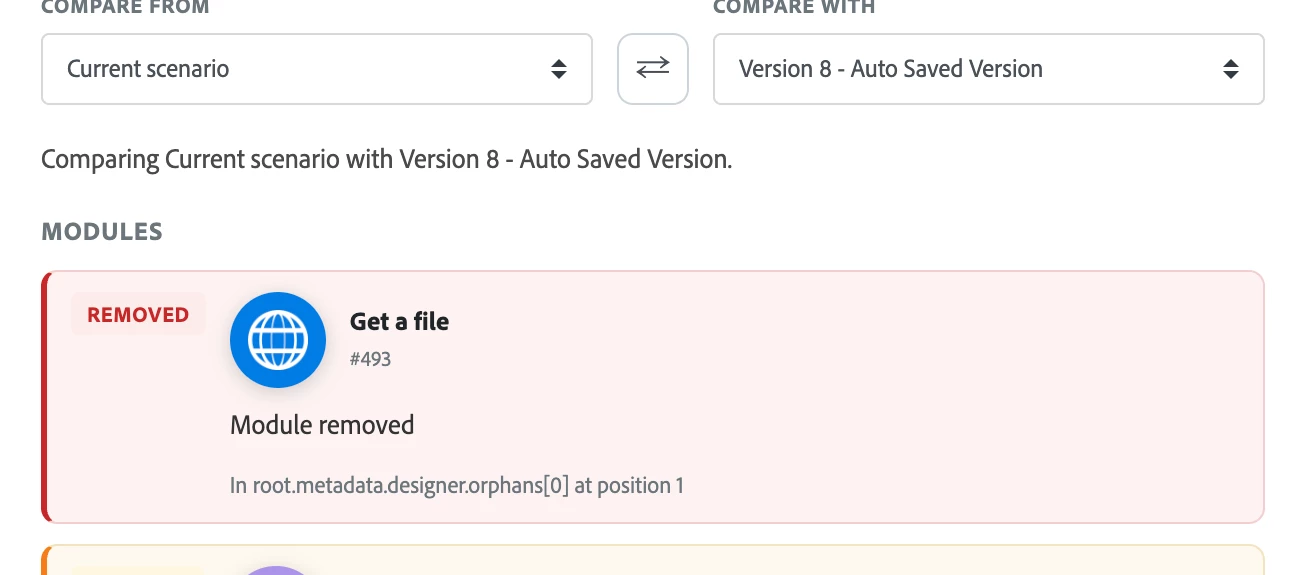
Product update: View and compare scenario versionsThis post introduces a new Review changes experience that makes it easy to see exactly what changed between two versions of a scenario so you can confidently restore older versions when needed. OverviewYou can now open a side-by-side comparison of any two versions of the same scenario to view detailed differences before you restore a version. The Review changes view highlights additions, removals, and edits (colored green and red) and groups changes by logical sections (Scenario, Scenario settings, Modules, Flows, Router routes, Error handlers, and Orphan groups). Restoring a version creates a new version, so all restores are reversible.How to compare scenario versionsClick Scenarios in the left panel and open the scenario you want to inspect. Click the More icon at the bottom of the screen, then choose Previous Versions. From the list of previous versions, click View changes for the version you want to compare. The Review changes panel
Hi Community ,@abhi_tiwa_19 , @DavidRoss91 , @bjoern__koth , @Devyendar , @RiteshGA @DineshK We have multiple events are generated from the source, we plan to ingest only a specific event. To achieve this, we intend to use the Profile Access API to verify whether a particular transaction event already exists for a profile in AEP.If the transaction event is not present based on the Profile API response, the event will then be ingested into AEP via the HTTP Streaming Endpoint.Reference:https://experienceleague.adobe.com/en/docs/experience-platform/profile/api/entitieshttps://developer.adobe.com/experience-platform-apis/references/profile#operation/retrieveEntityAdditionally, are there any guardrails, soft limits, or hard limits associated with the usage of this API endpoint?Any suggestions would be appreciated Thank You Reshmika
I have an ARM based laptop. I have downloaded AEMaaCS SDK from Adobe and trying to run 4502 but sites are not loading. I have the templates but whenever I try to create a page and click a template, the next screen is blank. Could not find anything in error log.
Does anyone know if there is a way to create a Fusion scenario that could add/remove users from a Proof Group?Thinking if we create a request queue that has proof group name, a field for the user they want added, and another field for any user they want removed. Then create a Fusion scenario to make those user updates to the Proof group. Is this possible? and if so what modules would we need to accomplish this?
Has anyone worked with WorkFocus.io? We’re in the process of implementing Fusion within our Workfront environment and have purchased 40 hours of consulting support. We’ve outlined several automation scenarios we’d like to build and are hoping to learn from others’ experiences (see screenshot)A few questions for those who have worked with them:What was your overall experience like? How many Fusion scenarios were they able to help you set up within your allotted hours? Did they recommend or require purchasing additional hours? Did they provide training or explain what they were building behind the scenes? Did they conduct a discovery session and help estimate the effort required for each scenario upfront?Because Fusion consulting can be a significant investment, we want to make sure we're planning our time and budget appropriately. Any feedback, advice, or lessons learned would be greatly appreciated. Thanks in advance!
Introduction In our previous post, Journey Simulation Agent — Cover Your Whole Journey in a Few Clicks with AI-Built Test Users, No Hand-Crafted Data, we showed how the Journey Simulation Agent generates a minimal, AI-built set of test users to exercise every branch of your journey — no manual profile construction needed. That post kept things simple: a journey with no event nodes.But most real journeys don't stay simple. They wait on events — a cart addition, a purchase, an app open, a custom behavioral signal. And those event-driven journeys have a few extra moving parts.This post covers those extra moving parts: how the Journey Simulation Agent automatically generates the test events your journey needs, matches them to the right test users, and triggers them in the right order — so you can go from draft to publish-ready without touching a single event payload by hand. The Problem: You Need Test Events for Test Users Here's where most practitioners hit a wall.The Journey Simulation A
Body:Hi everyone, We’re in the middle of migrating our mobile apps from Tealium to Adobe’s mobile SDKs, and we’ve run into a challenge with Org IDs that I’m hoping to get some guidance on.Current SetupWe currently have two different Adobe Org IDs in use: Adobe Analytics v5 SDK (Legacy) Data flows directly into Adobe Analytics Uses Org ID #1 AEP Mobile SDK (New) Data flows into Adobe Experience Platform Uses Org ID #2 The ProblemDuring the migration, we need both data streams to continue: Data must still flow into Adobe Analytics (Org ID #1) Data must also flow into AEP (Org ID #2) However, since the AEP Mobile SDK is tied to a single Org ID, we’re unsure how to architect the migration so that both systems receive the same events.Questions Is it possible to send events to AEP using MobileCore.trackAction / sendEvent, and then use Event Forwarding to route those events into Adobe Analytics (Org ID #1)? Is this the recommended approach for customers who need to sup
Is it? Its not explained in the documentation
Hi,I´m trying to revoke permisssions to certain users for deleting pages; so I am using the ACL deny for jcr:removeChildNodes and jcr:removeNode; however if I do this then the user is of permission for modifying the contents of a page (cut, paste, etc) but I want them to be able to modify pages.Example::/content/project/branch-of-pages/page1/content/project/branch-of-pages/page2I want the user to keep on being able to modify contents for page1 and page2, but I don´t want them to be able to remove any page under /content/project/branch-of-pages; is that possible?I have been experimenting with pruning permissions at a top level (/content/project) and then in the leaf node adding permissions for jcr:removNode and jcr:removeChildNodes if the node has rep:glob *jcr:content*, but with no success.Do you know what would be the combination of permissions I would need to do what I want?
What is the sample use case for that feature?I choose the audience - people from US. Then I choose “inner audience” for the point 1 people from Texas people from Miami I understood correctly?
Introduction A little while ago we introduced Simulation Mode — a way to test run a draft journey with lightweight, AJO-native Simulated Users before you ever publish. It was a big step: instead of pulling in AEP test profiles to try out a journey, you could spin up purpose-built test profiles right inside AJO.But Simulation Mode still left one job on your plate: you had to figure out which test users the journey needed, and you had to build each one by hand.The Journey Simulation Agent takes that job off your plate. It reads your journey, works out the minimal set of paths needed to exercise every branch, and uses AI to generate a realistic test user for each one, complete with the profile attribute values that path needs. Then it triggers them into the journey and hands you a single verdict: is this journey ready to publish, or not? No path-tracing, no hand-built profiles, no digging through logs.This post walks through that end-to-end, using an example journey. The Issue: Hand-Craf
I spoke at the Adobe Summit Experience League Theater AMA series a few weeks ago. For anyone who missed it - or who's been wrestling with the same adoption challenges I keep seeing - here's what I covered. The Adoption CeilingMost Adobe Analytics and CJA implementations eventually hit the same wall. Power users are thriving. Everyone else is frustrated. They don't understand what the dimensions mean, or why some of them have no data. They've stopped trusting the numbers. And whenever they need something, they file a ticket with IT - where it joins a queue.CJA makes this worse before it makes it better. More data sources means more dimensions spanning multiple departments, and most people have no map for any of it. The Lighthouse FrameworkAt Accrease, we've built an approach around this called the Lighthouse Framework. The idea is simple: instead of routing everything to IT, every business unit gets one trusted point of guidance - a 'lighthouse' - who sits in their team, understands the
Hello, I have just started working with AEM for a client which has set up and linked their Workspace, Assets and Content Hub I would like to export the metadata fields for each platform to ensure they appear on each platform correctly and determine which ones are linked and check everything is working correctly. Could someone tell me how to do this?Thanks
Already have an account? Login
Enter your E-mail address. We'll send you an e-mail with instructions to reset your password.