Explore product-specific spaces to ask questions, share insights, and learn best practices.
Recently active
Restrict webhooks by Adobe IMS authorization and browser originRestrict webhooks by Adobe IMS authorization and browser originWe’ve added two new security controls for custom webhooks: Allowed Origins (CORS) to restrict browser-based calls to specific domains, and Adobe IMS Bearer token validation so webhooks accept requests only when callers present a valid Adobe IMS access token.OverviewCustom webhooks can now enforce two common security requirements:Allowed Origins (CORS) — Specify which browser origins may invoke the webhook from client-side JavaScript. Requests from other origins are blocked by CORS, preventing untrusted web pages from calling your webhook. Adobe IMS authorization — Require requesters to send an Adobe IMS access token in the Authorization header (Bearer <token>). Fusion validates the token before accepting the webhook payload, enabling secure server-to-server or user-scoped calls using Adobe Identity Management.How to configure Allowed Origins and IMS author
Adobe Express connector now available in Workfront FusionWe’ve added a new Adobe Express connector so you can automate common Express workflows—like listing tagged documents, creating variations, exporting renditions, and checking operation status—directly from Workfront Fusion integrations and automations.OverviewThe Adobe Express connector exposes the primary Express API surface so you can programmatically interact with Express documents and tagged elements from your Fusion scenarios. The connector maps the Express API endpoints into modules that make it easy to include Express operations in integration flows, automation canvases, and scheduled jobs.Connector capabilities (API endpoints)Tagged documents — List all documents that contain tagged elements so you can discover assets to process. Tagged document details — Retrieve metadata and the tagged-element structure for a specific document to inspect editable regions and element IDs. Generate variation — Create new document variatio
Hey AJO community! We've just released an updated version of the Image to HTML converter feature, delivering improved accuracy in HTML generation through the use of higher-tier LLM models!This enhancement improves upon the existing feature that enables marketing teams to convert static image-based email designs (JPEG or PNG) into fully modular, editable HTML templates ready for deployment in the Email Designer, without requiring developer involvement. The updated model improves the precision and reliability of the generated HTML output, reducing post-generation corrections and supporting more consistent production workflows.If you're running email through Journey Optimizer and haven't tried this yet, check out the documentation to learn more! Documentation: https://experienceleague.adobe.com/en/docs/journey-optimizer/using/content-management/content-templates/image-to-html
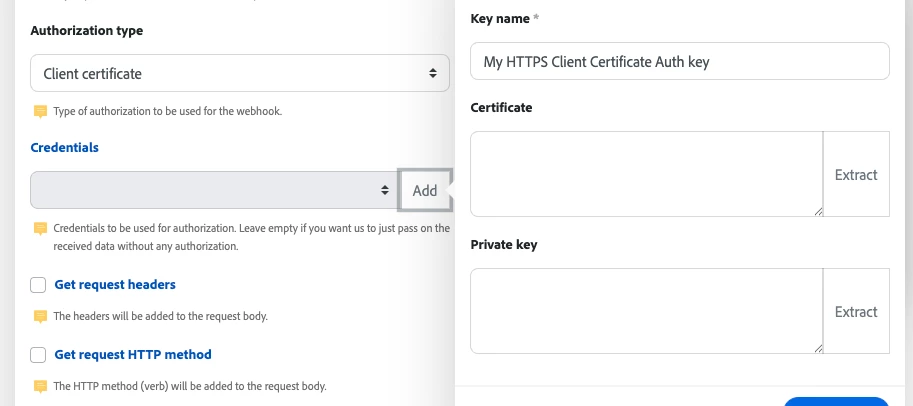
Product update:mTLS support for custom webhooksTo meet stronger security requirements, you can now use mutual TLS (mTLS) with custom webhooks. Add a client certificate and private key to a webhook so Experience League integrations and automations authenticate to the receiving service using client-side TLS credentials.OverviewCustom webhooks now support Client certificate authorization. When you configure a webhook to use a client certificate, Fusion will present that certificate and private key during the TLS handshake so the remote service can verify the client. This provides an extra layer of security for server-to-server webhook delivery when the endpoint requires mTLS.How to configure mTLS for a webhookOpen the Add a hook dialog for the webhook you want to create or edit and check Show advanced settings. Under Authorization type, select Client certificate. In the Credentials field, click Add. This opens the Create a key dialog. Give the key a descriptive Key name (for example, “My
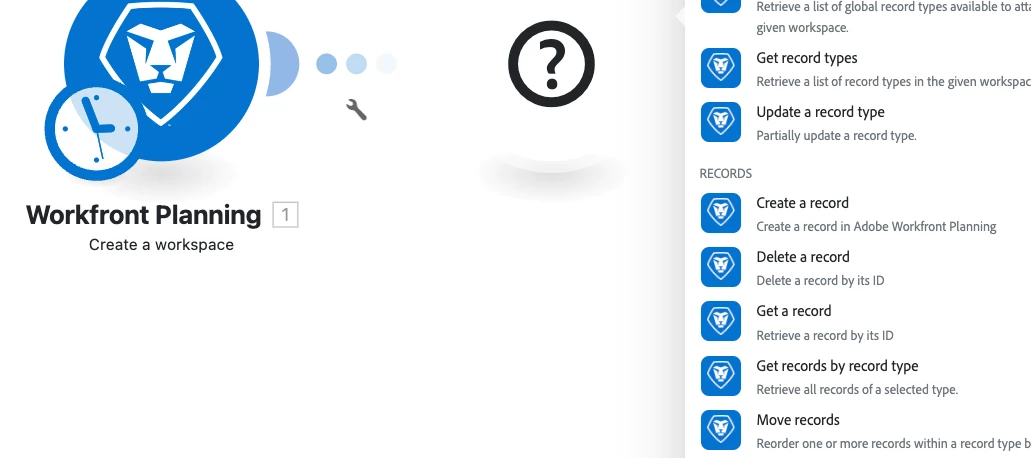
Product update: Workfront Planning v2 connectorWorkfront Planning v2 connector now availableWe’ve released a new connector that exposes the expanded capabilities of the Workfront Planning API version 2 so you can automate and integrate Workfront Planning resources directly from Experience League integrations and workflows.OverviewThe new Workfront Planning v2 connector adds modules that map to the Planning API v2 surface so you can programmatically manage Workfront Planning workspaces, record types, records, fields, and access workflows. The connector also includes user and permission queries and a generic custom-call module so you can call any remaining endpoints not covered by the dedicated modules.What you can do with the Workfront Planning v2 modulesCreate, read, update, and delete workspaces, record types, records, and fields. Retrieve user-level info such as authorization ID and permissions. Request access to a resource and view pending access requests. Make custom API calls to a
We want to hear how you work with brand standards, legal requirements, product information, competitor insights, and company policies, especially if you're using AI to bring any of this into your workflow today. Your input will directly influence the early concepts our design teams are building. Who we’re looking for✓AEM users who manage, deploy, or create digital assets✓ AEM users who are familiar with how context is managed at their company - this can include legal context, brand standards, product information, competitor insights, or company policies.✓ To participate in pre-release activities, you must be a member of the Adobe Feedback Program. If you aren’t sure whether your company is a member, no worries - we will check when you sign up! What we ask of users✓ Join us for a 30 minute session where we will discuss how you manage context at your company today, whether or not you are using AI as part of this process. Timeline✓ Interviews will take place this week and next week. How t
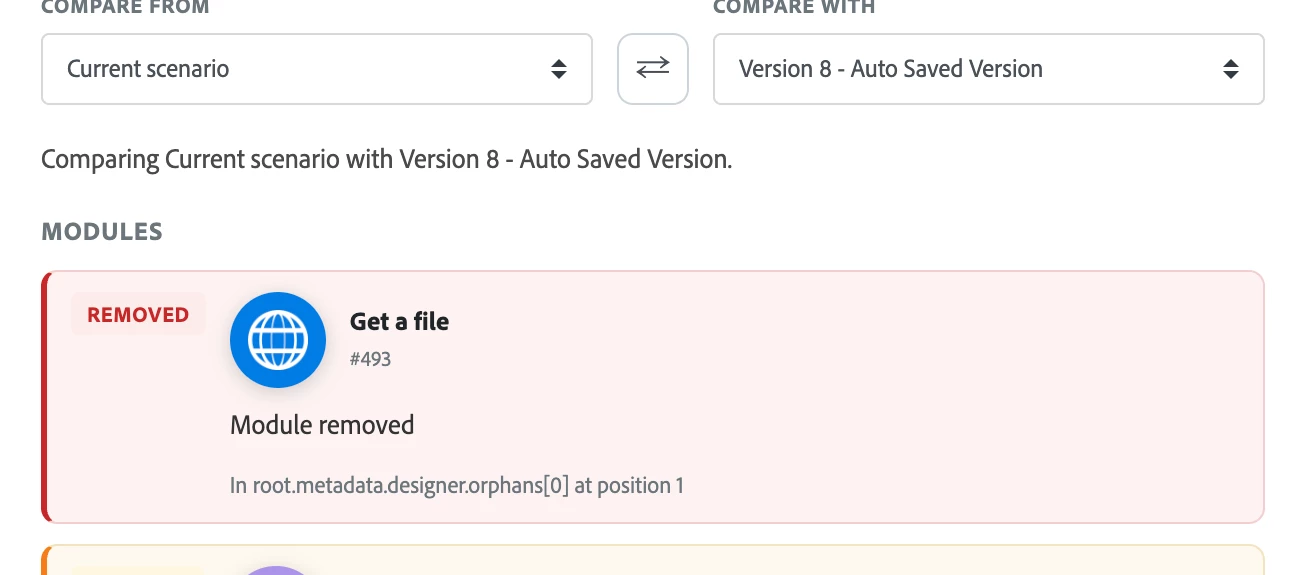
Product update: View and compare scenario versionsThis post introduces a new Review changes experience that makes it easy to see exactly what changed between two versions of a scenario so you can confidently restore older versions when needed. OverviewYou can now open a side-by-side comparison of any two versions of the same scenario to view detailed differences before you restore a version. The Review changes view highlights additions, removals, and edits (colored green and red) and groups changes by logical sections (Scenario, Scenario settings, Modules, Flows, Router routes, Error handlers, and Orphan groups). Restoring a version creates a new version, so all restores are reversible.How to compare scenario versionsClick Scenarios in the left panel and open the scenario you want to inspect. Click the More icon at the bottom of the screen, then choose Previous Versions. From the list of previous versions, click View changes for the version you want to compare. The Review changes panel
The Project Falco beta program grants you exclusive access to an updated version of Adobe Journey Optimizer B2B Edition that is specifically designed to supercharge your Marketo Engage instance (no purchase required).Program highlights• Agentic Program & Journey Creation: Design and optimize omni-channel lead journeys inseconds leveraging your existing programs, campaigns, and channels inside Marketo Engage.• Agentic Audience Segmentation: Prompt the audience agent to automatically discover andcreate audience segments using Marketo Engage data.• AI-powered Decisioning: Achieve next-gen personalization through AI-powered Next-bestJourney and Journey Path decisioning.• Omni-channel Orchestration: Connect and activate inbound and outbound channels togetherfrom a single journey canvas, expanding to web and paid channels.• Agentic BDR Experience: Allow your BDR teams to automate outbound sequences using theAccount Qualification Agent together with integrated marketing data.What you getE
Please note: This article was originally published on 1/6/26, but was accidentally removed during the Community transition.On Tuesday, March 31, 2026, Marketo Engage will deprecate the Search Engine Optimization feature (SEO). Why deprecate SEO? When we deprecate older features that have low usage, we can reallocate their resources to newly released and upcoming features, as well as to the overall maintenance of Marketo Engage. This in turn creates an improvement in performance for users across the board.What do I need to do? If you don’t actively use SEO, nothing. If you have used SEO in the past few months and you want to export your data, it must be done on or before March 31, 2026. All SEO-related data will be removed from the system and the SEO tile will no longer be available as of April 1, 2026. How to export: Issues Keyword Results Keyword Trends Competitor Keyword Trends I still want to use SEO. What tool can I use instead? We recommend Semrush, which offers a compreh
If you've been following Adobe Summit, you'll have seen the announcement of Adobe Data Engineering Agent, a purpose-built Adobe Experience Platform Agent powered by Experience Platform Agent Orchestrator. While the official blog covers the vision well, I want to share more on what it unlocks for your workflows your Adobe stack. What it's built to doData preparation is high-value but time-intensive, often delaying downstream activation. Adobe's AI & Digital Trends Study found 75% of organizations cite data integration and quality as their top AI implementation challenge. Data Engineering Agent addresses this with an AI-guided, human-in-the-loop approach that automates operational steps across the data lifecycle, so you can focus on higher-value decisions. How it plays out across your stackAdobe Experience Platform: Faster, more confident data onboardingData Engineering Agent extends Experience Platform’s data ingestion strength by making the onboarding process more guided and autom
We're excited to announce Unified Review and Approval, a new capability that brings together Adobe Workfront and Adobe Frame.io into a single, deeply connected review experience. This integration is available now for all Workfront customers upon a contract update. What's included Unified Review and Approval natively integrates Frame.io's professional-grade review surface directly into your Workfront workflows. Here's what your teams get:One review surface for every content type — Whether your team is reviewing a 30-second social clip, a 200-page PDF, or a Photoshop comp, the experience is the same. Frame.io supports over 40 file formats with native video playback for formats like ProRes, H.265, and DNxHD — plus visual markup tools for annotating directly on the asset. Frame-accurate commenting for video — Frame.io was purpose-built for creative review, with frame-accurate commenting, advanced watermarking, and support for files up to 500 GB. That capability now lives natively with Work
Japanese version of this announcement at the bottom of the page | このお知らせの日本語版は、このページの下部に掲載されています。To enhance performance, reliability, and scalability, Adobe is performing required network maintenance for Marketo Engage on May 16, 2026, from 16:00 UTC to 18:00 UTC. This will only affect subscriptions hosted in the San Jose data center. (Learn how to locate your data center)During this two-hour maintenance window, all Marketo Engage services will be unavailable. We recommend taking the following steps to mitigate any impact on your business.Avoid creating or updating leads/people or running processes that modify Person records.Do not trigger follow-on processes, as scheduled campaigns will be paused.Temporarily disable any integrations that send/receive data to/from Marketo Engage.Avoid running data imports/exports or major lead/person-generation campaigns.For externally hosted forms, Adobe can support submission caching. To request this, contact Adobe Support with your Munchkin ID and r
We’ve rolled out new Adobe Campaign updates and shared resources to help teams move faster, experiment more easily, and scale customer engagement with confidence. Here’s a quick look at what’s new: Adobe Campaign v8 updatesRecent v8 releases extend key use cases in the web UI while continuing to strengthen flexibility, security, and governance in the client console. Highlights include:Firefly + third-party image generation model integration Campaign inventory timeline view Multilingual deliveries Transactional message profile enrichment Adobe Experience Manager live copies + language copies Content experiments (A/B testing) Continuous delivery enhancements Campaign approval management SMS connector Security improvements 🔗 View full release notes:Adobe Campaign v8 Web UI release notes Adobe Campaign v8 client console release notes Support note: Adobe Campaign Standard and Campaign Classic remain supported. Roadmap investments are focused on Adobe Campaign v8, prioritizing long-term sta
For those of us in marketing operations who are wired to crave efficiency, governance and time-saving techniques, Marketo Engage tokens have always been a critical part of our process. Until recently, tokens could be created at a local (program) level or at the folder level within Marketing Activities. Fast forward to today, in addition to still having your tried-and-true local tokens, you now have the ability to create instance-wide tokens that can be applied across any program or folder! You can add and edit global tokens by going to the Admin tab, navigating to the left-hand side navigation tree and clicking My Tokens. Here you can drag, drop and edit token types, names and values to your liking. Note that you have to have admin permissions to access this. These tokens will now be available to use in any program when navigating to the program itself and clicking on the My Tokens tab. When creating a global token strategy you'll want to think o
We’re excited to share that all Prime and Ultimate customers now have access to the Lead Activity and User Audit Marketo Engage Data Streams. Whether you need to sync lead data into your CDP, keep a close eye on asset changes, or are looking to reduce your API load, Data Streams can help you do more with your data with less effort.What are Data Streams?Data Streams let you stream real-time events from Marketo Engage to any system. They send event data directly to your systems as they time, so you don't have to wait for scheduled syncs or manually query for changes.Current streams available:Lead Activity: Send lead-level engagement and activity events (e.g., form fills, list adds) directly from Marketo Engage to other platforms and services. User Audit Events: Stream changes made by users, such as updates to assets, programs, or tokens, to improve compliance across all marketing operations.If you are looking to integrate Marketo with downstream tools such as Snowflake or a homegrown CDP
What’s New in 2026.02.0The 2026.02.0 AEM release brings important enhancements across Generation, Activation, and Agentic AI capabilities. Below is a quick summary to help you understand what’s included and where to focus.AEM GenerationContent Fragment Management and Launches, OpenAPI side-port to 6.5 LTS SP2: Improved compatibility and extensibility with OpenAPI side-port support, helping teams working across Cloud Service and 6.5 LTS SP2 environments streamline integrations and content workflows.AEM ActivationQuiet Hours & Update-Free Periods – Now GA: Greater operational control with generally available support for defining quiet hours and update-free windows. This helps teams manage deployments and content activation with reduced disruption. AEM Content Advisor in Adobe Express: Content guidance capabilities are now integrated into Adobe Express, enabling smarter content refinement and optimization directly within creative workflows.AEM Agentic AIPipeline Troubleshooting | Code
February' 26 release notes Check out what's new and improved in the latest Adobe Journey Optimizer product release update: Release Notes New capabilitiesJourney arbitration: You can now use ranking formulas to automatically boost journey priority scores based on customer profile attributes and contextual factors, ensuring customers enter the most relevant journeys. This capability is only available for a set of organizations (Limited Availability). To gain access, contact your Adobe representative. Action activity in journeys: Journey Optimizer supports a new generic Action activity that enables you to configure both single actions and multi-action inbound action groups, allowing for streamlined action configuration within the journey canvas. In particular, this new feature allows for: A simplified native action configuration within the journey canvas. The capacity to create multi-action inbound action groups. The ability to add optimization to any built-in channel action. The abili
February' 26 release notes Check out what’s new in the latest Adobe Experience Platform release update: Release Notes New capabilities Alerts Slack integration for customer-facing alerts: You can now deliver customer-facing alerts to Slack. Follow the step-by-step tutorial to set up the Slack integration and receive alert notifications directly in your Slack workspace. Destinations Snowflake Batch generally available: The Snowflake Batch destination is now generally available. Real-Time CDP customers worldwide can now use this connector to activate data into their Snowflake accounts without needing to physically copy the data. All limitations from the limited release have been lifted (availability for US-only customers, support for audiences belonging to the default merge policy only). Segmentation Service Editable API audiences: You can now edit audiences created using either the Segmentation Service API or the Audience Agent in Segment Builder. Note: Audiences that contain ti
Content Advisor (evolution of Asset Selector) brings AI-powered content discovery directly into your content supply chain. With AI search and context aware recommendations based on canvas content and campaign briefs, native access to channel ready Dynamic Media renditions, customers can now discover relevant assets faster, work more creatively, and reuse content — all without switching tools. What This Means for customers Design and marketing teams can now discover and leverage approved brand assets instantly without manual searching. Creatives and non-creatives alike benefit from AI recommendations that inspire new content ideas and accelerate execution. Enterprise content supply chains become more efficient as teams remain in a single workflow from discovery to creation. Content Advisor capabilities at a glance: AI Search for smarter asset discovery Smart suggestions based on Express canvas context Campaign briefs to discover relevant assets Native access to all your Dyna
January' 26 release notes Check out what’s new in the latest Adobe Experience Platform release update: Release NotesNew capabilities Agent Orchestrator Adobe Experience Platform Agents usage-bound trial: Select customers now have a complimentary trial access to Adobe Experience Platform Agents. You can use the trial to explore and interact with Agents through the AI Assistant interface powered by Adobe Experience Platform Agent Orchestrator. The trial offers hands-on experience with AI Agents that operate within the context of customers’ existing Experience Cloud products and environments, allowing teams to evaluate value before committing to a full purchase. Destinations Kevel destination connector now available: The Kevel streaming destination for Adobe Experience Platform enables customers to activate Adobe audiences directly into Kevel’s UserDB and Segment Management APIs to support real-time targeting at ad decision time. Kevel provides the AI-enabled technology and expert g
Real-Time CDP Collaboration Release Real-Time CDP Collaboration now supports CSV file upload as a new method for sourcing audiences, as well as new mobile match keys (IDFA and GAID) for enhanced audience matching and measurement.New featuresCSV upload for Audience Sourcing: Upload CSV files to source audiences into Collaboration directly from the UI. Ideal for onboarding first-party data for short-term collaboration projects. Mobile Match Key Support: Collaboration now supports mobile match keys, including IDFA and GAID, for audience matching and measurement. These match keys are selected during account setup and can then be used when configuring connection settings for new connections and in downstream collaboration workflows.Please find the detailed information around the new functionalities here: Latest ReleaseFeel free to reach out in case you have any questions and/or feedback through the below comment section.
January' 26 release notesCheck out what's new and improved in the latest Adobe Journey Optimizer product release update: Release NotesNew capabilitiesDecisioning support in Push channel: You can now personalize and optimize the content of your Push notifications with Decisioning. Use Priority Scores, Formulas, or AI Models to display the best content to your customers. Direct mail channel in journeys: Previously limited to Campaigns, Direct Mail channel is now available on the journey canvas, enabling you to incorporate Direct Mail into your journeys. Direct Mail can now be used in both batch and 1:1 journey scenarios, with support for file extraction configuration and time-based frequency settings. Quiet hours (time-based exclusions): Quiet hours let you define time-based exclusions for Email, SMS, Push, and WhatsApp channels. They ensure that no messages are sent during specific periods of time, helping you respect customer preferences and compliance requirements. You can apply quiet
DetailsThe features in this release focus on Experience Manager Sites, Forms, Assets, and Cloud Foundation innovations and include the following: AEM SITES: Edge Delivery Updates AEM FORMS: Interactive Communications Associate UI AEM ASSETS: AI Search (Multilingual, Semantic) CLOUD FOUNDATION: MCP Server Release Overview Video: https://video.tv.adobe.com/v/3479789/ Seed Q&APlease use this thread to ask questions related to this release.See all the Previous Releases here and the Current Release Notes here.
Many of you have been building on AEM for years - crafting sites that don’t just look great but drive measurable business outcomes. You’ve set the bar high. Now, the landscape is shifting. People are finding answers and getting work done through new, powerful tools - ChatGPT, Google AI Mode, and others. The AEM team is committed to making sure this community stays ahead of that curve. That’s why we’ve built LLM Optimizer - a new capability that gives you deep visibility into how generative AI systems (like chatbots and agents) consume and interpret your site’s content. It connects those insights to business outcomes and provides step-by-step guidance to help you capture emerging opportunities. This week, we’re starting to roll out LLM Optimizer for AEM customers on AMS and Cloud Service. You’ll start seeing real data - tracking agentic traffic and surfacing your first set of optimization opportunities. We started this journey just over 100 business days ago, and it’s only the beginning
We’re excited to introduce the AJO Mobile Learning Hub, a centralized learning destination designed to help you configure, design, launch, and optimize mobile experiences using Adobe Journey Optimizer.Whether you’re just getting started with mobile channels or looking to refine advanced use cases, the hub brings together practical guidance and best practices in one place.Access the AJO Mobile Learning Hubhttps://experienceleague.adobe.com/en/docs/journey-optimizer-learn/mobile-learning-hub/overviewYou can also find it on Experience League under:Learn → Tutorials → Journey Optimizer → Mobile Learning HubWhat you’ll find in the hub Overview and Getting Started Learn about the value of AJO Mobile, review customer examples, and understand how mobile fits into your Journey Optimizer strategy. Configure and Launch (Developers) Step-by-step guidance for enabling mobile channels, including SDK setup, event triggers, and Adobe Experience Platform integration. Design and Deliver (Marketers)
Already have an account? Login
Enter your E-mail address. We'll send you an e-mail with instructions to reset your password.