Explore product-specific spaces to ask questions, share insights, and learn best practices.
Recently active
Marketoのメールアセット一覧とメールコンテンツ取得に関して、現在の検証結果として下記だが、v2仕様は公開情報となっていない。また、メールアセット一覧取得に関して、v1で旧エディタでの作成分と新エディタ作成分(ただしレスポンス内容の不足あり)という状況だが、この状態が正式仕様となるのかも公開情報となっていない。 APIを利用したシステム構築を行ううえで正式な仕様情報がなく、設計が困難なため早期に仕様の確定および公式情報として公開を頂きたい。 《検証結果》■メールアセット一覧取得 v1:旧エディタに加え、新エディタで作成したアセットも取得可能。ただし新エディタ分は、一部Subjectが含まれないなどレスポンス内容に不足が見受けられます。 (https://developer.adobe.com/marketo-apis/api/asset#operation/getEmailUsingGET) v2:新エディタで作成したアセットのみ取得可能。 (https://developer.adobe.com/marketo-apis/api/asset#operation/filterContentUsingGET_email)■メールコンテンツ取得 v1:旧エディタ作成メールのみ取得可能 (https://developer.adobe.com/marketo-apis/api/asset#operation/getEmailFullContentUsingGET) v2:新エディタ作成メールのみ取得可能 (https://developer.adobe.com/marketo-apis/api/asset#operation/getContentUsingGET_email)
It would be great if the Date field could be customized, such as being able to block or highlight specific dates when the calendar pops up.
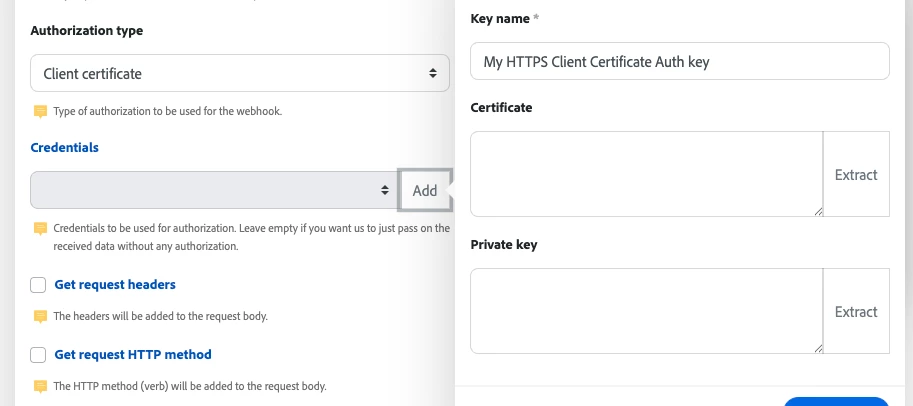
Product update:mTLS support for custom webhooksTo meet stronger security requirements, you can now use mutual TLS (mTLS) with custom webhooks. Add a client certificate and private key to a webhook so Experience League integrations and automations authenticate to the receiving service using client-side TLS credentials.OverviewCustom webhooks now support Client certificate authorization. When you configure a webhook to use a client certificate, Fusion will present that certificate and private key during the TLS handshake so the remote service can verify the client. This provides an extra layer of security for server-to-server webhook delivery when the endpoint requires mTLS.How to configure mTLS for a webhookOpen the Add a hook dialog for the webhook you want to create or edit and check Show advanced settings. Under Authorization type, select Client certificate. In the Credentials field, click Add. This opens the Create a key dialog. Give the key a descriptive Key name (for example, “My
Hello Team, We would appreciate your guidance regarding the Adobe Analytics Data Repair API. Our requirement is to replace all data for Exit Links, regardless of any condition.We used the following variable in our payload: "pageeventvar2": { "action": "set", "setValue": "data repair"} After executing the API, the results indicated that only the Custom Link values were updated (as expected), while the Exit Link values remained unchanged. Could you please advise whether there are any additional parameters, limitations, or specific configurations required to update Exit Link data through the Data Repair API? https://developer.adobe.com/analytics-apis/docs/2.0/guides/endpoints/data-repair/json-body Thank you for your support.
Hi all,I'm running into a limitation in Adobe Campaign and I'm curious how others handle this.It seems that I can only load one coupon code per email delivery. In my use case, I would like to include two different coupon codes in a single email, each with its own validity period.Has anyone implemented something similar?Any ideas or workarounds (e.g. data model, delivery setup, or workflow approach) would be very helpful.Thanks in advance!
RequestWe would like the ability to easily add a mailto link within the AJO content editor, avoiding having to form the link structure manually. ReasoningThe users of the content editor are often not technical This is fairly standard functionality for a WYSIWYG editor It is present in your other email products WorkaroundWe know how to create one manually, e.g.mailto:emailme@example.com?subject=I%20would%20like%20more%20information%20on%20your%20product
Hi Team,I am facing an issue with favicon loading.Previously, I only had the following code in my application, and it worked as expected:<link rel="shortcut icon" type="image/x-icon" href="favicon.ico"/>As part of an update, I wanted to use a favicon.png file since most modern browsers support PNG favicons. I replaced the ICO file with the following, and it worked correctly:<link rel="shortcut icon" type="image/png" href="favicon.png"/>However, for backward compatibility with older browsers, I included both the PNG and ICO files:<link rel="shortcut icon" type="image/png" href="favicon.png"/><link rel="shortcut icon" type="image/x-icon" href="favicon.ico"/>I expected modern browsers to load favicon.png and use favicon.ico only as a fallback for browsers that do not support PNG favicons. Instead, the browser always loads favicon.ico, and the PNG file is ignored.Is this the expected behavior? If both favicon types are specified, should the browser always prefer the
Hi Adobe Community,We're currently implementing a preference center/unsubscribe landing page using AJO campaigns with URL parameter encryption enabled via the Key Registry.**Current Setup:**- AJO email campaign uses the encrypt() helper in personalization editor- Email links include encrypted parameters: ?pid=v1.towEToq9cGLgo9x4...- Landing page is built using AJO Forms (not custom HTML)- Form is tied to an AEP profile-enabled dataset for capturing preferences**What We're Trying to Achieve:**When a user clicks the email link and lands on the form page:1. The encrypted pid (profile/identity) should be captured from the URL2. Assigned to a form hidden field automatically3. When the form is submitted, the pid should be mapped to a profile identity namespace (Email or CRM ID)4. Form submission data should stitch to the existing profile in AEP for preference updates**Our Questions:**1. **In AJO Forms Designer** - Can we configure a hidden field to automatically capture and map URL
Hi all, hoping someone can help with an embedded Marketo form issue. CORE ISSUEWe embed a Marketo form in a Next.js site. It renders correctly with the fields from the first approved version. But when we edit the form (e.g. adding hint text to a phone field) and approve the draft, the change never appears, even 2+ hours later. The form status shows "Approved" and the "Updated at" timestamp reflects the approval, but the definition served to the page is still the previous approved version.The only thing that makes the change show up is cloning the form, deleting the original, and re-embedding the clone (new form ID). Because embed IDs are referenced throughout the site, that isn't a viable workflow. WHAT WE OBSERVEGET {lp-domain}/index.php/form/getForm?...&form={id} keeps returning the PREVIOUS approved version. We polled from T+1min to T+2h; every response was stale. EVIDENCE (server-side cache)The getForm response carries the header cached: true, and the payload matches the prior
In the Bulk Lead Extract documentation, I see that the updatedAt and smartListId filters are not available for all subscription tiers. I am building a Marketo integration that will enable users to import their lead data into our platform, and some of my design relies on the updatedAt and smartListId filters. I was wondering if it is free of cost for anyone to enable these filters on their subscription (even the lowest tier), or if it is dependent on their tier.
Hi all, hoping someone can help with an embedded Marketo form revalidation issue. CORE ISSUEWe embed a Marketo form in a Next.js site that is under development. It renders correctly with the fields from the first approved version. But when we edit the form (e.g. adding hint text to a phone field) and approve the draft, the change never appears, even 2+ hours later. The form status shows "Approved" and the "Updated at" timestamp reflects the approval, but the definition served to the page is still the previous approved version.The only thing that makes the change show up is cloning the form, deleting the original, and re-embedding the clone (new form ID). Because embed IDs are referenced throughout the site, that isn't a viable workflow. WHAT WE OBSERVEGET {lp-domain}/index.php/form/getForm?...&form={id} keeps returning the PREVIOUS approved version. We polled from T+1min to T+2h; every response was stale. EVIDENCE (server-side cache)The getForm response carries the header cached: t
Link is https://experience.adobe.com/#/experiencemanagerBut it returns a 404.
Currently when you unassign a user from a task/issue, it automatically fills in the assignee with that user's job role. My company has never used this feature and it just creates extra work and confusion to either remove that job role or to see it in the assignments. It would be great if this is something we could disable in the setup area.
Many thanks to Aman Kumar Gupta (Senior Product Manager) and Siddharth Sahni (Senior Engineering Manager) for sharing their expertise on Content Hub! Thank you to the team for helping in the Q&A as well!If you weren’t able to attend live - or want to revisit any part of the session - you can access everything below. Session MaterialsSlide Deck PDF Webinar Recording Stay tuned for the consolidated Q&A from the session! We’ll posted it in this thread.Additional ResourcesContent Hub blogs: Unlocking Content Hub Extensibility Custom Workflows in Content Hub Session SummaryThis session covered three pillars for AEM Assets Content Hub: Making content easy to find, Real to use for your business workflows, and Safe to govern. Key capabilities demoed included AI (semantic) search, custom sorting, on-the-fly generation of channel-specific dynamic renditions (e.g., Instagram/LinkedIn crops) from Search bar of Content Hub, auto-updating Smart Collections for managing multiple brands, an
Hi Adobe Journey Optimizer Community!Looking to sharpen your Adobe skills, discover new ways to work smarter with AI, and learn directly from Adobe experts and customers? Skill Exchange 2026 registration is officially open! 🚀 Adobe Journey Optimizer (alongside Adobe Experience Platform and Applications (Real-Time CDP and Customer Journey Analytics) sessions will be held on August 6th, with sessions across 7 Adobe products throughout Aug 5th-13th. A couple sessions you can expect to learn from: One Platform, One Customer Calling the Right Plays with Intelligent Journeys Building an Intelligent Activation Layer and Orchestration Drives Results See full Adobe Experience Platform and Applications session list here Join us this August for: ✨ Expert-led sessions across 7 Adobe products 🤖 AI-powered tips and innovations 💡 Real customer stories 🎬 Live demos and practical takeaways you can apply right away 🤝 Opportunities to connect with fellow Experience Makers Whether you're just get
Hi AEP Community!Looking to sharpen your Adobe skills, discover new ways to work smarter with AI, and learn directly from Adobe experts and customers? Skill Exchange 2026 registration is officially open! 🚀 Adobe Experience Platform sessions will be held on August 6th, with sessions across 7 Adobe products throughout Aug 5th-13th. A couple sessions you can expect to learn from: One Platform, One Customer Governing at Scale: Building a Trustworthy Data Foundation Building an Intelligent Activation Layer and Orchestration Drives Results See full Adobe Experience Platform session list here Join us this August for: ✨ Expert-led sessions across 7 Adobe products 🤖 AI-powered tips and innovations 💡 Real customer stories 🎬 Live demos and practical takeaways you can apply right away 🤝 Opportunities to connect with fellow Experience Makers Whether you're just getting started or looking to level up your expertise, there's something for everyone. 🎟️ Save your spot today: [Register Now]
Hello Target Users,I have a scenario where i have to show different experiences for mobile and non-mobile users within the same activity. So i am using multiple audience in configure option to solve that (screenshot attached).But this seems to working only for non-mobile users, mobile users also seeing the same experience as non-mobile users. Am I missing something? or is there any other way to create activity for this scenario?Thanks in advance!
Currently, Salesforce sync errors can only be reviewed manually through Admin > Salesforce > Sync Errors in Marketo. While the UI provides valuable information about job-level and record-level synchronization failures and allows exporting data as a CSV file, there is no supported REST or SOAP API endpoint that exposes this information programmatically.For organizations that rely on centralized reporting, monitoring, and BI platforms, this limitation makes it difficult to automate the collection and analysis of SFDC sync issues.Provide a supported API endpoint that allows customers to retrieve Salesforce synchronization errors programmatically, including:Sync error timestamp Error type/category Error message/details Lead ID and/or SFDC record ID Sync job information Resolution status (if applicable) Ability to filter by date range Pagination support for large datasets
Hi everyone,I have a requirement where the email content remains the same, but the CTA link needs to change dynamically based on the lead's country using a Velocity Script in Marketo.However, I'm getting an error when I deploy the campaign.Requirement:Same email template for all recipients. Change only the CTA URL based on the lead's country. Example: US → www.youtube.com Canada → https://example.com/ca India → https://example.com/in Behavior:✅ Email Preview: Works as expected. ❌ Smart Campaign Send: Fails with a Velocity Script error.Velocity Script:#set($country = ${lead.Country})#set($url = "www.google.com")#if($country == "India") #set($url = "example.com/in")#elseif($country == "United States") #set($url = "www.youtube.com ")#elseif($country == "Canada") #set($url = "example.com/ca")#else #set($url = "www.google.com")#end${url}HTML: <td valign="top" align="center" style="text-align: center; padding: 12px 20px; color: #1570EF; font-size: 16px; font-family:Arial
Hi everyone,I'm facing a 404 issue with a custom Sling Servlet and the AEM Dispatcher. The servlet works for one placement of the component but returns a 404 for another, even though they share the exact same resource type.Environment:AEM as a Cloud ServiceServlet registered via @SlingServletResourceTypes with selectors = "customselector", extensions = "json"Dispatcher module with a standard filter.any configurationScenario:The servlet is registered for the resource type path/components/componentname and handles requests with the selector customselector and extension json (e.g., ...componentname.customselector.json).Placement A (Works): The component is placed inside an Experience Fragment (XF) used in the site header.Request URL: /content/experience-fragments/.../componentname.customselector.jsonResponse: 200 OKPlacement B (Fails): The exact same component (same sling:resourceType) is placed inline on a standard content page.Request URL:/content/path/us/en/pagepath/_jcr_content/root/c
I have created a Fusion scenario that removes deactivated users from their Home Team. The issue is that they still have Other Teams. I tried everything I could think of and kept getting errors to set their other teams to null. Does anyone know how I can accomplish this?Maybe I need to come at this from the Team side and remove any inactive users versus using the user update scenario to do it. It’s just that I have the user one accomplishing other actions so I was hoping to get the user profile corrected using the same scenario.
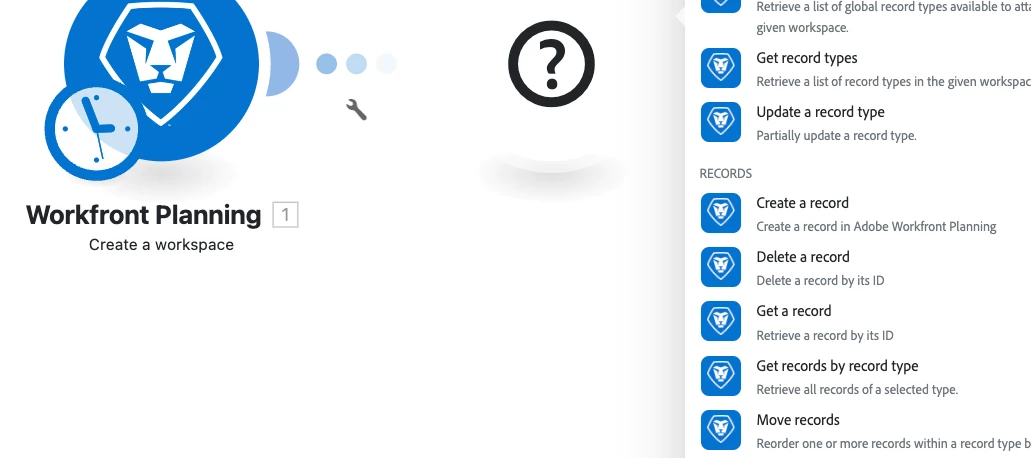
Product update: Workfront Planning v2 connectorWorkfront Planning v2 connector now availableWe’ve released a new connector that exposes the expanded capabilities of the Workfront Planning API version 2 so you can automate and integrate Workfront Planning resources directly from Experience League integrations and workflows.OverviewThe new Workfront Planning v2 connector adds modules that map to the Planning API v2 surface so you can programmatically manage Workfront Planning workspaces, record types, records, fields, and access workflows. The connector also includes user and permission queries and a generic custom-call module so you can call any remaining endpoints not covered by the dedicated modules.What you can do with the Workfront Planning v2 modulesCreate, read, update, and delete workspaces, record types, records, and fields. Retrieve user-level info such as authorization ID and permissions. Request access to a resource and view pending access requests. Make custom API calls to a
Hello the amazing Adobe Community, I am looking to understand a metrics.We have form conversion set as Segmented “Visit Container” with event## to fire when user submit a form Then create a calculate metrics using that Visit Container Segment + the (Visit) metric is our Form Conversion We want to understand why when we have last touch channel broken down and when we sum the form conversion for each of the channel it doesn’t add up to the “Deduplicate total within the workspace” example using dummy numbers. Can someone explain what is causing this? We understand that visits and sum should have slight difference of approx. 5% but for our form conversion calculated metrics its >15% difference between workspace number and total number. Explain in technical term is also welcome. I want to understand Adobe logic. Channel Visits Conversions Adobe Total 370,123 9,723 SEO 108,351 2,052 SEM 125,824 3,878 Direct 158,885 5,819 SUM 393,060 11,749
Request for Feature Enhancement (RFE) Summary: <Issue> An issue occurred where the publishing operation failed on the holding company's corporate website. <Cause> The cause was that a file uploaded to Assets did not comply with the naming conventions. However, the current version of AEM Assets allows files that do not adhere to naming conventions to be uploaded without displaying any error messages or warnings. <Request for Improvement> We would like a feature that checks file naming conventions during upload, displays an error or warning for non-compliant files, and controls the upload process. We believe this will help prevent issues upon publication and reduce the operational workload. Use-case: A specification that checks naming conventions during file upload, displays an error or warning for non-compliant files, and controls the upload process. Current/Experienced Behavior: With the current version of AEM Assets, it is possib
We want to hear how you work with brand standards, legal requirements, product information, competitor insights, and company policies, especially if you're using AI to bring any of this into your workflow today. Your input will directly influence the early concepts our design teams are building. Who we’re looking for✓AEM users who manage, deploy, or create digital assets✓ AEM users who are familiar with how context is managed at their company - this can include legal context, brand standards, product information, competitor insights, or company policies.✓ To participate in pre-release activities, you must be a member of the Adobe Feedback Program. If you aren’t sure whether your company is a member, no worries - we will check when you sign up! What we ask of users✓ Join us for a 30 minute session where we will discuss how you manage context at your company today, whether or not you are using AI as part of this process. Timeline✓ Interviews will take place this week and next week. How t
Already have an account? Login
Enter your E-mail address. We'll send you an e-mail with instructions to reset your password.