Leiste mit Community-Erfolgen erweitern.

Mark Solution

Diese Konversation wurde aufgrund von Inaktivität geschlossen. Bitte erstellen Sie einen neuen Post.

GELÖST

Auto Complete Task to 100% complete using Fusion

Avatar

Community Advisor

Is it possible to mark a task as 100% complete once the deadline has passed in Fusion? If so, is there a recommendation you can provide on where to start to build this in Fusion?


I tried the Auto Complete Task Tracking on the task but it will not mark as complete. We have an unassigned role that sits on these tasks, so I am not sure if this is causing the problem of not marking it as complete. We are not able to remove the unassigned role as we have reports pulling from these unassigned tasks.


Thank you!

1 Akzeptierte Lösung

Avatar

Korrekte Antwort von
Community Advisor

Hi Kiersten,


The approach I would take is as follows:


1) Add Search module that will look for tasks. Configure the filter rules to look for tasks where the plannedCompletion date is less than today, the status is not complete, and the role ID associated with the task is the "unnassigned role" you mention. + Any other relevant filter rules to narrow down your search to the specific tasks that need to be auto-closed (i.e., Template task ID).  It would look something like this:
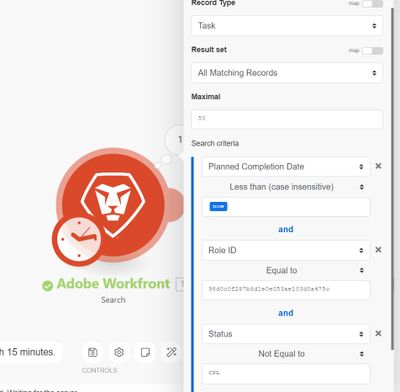
 

Screenshot 2023-03-10 101324.jpg


2) Than add an update record module, mapped to the task ID's located in step 1,  that will update the status of that task to Complete ("CPL")
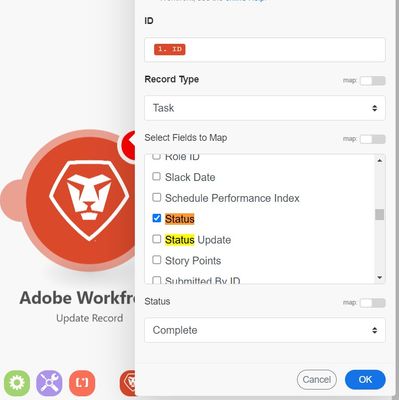
 

Screenshot 2023-03-10 101523.jpg


Hope that helps! Shout if you have any questions.


Best Regards,

Rich. 

Lösung in ursprünglichem Beitrag anzeigen

3 Antworten

Avatar

Korrekte Antwort von
Community Advisor

Hi Kiersten,


The approach I would take is as follows:


1) Add Search module that will look for tasks. Configure the filter rules to look for tasks where the plannedCompletion date is less than today, the status is not complete, and the role ID associated with the task is the "unnassigned role" you mention. + Any other relevant filter rules to narrow down your search to the specific tasks that need to be auto-closed (i.e., Template task ID).  It would look something like this:


Screenshot 2023-03-10 101324.jpg


2) Than add an update record module, mapped to the task ID's located in step 1,  that will update the status of that task to Complete ("CPL")


Screenshot 2023-03-10 101523.jpg


Hope that helps! Shout if you have any questions.


Best Regards,

Rich. 

Avatar

Community Advisor

Thanks, Rich! I will take a stab at it. 

Avatar

Community Advisor

I finally was able to get around to building this and it worked our perfectly! Thank you so much for your help!