AEM Guides Native PDF Subtitle Question | Community
Skip to main content
Level 4
October 17, 2023
Solved

AEM Guides Native PDF Subtitle Question

  • October 17, 2023
  • 1 reply
  • 1409 views

In Native PDF, what is the best way to publish a subtitle on a first page?


In our current OT setup, we use "outputclass" from the <Title> element to populate the subtitle content. I have attached the DITA for an example.


I know I can potentially set up a field in the asset's Properties, but is there any way I can leverage what we currently have in our DITA? Since the tag is outside of the <topicmeta>, I haven't had success with the general directions.


(I'm still on Guides version 4.2.229, in case that matters!)


Thanks for any help!

Josh
This post is no longer active and is closed to new replies. Need help? Start a new post to ask your question.
Best answer by AswiniLakshminarayanan

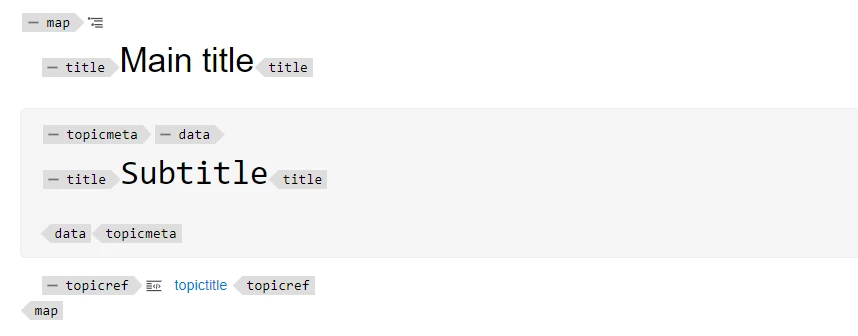
To render the subtitle in PDF, you can use metadata fields. For this, you need an element inside topicmeta or bookmeta containing the subtitle value.

Below is a sample where I have added the subtitle inside topicmeta.

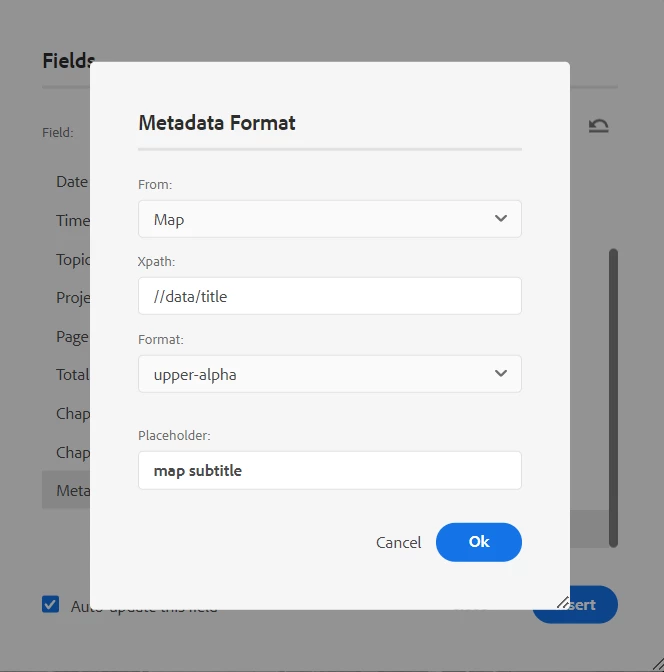
Added the metadata field to my first page with xpath value:  //data/title


and the PDF should render the subtitle something like below:


1 reply

Adobe Employee
October 17, 2023

You can achieve this through Fields metadata, which is like a variable and you can insert anywhere in the page layout. You can find the details on this page. We did a workshop in one of the expert sessions. Let us know if you still face any issues. It is supported in your version.


Level 4
October 17, 2023

Thanks for the quick response again, ViveKK! The presentation you referenced is very helpful, however I don't have all the options that the presenter did.

I'm able to pull the title and copyright logo from the DITA successfully, but I'm still having trouble with the subtitle. I've attached the code I'm trying to use for the front page template.


Do I need to change the data-subtype? (The illustration for where this is in the DITA is in the previous attachment.) I've seen some that include an "@xxxx" on the end. Where would I need to use those?


Thanks again for your help!

Josh

AswiniLakshminarayananAdobe EmployeeAccepted solution
Adobe Employee
October 18, 2023

To render the subtitle in PDF, you can use metadata fields. For this, you need an element inside topicmeta or bookmeta containing the subtitle value.

Below is a sample where I have added the subtitle inside topicmeta.

Added the metadata field to my first page with xpath value:  //data/title


and the PDF should render the subtitle something like below: