
Web SDK Part 4: Avoiding Banana Peels (and other things that can trip you up!) | Community
Skip to main content
Andrew_Wathen_
Community Advisor
Community Advisor
February 16, 2024

Web SDK Part 4: Avoiding Banana Peels (and other things that can trip you up!)

  • February 16, 2024
  • 25 replies
  • 12675 views

Going back to what I said in my first post of this series, I'm a big fan of Web SDK but 'the elephant in the room' is that Web SDK was not primarily designed for Adobe Analytics.  This means there are a few unexpected things that can cause you to slip up.  I'm here to help you avoid those banana peels!

This article is going to cover six potential issues relating to:

  • Automated Click Data Collection
  • using Adobe Target with Adobe Analytics
  • Market Channels on Single Page Application (SPA) Websites

Automated Click Data Collection

As an Adobe Analytics expert you are probably used to your Adobe Analytics implementation automatically tracking Exit Links and Download Links.  Within the Web SDK Extension you can enable 'Click Data Collection' and on first glance this appears to be the same capability. It is true that 'Click Data Collection' provides automatic Exit Link and Download Link tracking. However, there are some big differences that you need to be aware of!

Banana Peel #1: Click Data Collection fires all the time?!

Yes, you heard me correctly; it doesn't just track Exit Links and Download Links, it actually tracks every single time any link is clicked.  So, unless you want to receive a large invoice from Adobe for all those additional server calls, you are going to need to do something about this!

Solution

Fortunately, it is easy to supress these additional calls. Within the configuration of the Web SDK Extension, Adobe provides a callback function that only executes when the automated Click Data Collection fires (If you are doing this in code see onBeforeLinkClickSend). 
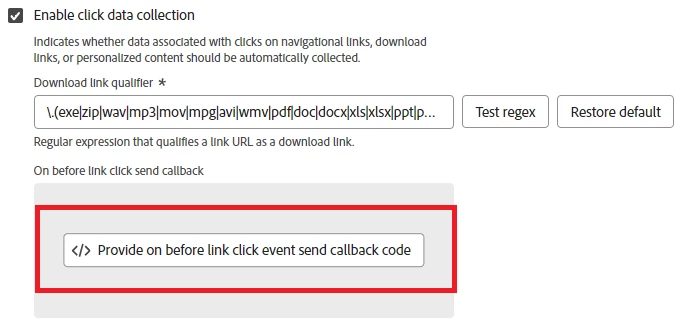
Returning false in this callback function stops the Web SDK sending the data.

Therefore, to supress the additional calls, we can include a small snippet of code in the callback function, that detects if it is an 'other' link tracking call (rather than the other possible values 'exit' or 'download') and if so, blocks the call by returning false. For example:

if (content.xdm.web.webInteraction.type === "other") { return false; }

NOTE: The callback function only executes when the automated link tracking happens.  Therefore, this will not stop any custom link tracking that you're doing (which is a good thing!).

Banana Peel #2: Exit and Download tracking doesn't capture the link URL

By default, Click Data Collection actually captures the text of the link, rather than the link URL.  This means if you do nothing, your Download Links and Exit Links will start collecting different values to what you are used to. You may be happy to accept this change, but if you are not, there is a simple fix to revert the value back to the URL.

Solution

Adobe's recommended approach is to remove the value of the options.xdm.web.webInteraction.name property (which is where the text of the link is captured). If this property is undefined, Adobe falls back to using the link URL.  Again, we can put code within the same callback function to achieve this. For example:

if (content.xdm.web.webInteraction.type === "download"||content.xdm.web.webInteraction.type === "exit") { content.xdm.web.webInteraction.name = undefined; }

Banana Peel #3: Exit Links fires when moving between subdomains of your website

If the link domain does not have the exact same top-level domain and subdomain, Exit Link tracking fires.  This means by default you might be tracking a lot of navigations that you consider internal to your site (e.g. shop.mysite.com to checkout.mysite.com).

Solution

Unfortunately, there is no 'out of the box' whitelist/blacklist for exit link tracking domains.  However, again it is easy to use the same callback function to supress the unwanted Exit Link tracking. For example:

if (content.xdm.web.webInteraction.type === "exit"){ if (content.xdm.web.webInteraction.URL.includes("mysite.com")){ return false; }

This approach could also be extended to cover any other domains that you want to supress Exit Link tracking for.

Adobe Target (in combination with Web SDK and Adobe Analytics)

Using Adobe Target in combination with Web SDK and Adobe Analytics has many benefits.  However, if you are using both Analytics and Target there are a couple things you need to be aware of...

Banana Peel #4: Migrating Adobe Analytics but not Adobe Target

To reduce the complexity of migrating to Web SDK, you may be tempted to phase your migration by moving Adobe Analytics over first and then moving Adobe Target over at a later date.  If possible, you should avoid this because it will break the A4T (Analytics for Target) integration between the two capabilities.

Solution

If you want the A4T integration to continue working, you have to migrate both Adobe Analytics and Adobe Target to Web SDK at the same time.

Banana Peel #5: 'Send Events' just for Adobe Target

With your non-Web SDK implementation, you will be used to making calls to Adobe Target separately from Adobe Analytics.  With Web SDK this is no longer possible; every time you call the Send Event, the hit will be forwarded by the Edge Network to Target and Analytics whether you like it or not!  Therefore, problems occur if you only populate the XDM Object with Adobe Target in mind.

If you do this, Adobe Analytics will still receive the hit and may revert to some default behaviours which may not be desirable! The main two default behaviours you need to look out for are:

  1. if you don't tell Adobe Analytics otherwise, it treats incoming hits as Page Views
  2. if you don't give Adobe Analytics a pageName it records the URL of the page in the page name variable

For example, you might forget to fully populate the XDM Object when using Send Event to tell Target that:

  • a proposition has been displayed
  • a button has been clicked

In both these scenarios you would get the previously mentioned default behaviours in Adobe Analytics, inflating your Page Views and causing URLs to appear in the page name variable.

Solution

The issues described are easily avoided by making sure the XDM Object is always populated in a way that is valid for Adobe Analytics.  For the above example, I would suggest populating the relevant properties in the web.webInteraction part of the XDM Object so that Adobe Analytics treats the hit as link tracking (see part 2 of this series for how to do this).

Banana Peel #6: Marketing Channels breaks on SPA websites

A Single Page Application (SPA) website is designed to improve load performance by not fully refreshing the browser when a user navigates between screens.

There is a key difference between how the old Adobe Analytics JavaScript and the new Web SDK JavaScript handles these SPA page loads (i.e. where the browser does not fully refresh).

This difference potentially will break your Marketing Channel Rules and can affect any rule that use Hit Attributes derived from the following variables:

  • URL
  • Query String Parameters
  • Referring URL

The old Analytics code only included these variables in the payload of the first page view made after a full reload.  This meant that additional page views made as a result of SPA navigations (i.e. without a full refresh) did not have these variables included in the hit. Conversely, the Web SDK transmits these variables on every page view.

This could have big implications for any Marketing Channel Rules that reference any of these variables (or attributes derived from them).   We found that our Marketing Channels were being corrupted as they were being overwritten when rules were being triggered when we hadn't expected.

Solution

This is a difficult one as I'm not sure I have a 'recommended' approach.  Therefore, I will share with you what we have done, but caveat it by saying you need to work out what is best for your situation.

We couldn't find a satisfactory way of changing our Marketing Channel Rules to work with the new Web SDK behaviour.  This led us to go down the route of manipulating the values in the XDM Object to replicate what was happening with the old Adobe Analytics JavaScript.  To achieve this, we had to detect whether or not we were on the first page view following a full browser refresh, and then alter the XDM object appropriately.  As a result, we were able to leave the Marketing Channel Rules as they were and get the same outcome.

Final Thoughts

A lot of the knowledge in this article was hard won (i.e. we made mistakes and had to learn from them!).  Hopefully, I have saved you some of the pain and head-scratching that we had to go through.

And in that spirit, I think it would be fantastic if you've come across your own 'banana peels' while implementing Web SDK, if you share them in the comments!

As always, thanks for reading, and if you would like updates on when these posts go live please consider following me on LinkedIn.

Read other parts of this blog series:

25 replies

Level 3
February 16, 2024

@andrew_wathen_ 


Thanks so much for this article.  It has already helped me with several issues that I've uncovered with implementing the Web SDK.  Some other 'banana peels' I've come across are:


1) Web SDK Extension > Variable case.

Your above examples actually show this in reality.  Your "content.xdm.web.webInteraction.URL" reference shows that 'URL' is not camelCase.  While "content.xdm.web.webInteraction.type" and "content.xdm.web.webInteraction.name" are.  Then there is "content.xdm.web.webPageDetails.Name" which is also not camelCase.   I suspect this is related to the Schema Field Groups and how those were set up.  My working theory is the WebSDK uses schema 'display' names while the AEP Query Service (by contrast) uses the schema 'field' names.


2) I was disappointed by the fact that Web SDK Rules don't have a 'custom code' section where you can set events based on conditions.  For example, in a previous AA implementation we fired a Page View Rule on every browser load event and then used the Rule's custom code section to differentiate which AA Success Event to set (if home set event1, if internal search set event2, etc.).  I was originally thinking we could use the 'On before event send callback' feature, but as I understand that feature, you can't actually "add" variables to the sendEvent beacon, unless the variable is already part of the sendEvent Schema.  For those of you that don't know, not every schema variables is available after the sendEvent function triggers - https://experienceleaguecommunities.adobe.com/t5/adobe-experience-platform-data/can-you-manually-set-analytics-events-evars-in-sdk-event/m-p/653252#M6803.  This is making it very difficult to add 'conditional' logic to my Web SDK implementation.


3) on a similar note, I did recently discover that if you are using the 'On before link click send callback' to track download links and exit links, you can't actually collect 'custom' Schema variables.  Meaning, I've been trying to figure out a way to add 'campaign tracking code' to the event record when you download a pdf or when you click an exit link.  While the campaign tracking code is a custom dimension in my Schema, it's not available on the 'Click Data Collection' event call schema.  This is proving very problematic since my uses case involved connecting Power BI to my AEP dataset and I don't have the luxury of using CJA's Data View Persistent setting.


4) I was also disappointed by the decision to not support Counter eVars with the CJA Web SDK implementations.  If you recall with AA implementations, for Counter eVars you just need to send in eVarX = "+1" and the AA tool will 'do the math for you' so to speak.  But if you're implementing the Web SDK to support CJA, there is no 'data processing' that will do the math for you.  Same goes for 'visit number' and 'hit number', those concepts don't apply to AEP and for the most part will be sacrificed if you're migrating from AA over to CJA.  Even if you do use WebSDK to implement AA and then use AEP's AA connectors to pull the data out of AA, that solution too pulls the data out of AA before 'session' metrics are set and before 'counter eVar' processing has occurred.  A true disappointment and challenge for a lot of us that use all the features of AA. 


The best solution I've come up thus far for counter eVars is to use 'cookies' in my WebSDK implementations and increment the counters on my own.


The best solution I've come up with for visit number and hit depth is to write a Query Service SQL script to try to augment my AA Dataset in AEP.  There appears to be a 'sess_timeout' function that does exactly what I want, I just haven't figure out way to run this function on my dataset on a daily basis.  I would like to think that this would be something that could be added to the Data Ingestion Data Prep functionality, but sadly it's not there yet.


I know some of this may sound like I'm 'complaining' and I am sorry about that.  Learning a new tool and a new way of working, especially after 15 years of doing things the 'old way' does come with some frustrations.  


But I love ideas of posts like the above since it really helps us 'practitioners' come with practical solutions.  The Adobe documentation is fine if you want to talk about theory, but posts like this are far more valuable.  Thanks again!

Level 3
February 16, 2024

@andrew_wathen_ 


I thought of some more 'practical solutions' I think the community would appreciate.


(since I had 4 earlier comments)

5) I figured out a better way to Debug your Web SDK implementations.  You can add this little code snippet to your Web SDK Extension 'On before event send callback' command window and it will print the schema value pairs in your console.


console.log(JSON.stringify( content, null, 4 ));


This works for all Page View Rules, Click Tracking Rules AND for the Click Data Collection calls (that again support Download and Ext Link tracking).  This is also a great way to see what schema variables are available after the sendEvent function fires, so you'll know exactly which variables you can manipulate with your 'callback' scripts.


6) Be careful of 'beacon bleedover'

Beacon bleedover is when you set a variable on one beacon and the variable gets pasts (accidently) to the next beacon.  I discovered this issue in CJA when I tried to confirm that sum of Page Views + Link Clicks Events was equal too the Total Events (we hadn't implemented download or exit link data collection yet).  What we found was the equation was not balanced.  The sum of Page Views + Link Click events was greater than the Total Events collected by CJA.  


My investigation revealed that the Rule Based Click Tracking sendEvent call still included the 'content.xdm.web.webPageDetails.pageViews.value = 1' setting.  This is the setting you set up on your Page View Rule.  Since Web SDK does not support 'Clear Variables' (s.clear = true) script, we had to go into each of our Click Tracking Rules and set 'content.xdm.web.webPageDetails.pageViews.value = 0', that way when AEP/CJA/AA summarizes the Page View metrics, it doesn't artificially inflate the Page View metric.


Again, thank so much for this post.  It has already helped me control for the 'Click Data Collection' issue I was having.

samhollingshead
Level 2
February 19, 2024

Hello @jlinhardt_blueacorn on point 3 you are able to achieve this here if you merge the content.xdm with your custom xdm object you can then assign values to your custom paths e.g.


//Merging the action XDM object with the default XDM object
const globalXdmObject = _satellite.getVar('your custom xdm object');
content.xdm = merge globalXdmObject and content.xdm - you could use something like object.assign()


You can then write to the custom.xdm following your custom path e.g.


content.xdm.mycustompath.campaigntracking code = 123456;

Level 2
February 19, 2024

Hi @andrew_wathen_  Thank you for a great blog post series, looking forward to every new part. 

I was wondering, all posts up until now have been for web implementation of Web SDK . Are you planning on doing a post on Mobile SDK ? I am asking i particular, because the approach for using Data Collection for making the AEP/AA integration work, is not possible for apps, for obvious reasons. So I am curious about you perspective on app implementation/migration. 


thanks! 

Level 3
February 20, 2024

Hey everyone, 


I just wanted to call out @samhollingshead  for helping me figure out my #3 issue above, setting global variables when users click on downloads or exit links.  


For those of you that didn't follow what was suggested, perhaps this will help.  Part 3 of this series talked about the idea of 'merging' or 'stacking' your XDM objects within Adobe Data Collection. 


In summary,

- you can create a 'Global' XDM Object for your global variables.

- you can create a 'Page View' XDM Object for your page view variables.

 - and you can create a 'link click' XDM Object for your link tracking variables.  

Then you can 'merge' (or stack) two of the above three XDM Objects together and call the 'merged' XDM Object when you trigger a 'sendEvent' action within your rules.


Now that architecture works great for all your 'rules', but it doesn't actually work when tracking the Download and Exit Link clicks (i.e. issue #3 above in my original post).  So to support those beacons, you have to write some custom code that will 'merge' together your Global Variable XDM Object and the default 'content.xdm' object that is used when you active the 'Click Data Collection' checkbox within the Web SDK Extension.   


To do this, you need to open the Wed SDK Extension and scroll down and open the 'On before link click send callback' custom code screen.  In that screen you need to write JS code that will pull in your Global XDM object (from a Data Element) into a variable and then use the Object.assign() method to merge it with the default content.xdm together.  Something like this:


var globalTemplate = _satellite.getVar('XDM | Global Template');
content.xdm = Object.assign( content.xdm, globalTemplate );


In truth, this is more of an 'append' global variables approach, rather than a 'merge' because I'm actually updating the 'content.xdm' object with a combination of the 'content.xdm' and my 'Global XDM Object'


Here is a quick link for more information Object.assign().  https://developer.mozilla.org/en-US/docs/Web/JavaScript/Reference/Global_Objects/Object/assign


The important thing to understand is how does this method handle the duplicate variables across the two objects that are being merged.


I hope that helps every understand that additional effort is required to make sure your Download and Exit Link beacons contain your site's global variables.


samhollingshead
Level 2
February 20, 2024

Thank you @jlinhardt_blueacorn glad we worked it out 🙂

Franc_G
Level 4
February 27, 2024

@andrew_wathen_ 

Thanks for sharing the info - very useful! Sharing one interesting observation I have made today while doing some testing.

Falsy values (js)!!!

If we have a "falsy" (with the exception of "false" and 0) value as an output in data definition in Ensighten (equivalent of data element in Launch) THEN the mapping does not kick in and a variable is not set in the request. Why is this important ? Well, if you set a variable on a pageload level AND the data source (for this variable) is not present THEN you will see a lot of undefined values in adobe. In other words, a variable is not set when an uderlying data source (data element, js code output, hardcoded value etc.) is not available.

Note: I have observed this behaviour in Ensighten and unsure whether the same applies to data elements in Launch. Also this appears to be set in the AEP App in Ensighten (not something automatically done by alloy.js). Please double check if you are using Adobe Launch. 


Morish2412-2
Level 2
March 29, 2024

Really helpful !

bjoern__koth
Community Advisor and Adobe Champion
May 2, 2024

Hi @andrew_wathen_ ,

thx a lot for pointing out these pitfalls!


About "Banana Peel #6: 'Marketing Channels breaks on SPA websites", that is indeed unfortunate. Can you shed a little more light on your workaround? And do you know if Adobe is working on fixing this?

Could this potentially be solved with a getValOnce approach with a fallback if not set to the desired "clean" version of e.g., the URL?


Just similar to what you would've typically done in AppMeasurement to not intialize the same Tracking Code with the same campID twice?


Best regards from Switzerland,
Björn

Cheers from Switzerland!
Franc_G
Level 4
May 10, 2024

Hi @andrew_wathen_ & happy Friday! Have a couple of questions which you may be able to help me with.


  1. Have you seen any impact in terms of the AT performance ? The reason why I am asking is that two things need to happen before AT server call is being made :
    • alloy library (base code) needs to be downloaded from cdn (alloy is one blob of code vs separate AT.js,AppMeasurement.js etc. libraries
    • extra parameters need to be mapped and sent to AT; example - xdm.web.webPageDetails.name  AND / OR data.__adobe.target.entity params
    • All of the above takes time - hence the consideration. Plus there is this pre-hiding option, which I have put in place and testing at the moment.
  2. Does alloy save any variable data the same way the adobe libraries did ? Namely, I am talking about the 
    window.AppMeasurement && window.s ? This is one quite relevant for SPAs. I can see in our existing implementation that s obj. was cleared in order to prevent "bleading" of variables into subsequent calls. 
     
    Thanks,
    Franc