Explore product-specific spaces to ask questions, share insights, and learn best practices.
Recently active
Sometimes, a collaborative dashboard can benefit from the Comments feature, but most of the time this is unnecessary and instead causes annoyance by opening frequently by accident as users try to scroll down through the workspace.While I can turn off comments individually on each dashboard, it would be much more convenient to default this to Off in Preferences and only toggle Comments section on when needed..
Idea SummaryUpdate Workfront email notification subject line formatting so the ticket subject appears first, followed by the notification type or status.ProblemUsers rely on email subject lines to scan, filter, and sort notifications. Currently, Workfront places notification actions first, which creates inconsistent subject lines and makes sorting ineffective.Current examples: Request Submitted: Subject Comment on Subject Subject is Ready to Start Because the ticket subject is not consistently positioned, users cannot easily group or prioritize notifications related to the same work item.Proposed SolutionStandardize all Workfront email notification subject lines using a consistent structure:[Ticket Subject] – [Notification Type/Status]Examples: Subject – Request Submitted Subject – New Comment Subject – Ready to Start Benefits Improves email sorting, filtering, and scanning Creates consistent notification patterns Reduces user friction managing high email volumes Aligns w
Hi!It would be great if Workfront would show all people assigned to tasks on reports instead of just the primary person.
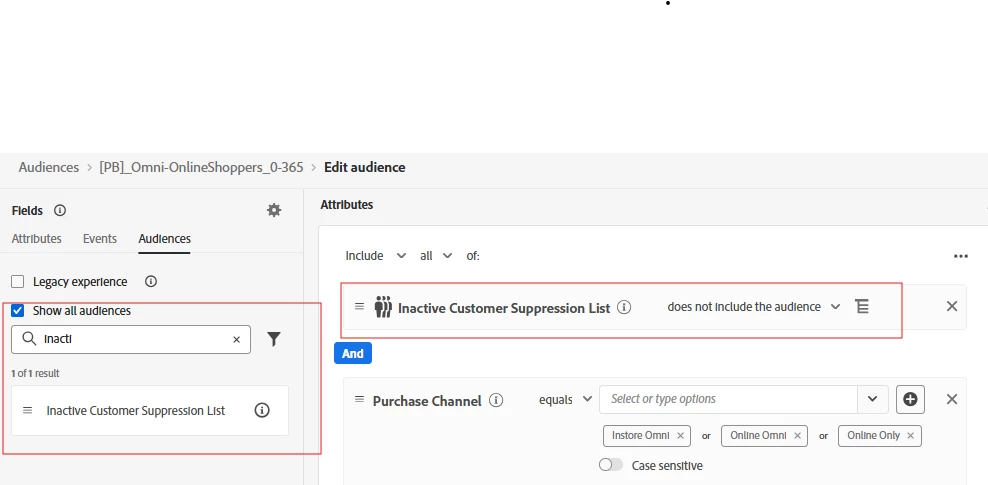
Description:We use a specific naming structure for our Journeys and our message names. We want to be able to Query this Name when creating an audience, instead of having to use Journey ID or Message ID. Why is this feature important to you:As I empower more teams to work on campaigns as standalone teams, including test variations with split tests, I need to have overarching criteria that will allow me to all audiences who have received a type/class of mailing without having to create a manual list of Journey ID or message IDs How would you like the feature to work:For instance, if all emails with an Offer use "-OFFER-" in the message name, then I want to be able to create and audience with anyone who has received a message with "-OFFER-" in last X months and not have to recall all the journey IDs. Similarly, if a customer has been in any journey that begins with "XYZ-" in last X day I want may want to exclude them. I don't want to have to s
Enable system admin to unshare with a specific user multiple projects, tasks, etc. Today if 100 projects were shared with a user, you can not unshare the 100 projects at once, you have to unshare one by one by one by one by one by one by one.. .until done for a specific user.
My idea is to offer the ability to pull Workfront Schedule Exceptions into Calendar reports in a manner similar to how user PTO can be displayed in a Calendar report. My company operates globally and uses multiple Workfront Schedules on user profiles with Exceptions to reflect regional office holidays. These Exceptions appear as holidays in the Workload Balancer and appropriately block resourcing, which works well for our resourcing needs. However, we would also like the ability to surface Workfront Schedule Exceptions in Calendar reports when reviewing task and project dates. Currently, this functionality is not supported by the API. Would love to see this added to the product roadmap.
My idea is to offer a date range filter in reports that ignores weekends. We use date ranges in many of our reports. When using a date range filter, including relative date ranges such as between $$TODAY-2D and $$TODAY, weekends are included in the calculation. As a result, when a report with the above relative date range is run on a Monday, tasks due on Thursday and Friday may not appear because the weekend days are counted in the range. We have used a Report Prompt, allowing users to manually enter the appropriate dates based on the day they are running the report. But we would like the ability to tell the system to ignore weekends when setting a date range filter in reports. Currently, Workfront offers the ability to ignore weekends in Schedules, Repeating Deliveries of reports, and creating Recurring Tasks.I would love to see a similar functionality built into report filters to tell the system to ignore weekends for date ranges. Thanks!
No task duration type, constraint type, or predecessor dependency type allows Project Managers to create tasks with variable durations. We have several instances where task A and C are set dates and task B falls between them. This duration can be 50+ business days and changes as task A and C move based on external factors. This also happens so frequently and in different workflows that a Fusion scenario isn’t feasible.Ideally Workfront would have a new predessor type that drives both the start and end date independently instead of depending on a planned duration. Task B planned start date starts when Task A’s end date finishes and Task B’s planned completion date finishes when Task C’s start date starts. The current work around is to set fixed dates for the task and manually update them as the other tasks recalculate but that takes a lot of diligence and effort on the project manager.
We have received confirmation from Adobe Support that when importing customer attribute data from non-Adobe CDP sources using the Adobe Target Bulk Profile Update API (v2), although the data is transferred in array format, Adobe Target can only process it as ‘single-value strings’.If array format can be received, should it not then be possible to handle it as an array within Target?This would be significantly more convenient when creating audiences, so we would very much appreciate your consideration of this matter.
In Queries > Templates, there is currently no way to organise query templates beyond a flat list with a search bar. As the number of templates grows, this creates several usability challenges: No ability to create folders or group queries by use case, brand, or purpose Users must remember the exact query name to find it The search is case-sensitive, so queries cannot be found unless the name is typed exactly This often results in duplicate or sample queries being recreated multiple times, leading to clutter and inefficiency For teams working extensively with queries (especially in enterprise environments), this significantly impacts productivity and governance.
We have a requirement to apply different capping thresholds to different placements,For a given customer A show offer B, X times in Placement C or Y times in Placement Dwhere X <> YFor example,For customer Andrew, show LOAN offer, 3 times over 7 days in Header placement or 2 times over 14 days Footer placement My idea would be to include an optional placement qualifier (“Placement name”) when selecting “Apply capping to each placement” as shown above. Capping would then apply to “Placement name” only and not all placements. Note that placement capping is “Offer Decisioning” functionality, which would need to be re-introduced into experience decisioning.
Summary of Request The current Adobe Marketo Engage REST API is severely limited regarding the programmatic construction of marketing assets. While we can "Clone" or "Trigger" assets, we completely lack the ability to Create, Read, Update, and Delete (CRUD) the internal logic of Smart Campaigns (Flow Steps & Triggers) and Smart Lists (Filters & Rules) via API.As marketing operations move toward hyper-automation and dynamic campaign generation, the inability to define campaign logic via code is rendering the Marketo API obsolete compared to modern, developer-friendly platforms. We urgently request new endpoints to manipulate these assets' definitions directly.Current Limitations & Pain Points Smart Campaigns are "Black Boxes" to the API: The Problem: We can create a shell campaign or clone an existing one, but we cannot add, edit, or order Flow Steps (e.g., "Send Email," "Change Data Value," "Wait") or Smart List Triggers via API. The Impact: We cannot dynamically gen
In Adobe Workfront Goals, the current UI offers very limited view customization compared to Projects or Tasks.At the Goals and Progress Indicators levels, users cannot:- Add or remove columns- Display additional fields- Group or sort data- Customize or save viewsIn particular, at the Progress Indicators level, there is no ability to group, filter, or customize the view in a similar way to task lists.These limitations make it difficult to review goals at scale and reduce usability for leadership and program-level reviews.
For improved clarity and productivity, could Adobe provide an option to associate a project with a default or preferred view that automatically loads when the project is opened?(If I understand Workfront correctly, it always uses the most recently selected view when opening a project. This requires users to manually search for and select the appropriate view each time, even if a view was created specifically for that project.)
Before Adobe combined the Requestor and Reviewer Access Levels, reviewer had the ability to view project, portfolio, reports, etc.. if the share setting 'Everyone in the system can view' was selected. Since we now only have one Access Level called Contributor, this setting is non-functional and explicit shared users must be selected otherwise Contributors cannot view these resources.This is clearly and oversight when merging the previous access levels and needs to be reversed. The 'Everyone in the system can view' is false and should not be an exception with a hidden meaning that is not reflected in any documentation.
I would love to see the Comment stream in the Update sections change. Most users complain that the threads are hard to follow and expect to be able to read from top to bottom with the latest at the bottom similar to how Slack, Teams, Reddit, WhatsApp and other messaging/social media platforms function. Below is a quote from one of my Super Users“Today, it is difficult to find the latest message in the Updates section. It may be at the top in the latest thread, or it may be somewhere below in response to an older thread, because older threads are lower on the page. Instead, Updates could be arranged oldest to newest - top to bottom. When you open the Updates, you could see the latest message at the bottom. The UI could have a message that tells you when there are unread messages above that you should scroll back to see. But overall, this would prevent the hunt for the latest as the latest will always be at the bottom. This is similar to the flow of iMessage threads where the further up
Looking to populate city, state, country, geolocation values to Adobe Analytics’ default Cities, Region, Countries dimensions. In this case, I would like to prevent Adobe’s IP lookup from populating these values, and populate the default geo dimensions to use geolocation information derived from my own application. Reasons for taking this approach -1 Adobe does not appear to handle IPv6 addresses correctly. Adobe Support confirmed this is the case.2 Better accuracy of geolocation Request - Add a method to overwrite the default geolocation dimensions in Analytics.
It would be nice to be able to programmatically access the QA URLs for a current running AB test. We run a small subset of front end tests in our CI pipeline and we need the tests to be deterministic. The way we do that now is manually retrieve the QA URL from the adobe target GUI. We'd like to have the test determine the experience without having to retrieve the QA URL manually. I have two suggestions:First: Add it to the existing `Get AB Activity by ID` Second: Create a new API to `Get AB Activity QA URLs by ID` Suggested response: "experiences": [ { "experienceLocalId": 0, "name": "Experience A", "visitorPercentage": 34, "qaUrl": "at_preview_token=g5xKOs9QjAl3KN%2BwvyAAmnWEFq%2Br1NJA9GWwjZnLpb4%3D&at_preview_index=1_1&at_preview_listed_activities_only=true&at_preview_evaluate_as_true_audience_ids=1100025", "offerLocations": [
Allow announcement banners Adobe creates to be limited to administrators only or the ability to adjust who sees these types of banner announcements. Recently all users had an announcement introducing a trial for the planning module and it is confusing for end users who have limited decision making on additional modules.
It would be extremely useful to be able to utilize $TriggerObject in Email Script Tokens for the "<Custom Object Name> is Updated" trigger, in addition to the "Added to Opportunity", "Opportunity is Updated", and "Added to <Custom Object Name>" triggers. This would provide the following benefits: Increased flexibility in Email sends using VTL tokens Increased efficiency in API use Increased scope of Custom Object use
When we try to send emails from AJO we get this alert. Saying that the opt-out link is missing in the body.But his is not entirely true. The link is there, but is placed inside a fragment. To us it seems like AJO is not able to see this link when it is inside a fragment, and then returns a alert. We have placed the link inside a footer fragment, that is not broken before sending the email. We are also using if/or logic controlled by variables to show the right language for that link. This also might be a reason for AJO is not able to recognize the link. But it is there, and it is working. Could the code checker that looks for this opt-out link also try to look for this code inside fragments?
機能改善要求(RFE)概要: When editing a live-copied Content Fragment, please enable breaking inheritance directly in the New Editor. ユースケース: The author localizes the values of the live-copied Content Fragment. 現在/体験した動作: We have to switch editing modes to break inheritance, which is very inefficient. 改善/期待される動作: In the New Editor, I would like all the features covered by the traditional editor to be available, with additional new features added. 環境の詳細(AEM バージョン/サービスパック、もしあればその他の詳細): AEM As a Cloud Services 顧客名/組織名 Kyocera スクリーンショット(ある場合) コードパッケージ(ある場合)
In multi-brand Adobe Experience Platform implementations, consent information is often captured as event data, with each brand emitting its own consent events.These consent signals are then elevated to the profile level using Computed Attributes, so they can be reused consistently across audiences, consent policies, and activation use cases.However, Computed Attributes currently have a maximum lookback period of 6 months. If no qualifying events are present within that window, the computed attribute value is nullified, even when no explicit consent change or withdrawal has occurred.This behavior creates challenges when modeling consent, which is inherently a stateful attribute, not a time-bound behavioral signal. Suggested EnhancementProvide an option for Computed Attributes to retain the last known value beyond the lookback window, unless:A new qualifying event updates the value, orAn explicit revocation / change event is received.This could be implemented as:A configuration option su
We often run into all kind of problems with the email designer during a AJO upgrade/release. Created content disappears, variable settings used in fragments changes/disappears, Image sizes changes etc etc. All this things come back from the users as bug reports. When investigating the issues, we often need to conclude that the error/experienced behavior most come from hickup in the code during the code upgrade. Suddenly all is back to normal again, the day after, without changing anything. Out theory is that a AJO upgrade/code change possible has some impacted on the use of the email designer during the code upgrade. Maybe it is hard or difficult to store things at the same time the source code is been updated. At least we experience that it might be a challenge here. We would therefor like to have the option to “lock” the email editor and other components that creates things in AJO during an update . The lock could explain that this feature is temporary locked caused by an code upgr
Hi Team,Maybe it is nice to have an “Attach Template” function under the TASK. the same with Project. so the form that is associated with a template will go directly under “task details” instead under “Project details”Thanks,
Already have an account? Login
Enter your E-mail address. We'll send you an e-mail with instructions to reset your password.