Assistance with timesheet reporting | Community
Skip to main content
Level 2
December 12, 2024
Solved

Assistance with timesheet reporting

  • December 12, 2024
  • 2 replies
  • 532 views

Hi,

We have recently begun using the timesheet feature in Workfront.  I'm trying to build a report but it seems like what I am wanting is a combination of what I can get in an hour report and a timesheet report.  Is there a way to get a report that has both elements.  

I'm wanting to group by user and then by timesheet (which I can do in a timesheet report) but then under the timesheet I want to see the source and hours (which I can get in an hour report).   I would also like a link to the timesheet, which I see in timesheet report but not in hours.

Any suggestions and help is appreciated.

Thanks

Heather
 

This post is no longer active and is closed to new replies. Need help? Start a new post to ask your question.
Best answer by Madalyn_Destafney

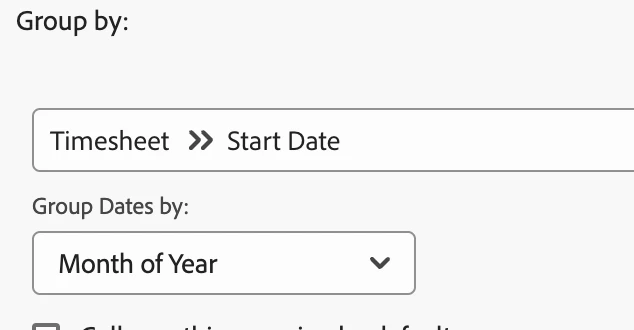
Hi, you can group by certain timesheet elements in an hour report. For example, can group the hours by timesheet start date:

 You can add columns in the hour report for timesheet ID (if you need to copy/search it to go to it) but it's also already grouping by the timesheet..I'm sure there's a way to link to the timesheet in text mode.

2 replies

Madalyn_Destafney
Community Advisor
Madalyn_DestafneyCommunity AdvisorAccepted solution
Community Advisor
December 12, 2024

Hi, you can group by certain timesheet elements in an hour report. For example, can group the hours by timesheet start date:

 You can add columns in the hour report for timesheet ID (if you need to copy/search it to go to it) but it's also already grouping by the timesheet..I'm sure there's a way to link to the timesheet in text mode.

If this helped you, please mark correct to help others : )
KellieGardner
Community Advisor
Community Advisor
December 13, 2024

Typically with reporting you want to start at the lowest object and report up in the hierarchy. So, I would start with an hour report and then pull in the data you can regarding timesheets.


Then you can add columns for timesheet data to display.

  • Display Name is the name of the timesheet itself but it doesn't hyperlink.


You can use the following text mode in a grouping to group by timesheet name:


group.0.linkedname=timesheet
group.0.valuefield=timesheet:displayName
group.0.valueformat=string
textmode=true