Développer ma barre des réalisations de la Communauté.

Mark Solution

Cette conversation a été verrouillée en raison de son inactivité. Veuillez créer une nouvelle publication.

RÉSOLU

Some rule components not loading on slow Internet connections

Avatar

Level 4

Hi community,

I found some interesting in Adobe Launch.

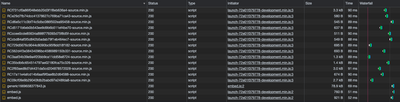
These are the list of Rule Components loading using regular Internet connection:

OscarMM_0-1669819535546.png

These are the list of Rule Components loading using slow 3G Internet connection:

OscarMM_1-1669819545100.png

You can see there are several Rule Component not loading when speec connectop is slow? Why this happend? How can we fix it?

Thank you!

1 solution acceptée

Avatar

Réponse correcte par
Employee

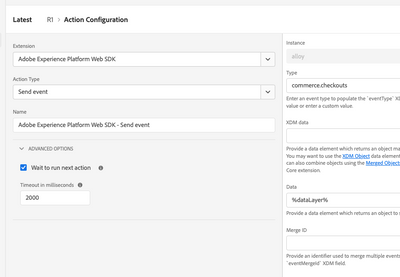
In the advanced section from each rule component there is a timeout field. The default value is 2s. You can increase that value.

Screenshot 2022-12-09 at 9.01.16 AM (2).png

Voir la solution dans l'envoi d'origine

7 Replies

Avatar

Community Advisor

Hi @OscarMM , seems strange to me. May be switching network and reloading same rule components did not attempt to load them again. Could be a method to optimize calls that are happening when connection is slow. On solution part if it is really the case I would advise to be on good network to avoid time out errors and such unexpected behavior.  

Avatar

Community Advisor

@OscarMM did you try debugging? Here's a good way to troubleshoot - https://helpx.adobe.com/dtm/kb/troubleshooting---why-is-my-page-load-rule-firing-incorrectly--.html 


See if this helps you.

Avatar

Réponse correcte par
Employee

In the advanced section from each rule component there is a timeout field. The default value is 2s. You can increase that value.

Screenshot 2022-12-09 at 9.01.16 AM (2).png

Avatar

Community Advisor

Great point!

Avatar

Level 4

Confirmed, this fixes the issue. Thank you!

Avatar

Level 4

I have one extra question.

If we change the timeout value from 2s to 5s, is there any side impact? May be site performance rate? Why 2s is default one?

Avatar

Employee

The timeout means that the engine will move to the following action in the rule if a specific action takes more than the timeout limit to return a response. Therefore, if a particular action takes longer to complete, there is an increased risk that the user leaves the page before the rule is completely processed.

The default value was arbitrarily chosen by my team when we implemented the feature.