WebSDK: Disable custom links while keeping downloads and exit links | Community
Skip to main content
Level 3
October 17, 2023
Solved

WebSDK: Disable custom links while keeping downloads and exit links

  • October 17, 2023
  • 3 replies
  • 3580 views

I see the documentation for filtering link-tracking.  Track Links Using the Adobe Experience Platform Web SDK | Adobe Experience Platform


We want to keep the download links and exit links for automatic links tracking in the WebSDK and disable custom links.  We are not finding the custom links helpful so want to not capture them. We do want to capture Activity Map values on the resultant page.


Does anybody know what the code for that would look like?


AppMeasurement code automatically sets the exit link to the "destination url" and also sets the "page url" of where the exit link was clicked on.  WebSDK sets the exit link to the text of the link and does not set the "page url".  We are going to have to play with this to make sure to send in the page url.

This post is no longer active and is closed to new replies. Need help? Start a new post to ask your question.
Best answer by Andrew_Wathen_

Within the Experience Platform Web SDK extension there is an option to turn on automating link click tracking...
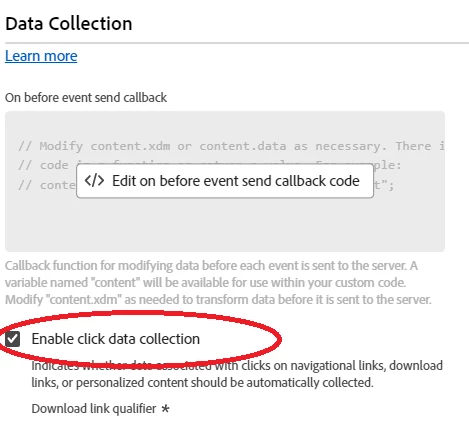
When this is selected, the default behaviour is to collect literally every single link click (not just exit links and downloads)

However, there is a way to make it exit link and download specific.  You need to add a code snippet at top of the "On before link click send" callback (this is a bit like the equivalent of putting something in doPlugins in the old appMeasurement.js)
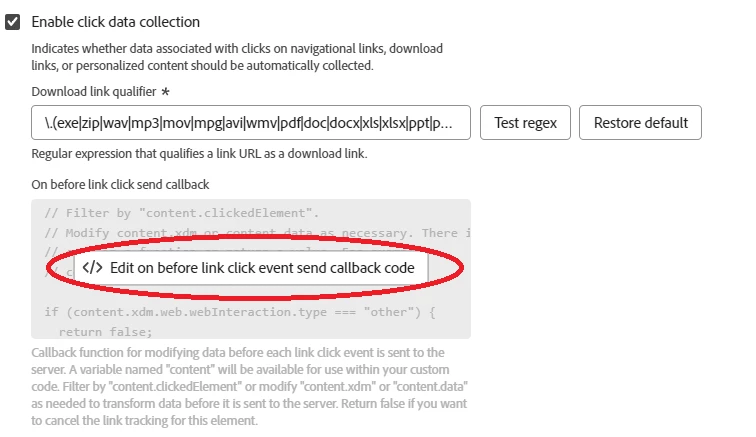
The code snippet is:


if (content.xdm.web.webInteraction.type === "other") { return false; }


What this does is it detects when it is not exit or download (i.e. it is  "other") and returns "false", which disables the web SDK from sending the data.

NOTE: this only disables the automatically generated clicks classified as "other"; fortunately it does not disable any manually generated ones that you may have created using the send event that also pass the value "other" in the same xdm property!🙂

Although it is not very clear, the help article that specifies this is here:

Track Links Using the Adobe Experience Platform Web SDK | Adobe Experience Platform

(Help article states: "Adobe recommends returning false for the link clicks that should not be tracked. Any other response will make Web SDK send the data to the Edge Network." - you have to work out this translates to the above)

Bonus information - Exit Link Tracking:

Similarly to the old analytics extension, Web SDK will automatically treat any link that goes outside of the current domain as an exit link. The old Analytics Extension used to let you black list additional domains that you didn't want to treat as exit links.  This functionality does not exist in the same way in Web SDK.  If you want to prevent additional domains being treated as exit links you now need to do this in code, again returning "false" in the "On before link click send" callback.

3 replies

Jennifer_Dungan
Community Advisor and Adobe Champion
October 17, 2023

Maybe I am missing something here... but custom links are all coded and triggered in Launch.. if you don't want those, wouldn't you just disable those rules?


Custom Links aren't automatic the way Download or Exit links are... the only disabling you should have to do is to stop running any s.tl calls.... 

Level 2
October 17, 2023

You would think that, but anything with an anchor tag is getting sent automatically as a custom link if they are not exit or download links.


We definitely did not code the ones that we are seeing. 


The custom links that we have coded are working as expected.

Jennifer_Dungan
Community Advisor and Adobe Champion
October 17, 2023

That actually sounds like a bug in the implementation... there is no way clicks like that should be triggering additional calls unbidden... this will inflate your server calls.


I am not on WebSDK yet, but given how the contracts and pricing structure is based around server calls (s.t and s.tl) what you are describing would almost double your server calls... 


I think you need to investigate the cause of those extra tracking hits....


You could probably run an s.abort for custom links, but this would then also affect your real custom link tracking, and that wouldn't be good.


(inside doPlugins)

if (s.linkType === 'o') { s.abort; }


But finding the root of the issue would allow you to properly prevent the calls you don't want, while allowing the ones you do....  this code here will still have the code run, but will stop the execution at the last minute (for all custom links, including the ones you specifically coded)

Andrew_Wathen_
Community Advisor
Andrew_Wathen_Community AdvisorAccepted solution
Community Advisor
October 18, 2023

Within the Experience Platform Web SDK extension there is an option to turn on automating link click tracking...

When this is selected, the default behaviour is to collect literally every single link click (not just exit links and downloads)

However, there is a way to make it exit link and download specific.  You need to add a code snippet at top of the "On before link click send" callback (this is a bit like the equivalent of putting something in doPlugins in the old appMeasurement.js)

The code snippet is:


if (content.xdm.web.webInteraction.type === "other") { return false; }


What this does is it detects when it is not exit or download (i.e. it is  "other") and returns "false", which disables the web SDK from sending the data.

NOTE: this only disables the automatically generated clicks classified as "other"; fortunately it does not disable any manually generated ones that you may have created using the send event that also pass the value "other" in the same xdm property!🙂

Although it is not very clear, the help article that specifies this is here:

Track Links Using the Adobe Experience Platform Web SDK | Adobe Experience Platform

(Help article states: "Adobe recommends returning false for the link clicks that should not be tracked. Any other response will make Web SDK send the data to the Edge Network." - you have to work out this translates to the above)

Bonus information - Exit Link Tracking:

Similarly to the old analytics extension, Web SDK will automatically treat any link that goes outside of the current domain as an exit link. The old Analytics Extension used to let you black list additional domains that you didn't want to treat as exit links.  This functionality does not exist in the same way in Web SDK.  If you want to prevent additional domains being treated as exit links you now need to do this in code, again returning "false" in the "On before link click send" callback.

Level 3
October 24, 2023

Thank You!

October 27, 2023

Have you solved the issue with Web SDK sending the exit link name instead of the destination URL?

Is there a way to get both "exit link name" and "exit link URL" without the custom event implementation?