filter classification rule | Adobe Higher Education
Skip to main content
Level 2
February 22, 2021
Beantwortet

filter classification rule

  • February 22, 2021
  • 2 Antworten
  • 927 Ansichten

hi there, 

is there anyone who knows how to not to correct 1 depth data if there is 2 or 3 depth data? 


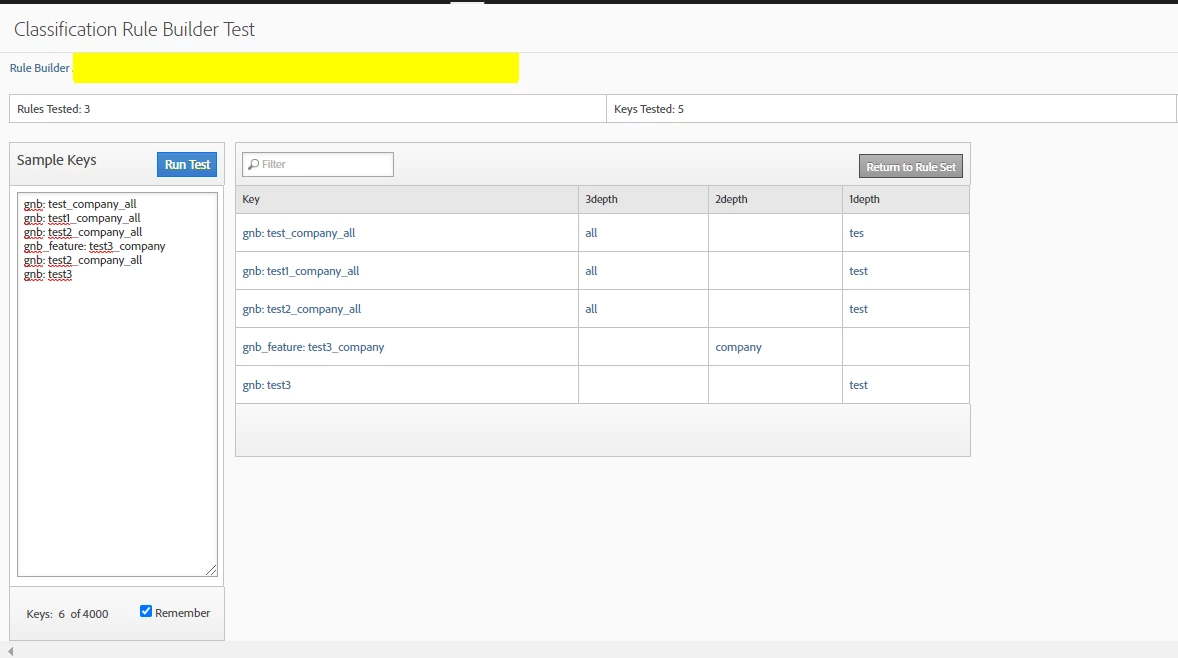
for example, as you can see the picture, 


gnb: test_company_all has 2 values : "all" for 3depth and "tes" for 1depth (donna why just "tes" came out :(, anyway) 


but i would like to get just "all" for 3depth, since "tes" is not the data that i want to collect. 


1depth should collect just 1 depth sentence like "gnd:test3" which doesn't have _ in value. 


let me know if you guys know the way. thanx 

this is the regular expression that i used for this classification 


1depth: ^(gnb: )(.[a-zA-Z0-9 ]+)[^_$%^&]
3depth: ^(gnb: )(.*)(_)(.*)(_)(.*)
Dieses Thema wurde für Antworten geschlossen.
Beste Antwort von yuhuisg

Regarding your "tes" value in 1depth, it's because of your RegEx. I believe 1depth is getting the content of the $2 group.

So, with some colouring to help to explain:

Your regular expression for 1depth: ^(gnb: )(.[a-zA-Z0-9 ]+)[^_$%^&]

Your value and its matches: gnb: test_company_all

The red expression is preventing the last character from being included in your green expression. So instead of "test", you're getting "tes", i.e. without the last "t".

Likewise with "gnb: test2_company_all" and "gnb: test3"

2 Antworten

PratheepArunRaj
Community Advisor and Adobe Champion
February 22, 2021

Hello Hyeran,

It can be achieved by Stacking Rules in Classification Builder.

Check out my blog (https://terrynwinter.com/adobe-analytics-stacking-rules-in-classification-rule-builder/) and the same will help you on what you are trying to achieve.

Thank You, Arun.

Thank You, Pratheep Arun Raj B (Arun) | Xerago | Terryn Winter Analytics
yuhuisg
Community Advisor
yuhuisgCommunity AdvisorAntwort
Community Advisor
February 24, 2021

Regarding your "tes" value in 1depth, it's because of your RegEx. I believe 1depth is getting the content of the $2 group.

So, with some colouring to help to explain:

Your regular expression for 1depth: ^(gnb: )(.[a-zA-Z0-9 ]+)[^_$%^&]

Your value and its matches: gnb: test_company_all

The red expression is preventing the last character from being included in your green expression. So instead of "test", you're getting "tes", i.e. without the last "t".

Likewise with "gnb: test2_company_all" and "gnb: test3"