Days since last visit -- A userID must have a single day as a last day since last visit. But I am seeing UserID is 0days,1days, 2days,,,,, how come this ? | Community
Skip to main content
Level 4
March 24, 2020
Solved

Days since last visit -- A userID must have a single day as a last day since last visit. But I am seeing UserID is 0days,1days, 2days,,,,, how come this ?

  • March 24, 2020
  • 2 replies
  • 7710 views

Hi Team,

I am trying to pull DaySinceLastVisit(DSLV) for a userID. As per the DSLV, a userID must have a day/days since last visit, only one row of data may be 0day or 1 day or 2 days. But I am seeing in the report, same userID have 0day,1day, 2day,... My question is how come a UserID have multiple DSLV values? Please help me.
 

Thanks,

Dinesh 
 

This post is no longer active and is closed to new replies. Need help? Start a new post to ask your question.
Best answer by igorm75245240

Hi Dinesh,


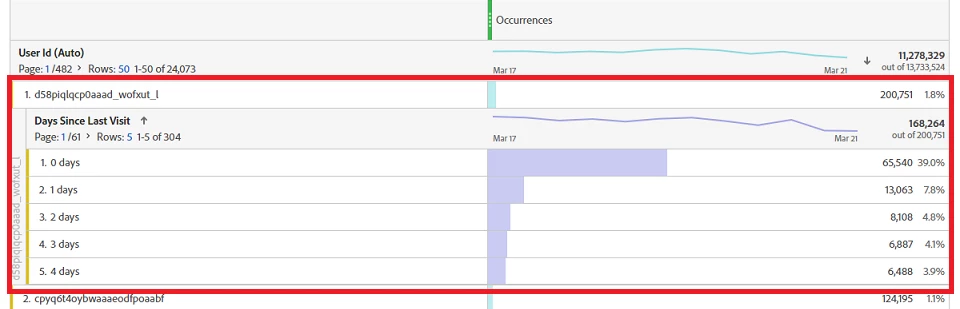
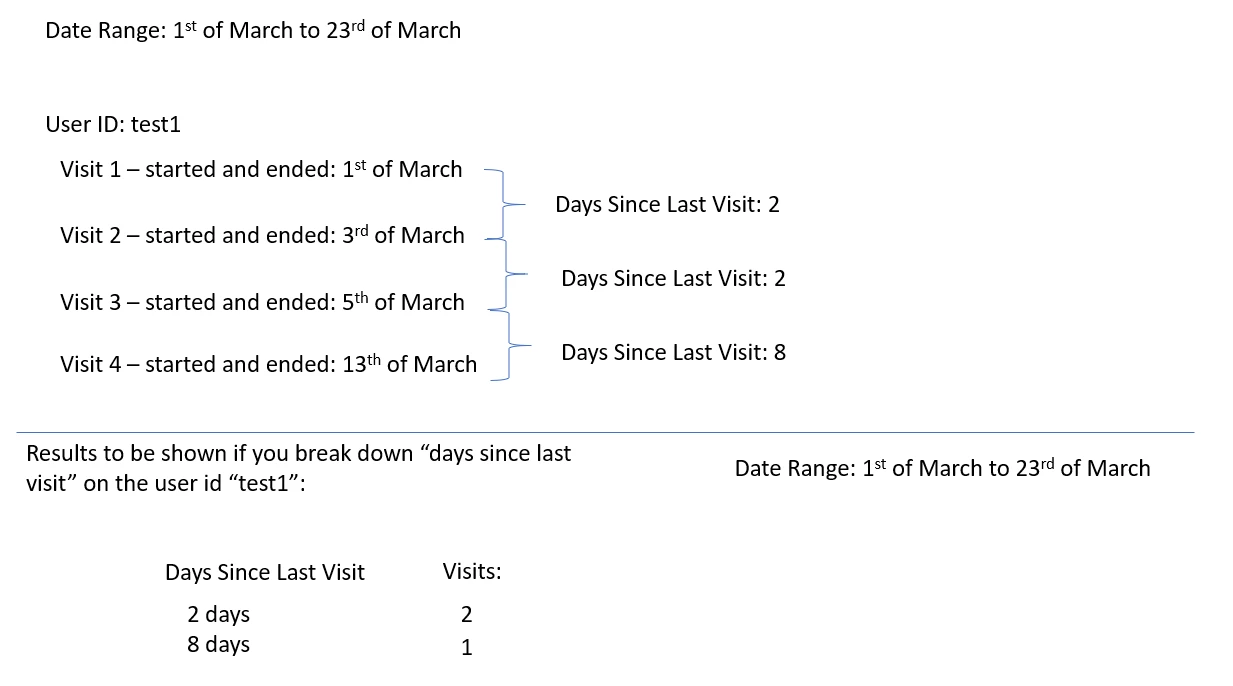
I believe the issue is related, probably, to your date range. If you have a long date range, the dimension will show all the hits associated with the user ID. Have a look in the example below:

Because my date rage is almost a month of data, I'm pulling all the hits associated, to this user, with the "days since last visit" as a dimension.

This might be the reason you're seeing multiple figures in the dimensions.

2 replies

igorm75245240Accepted solution
Level 2
March 24, 2020

Hi Dinesh,


I believe the issue is related, probably, to your date range. If you have a long date range, the dimension will show all the hits associated with the user ID. Have a look in the example below:

Because my date rage is almost a month of data, I'm pulling all the hits associated, to this user, with the "days since last visit" as a dimension.

This might be the reason you're seeing multiple figures in the dimensions.

Level 4
March 25, 2020

Sorry, I am not convinced with the answer. I am expecting when a user visit in any date range, DaysSinceLastVisit should report the latest visit day. Otherwise DSLV is not serving the purpose. This issue holds good for DaysSInceLastPurchase. Please rethink & help me.


PFB the screen shot, where date range is for 1 day (Mar23), still there 0days, 1days,2days....  for the user. how come?


jantzen_b
Adobe Employee
Adobe Employee
December 3, 2020
Do any of the answers below answer your initial question? If so, can you select one of them as the correct answer? If none of the answers already provided answer your question, can you provide additional information to better help the community solve your question?