ActivityMap.region override - clicked element value is 0 | Community
Skip to main content
Level 2
September 22, 2025
Question

ActivityMap.region override - clicked element value is 0

  • September 22, 2025
  • 1 reply
  • 481 views

Hello,


We have set up Adobe Analytics with Activity Map through Adobe Launch and overriding the Activity Map region using the following:
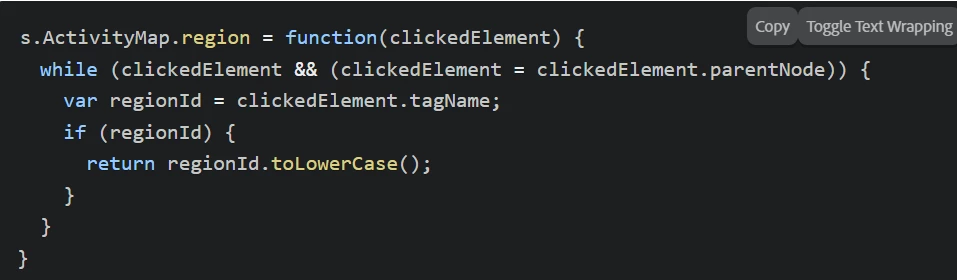
I found the above code example from ActivityMap.region | Adobe Analytics and it works as expected for most of the links on our website. However, for some links/buttons, the value of clickedElement appears to be 0 instead of the actual HTML DOM element object.


Screenshot:
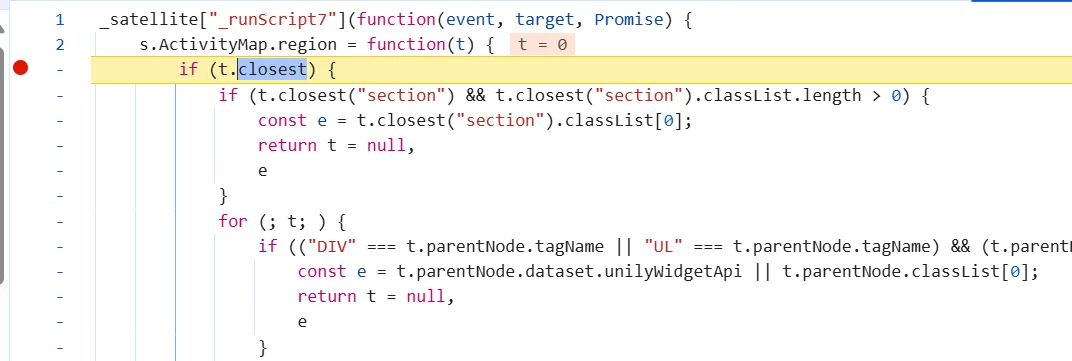
 

Please help me understand what the reason could be. Any help would be highly appreciated.


Regards,

Saif


1 reply

Jennifer_Dungan
Community Advisor and Adobe Champion
September 22, 2025

Unfortunately, since this is custom code for a site I don't have access to, trying to debug this is going to be hard.


However, here is my recommendation:


Since you already seem to be running a watch in your code to see the final result, I would suggest trying to dig further into the logic that is being run, trying to see what is happening at each step... (i.e. is there a value that ends up being overwritten, or maybe the logic doesn't properly cover the elements and so there is no value to be set, with no fallback - like the standard "BODY")


I have custom code to support the Activity Map Link, but not the Region (for that, I have a data attributes in our HTML to set the regions with a little more control) (https://experienceleague.adobe.com/en/docs/analytics/implementation/vars/config-vars/activitymap-regionidattribute#sactivitymapregionidattribute-using-appmeasurement)