
ActivityMap Firefox extension | Community
Skip to main content
ActiveMitchell
Adobe Champion
Adobe Champion
June 3, 2020
Solved

ActivityMap Firefox extension

  • June 3, 2020
  • 2 replies
  • 2782 views

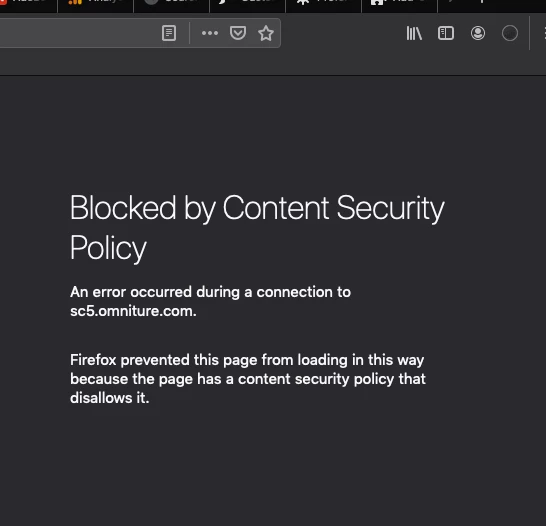
Hello - I'm attempting to access the Activity Map extension (v1.0 Apr/2020) in Firefox/Mac.  It worked a couple weeks ago.  Now just after completing  the  login I see an error message stating there's a content security policy (CSP) issue.  I've reviewed browser security/privacy settings but no luck.  No luck with searching this issue either.  Thanks for any info/recommendations.
 

This post is no longer active and is closed to new replies. Need help? Start a new post to ask your question.
Best answer by saumyag24417044

It looks like your company has strict security settings that prevent the ActivityMap frame from being injected into the web page.It is because of your Content-Security-Policy. Here are two ways you could update the content security policy to have ActivityMap work on their site:

Wild card domains

  • For 'connect-src', add sitecatalyst.omniture.com
  • For 'frame-src', add *.omniture.com

No wild card domains

  • For 'connect-src', add sitecatalyst.omniture.com
  • For 'frame-src', add sitecatalyst.omniture.com authorize.omniture.com sc5.omniture.com

Preference would be that you use the wild card domains, in case the Experience Cloud login process ever changes in the future and uses different domains.


Hope this helps!


Thanks,

Saumya

2 replies

saumyag24417044Accepted solution
June 16, 2020

It looks like your company has strict security settings that prevent the ActivityMap frame from being injected into the web page.It is because of your Content-Security-Policy. Here are two ways you could update the content security policy to have ActivityMap work on their site:

Wild card domains

  • For 'connect-src', add sitecatalyst.omniture.com
  • For 'frame-src', add *.omniture.com

No wild card domains

  • For 'connect-src', add sitecatalyst.omniture.com
  • For 'frame-src', add sitecatalyst.omniture.com authorize.omniture.com sc5.omniture.com

Preference would be that you use the wild card domains, in case the Experience Cloud login process ever changes in the future and uses different domains.


Hope this helps!


Thanks,

Saumya

July 14, 2020
@activemitchell - Did the answer provided in my last comment help?