
Journal entry report - rename enum labels / names | Community
Skip to main content
lgaertner
Level 9
May 31, 2024
Solved

Journal entry report - rename enum labels / names

  • May 31, 2024
  • 1 reply
  • 454 views

Hello,


I did not test, if this is a general problem, but perhaps there is a solution for this:

I created a Journal Entry report, which should show how often a user made an approval decision.

So I set the filter to only show the entries with the following change types:

ADA, ADC, ADN, ADR


ADA - enum.actiontypeenum.assetapproval.decision.approved
ADC - enum.actiontypeenum.assetapproval.decision.approved.changes

ADN - enum.actiontypeenum.assetapproval.decision.needs.work

ADR - enum.actiontypeenum.assetapproval.decision.revoked


To get an informative chart, I have grouped by the changeType, but unfortunately both the grouping titles and the chart labelling show enum.actiontypeenum.assetapproval.decision.* surrounded by question marks. Can I somehow change this to the three-digit abbreviations, or even better, to a customised label?
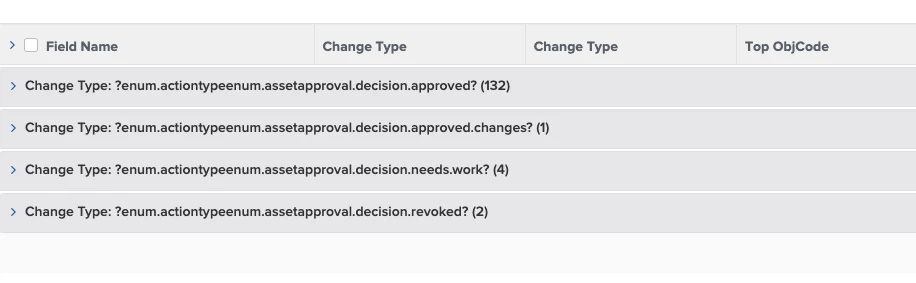
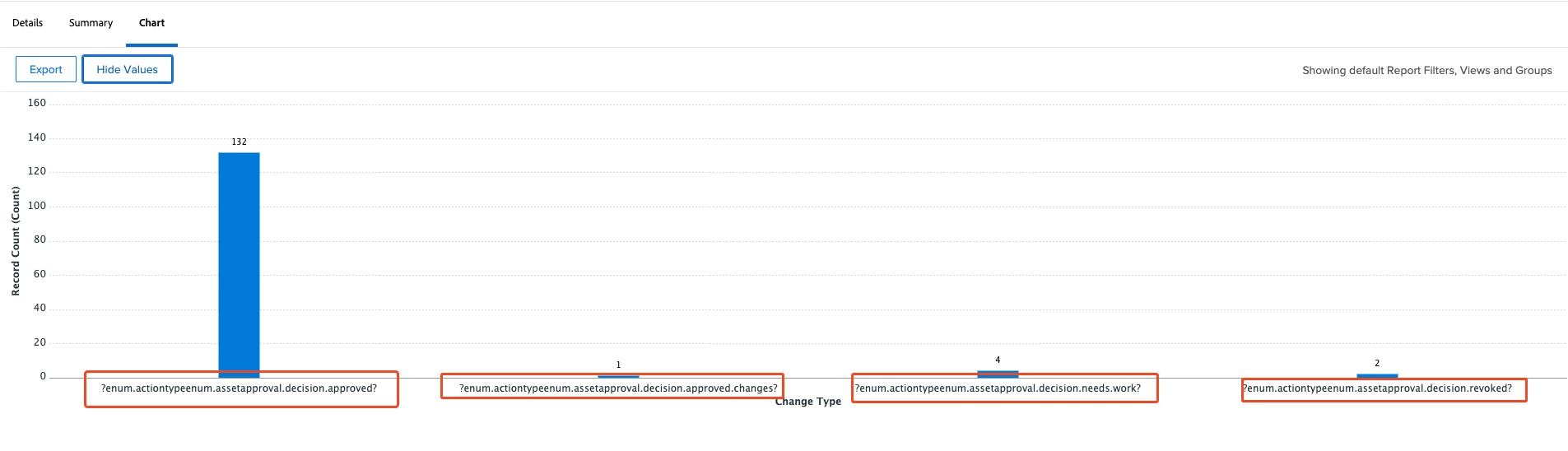


Getting the three digit key in the columns is no problem by changing the type to string.


Thanks in advance.


Regards

Lars

This post is no longer active and is closed to new replies. Need help? Start a new post to ask your question.
Best answer by Madalyn_Destafney

This is one of the things about reporting I really don't like and hoping it's different in future reporting. Even if you change grouping names in the details view of a report, you cannot change them in chart groupings, it'll always be the label, as far as I know.

1 reply

Madalyn_Destafney
Community Advisor
Madalyn_DestafneyCommunity AdvisorAccepted solution
Community Advisor
June 7, 2024

This is one of the things about reporting I really don't like and hoping it's different in future reporting. Even if you change grouping names in the details view of a report, you cannot change them in chart groupings, it'll always be the label, as far as I know.

If this helped you, please mark correct to help others : )