Filter out specific parent task using valueexpression | Community
Skip to main content
Level 2
March 5, 2024
Solved

Filter out specific parent task using valueexpression

  • March 5, 2024
  • 2 replies
  • 2098 views

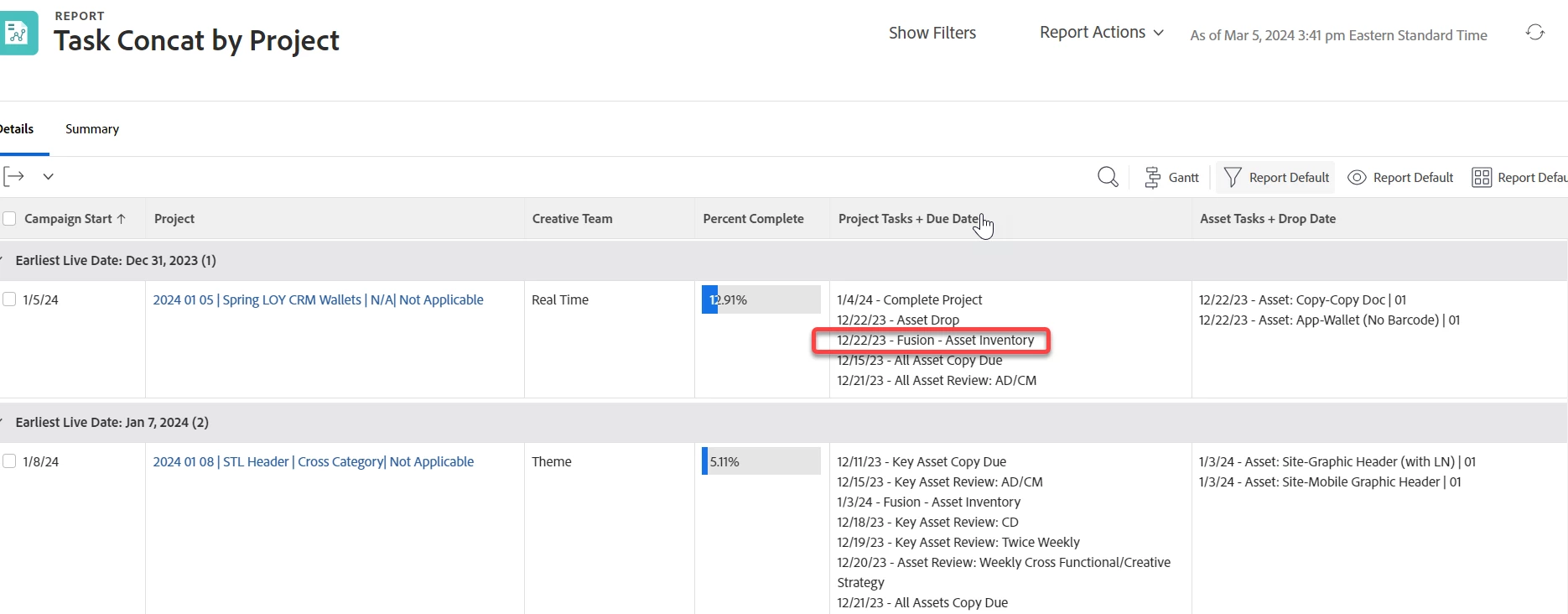
Hi! I'd like to filter out a specific parent task from showing in a report. However, a filter is not working now that I've combined all tasks into one field. Anyone know how I might manipulate the valueexpression for the Project Tasks + Due Date column to also NOT CONTAIN "Fusion - Asset Inventory" parent task? Thanks in advance! New to using text mode!


displayname=Project Tasks + Due Date
listdelimiter=<p>
listmethod=nested(tasks).lists
textmode=true
type=iterate
valueexpression=IF(CONTAINS('Asset:',{name})=true," ",CONCAT({plannedCompletionDate}," - ",{name}))
valueformat=HTML
 

This post is no longer active and is closed to new replies. Need help? Start a new post to ask your question.
Best answer by KellieGardner

It looks like you would also need to remove the : as well since the parent task isn't formatted as "Asset:"


IF(CONTAINS('Asset',{name})," ",CONCAT({plannedCompletionDate}," - ",{name}))


I just looked at your task list you posted and see that it would filter out additional items in the milestones below so I would do 2 IF statements combined.


Try this:


IF(CONTAINS('Asset:',{name})," ",IF(CONTAINS('Fusion - Asset Inventory',{name}),"",CONCAT({plannedCompletionDate}," - ",{name})))

2 replies

KellieGardner
Community Advisor
Community Advisor
March 5, 2024

HI @colleenkl - You don't need the "= true" after the contains statement. 


CONTAINS(findText, withinText)


See if this works:

IF(CONTAINS('Asset:',{name})," ",CONCAT({plannedCompletionDate}," - ",{name}))

ColleenKlAuthor
Level 2
March 5, 2024

hey Kellie!
I need to keep the "Asset" statement in there b/c it's differentiating the two different task types we have - project column does NOT contain tasks with "Asset:" but the Asset Task column does. I want to also remove the "Fusion - Asset Inventory" parent task from what's showing in the project column, however. Does that make sense?

ColleenKlAuthor
Level 2
March 6, 2024

I just looked at your task list you posted and see that it would filter out additional items in the milestones below so I would do 2 IF statements combined.


Try this:


IF(CONTAINS('Asset:',{name})," ",IF(CONTAINS('Fusion - Asset Inventory',{name}),"",CONCAT({plannedCompletionDate}," - ",{name})))


YES!! That worked! I knew it would have to be a double statement, but I'm still uncertain how to write those being so new to text mode. Any pointers on where to find a cheat sheet? 🙂


Thank you so much, Kellie, for sticking with me and for your help. So appreciate the extra brains coming together here!

Level 6
March 6, 2024

Hi Colleen, 


You said that the Project tasks are milestones. Are you using a milestone path on the project and do you have them tagged?  If so, you can use this textmode on a Project report to pull only those Project tasks:


valueexpression=IF(!ISBLANK({milestoneID}),CONCAT({plannedCompletionDate}," - ",{name}))
listdelimiter=<p>
listmethod=nested(tasks).lists
valueformat=HTML
displayname=Project Tasks + Due Date
textmode=true
type=iterate


This is my test schedule:


My test renders the following results:


I hope this helps, 

Teale

ColleenKlAuthor
Level 2
March 6, 2024

Hey Teale - interesting to see another perspective! We aren't using WF milestones currently. Internally, we reference project tasks as "milestones" to differentiate them from asset tasks. But cool to understand something different!