Hi All,
I've got a Workfront webhook as the first module of a Fusion scenario. The scenario is meant to run when the Home Team of an active Workfront user is updated - but it's not working.
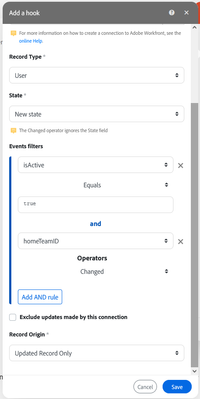
Here's how it's configured:
Record type: User
State: New state
Filters:
HomeTeamID Changed
AND IsActive EQUAL true
AND connection updates included
Record Origin: Updated Record OnlyWhen I update an active user's Home Team, the webhook is not called so the scenario does not run.
I did some testing and figured that the issue is caused by the filter IsActive EQUAL true.
If I create a webhook withouth that filter, it just works fine. (Obviously it is also called when an inactive user's Home Team is updated - which is not what I want.)
Record type: User
State: New state
Filters:
HomeTeamID Changed
AND connection updates included
Record Origin: Updated Record OnlyCan someone please tell me what is wrong with this filter?
Thank you,
Tibor
Solved! Go to Solution.
Topics help categorize Community content and increase your ability to discover relevant content.
Views
Replies
Total Likes
Update: The Adobe team has confirmed that this was a bug and they fixed it now.
The isActive event filter is now working as expected on the user object.
Worth noting that the filter value has to be a boolean value (true/false) and that can only be achieved by selecting the true/false keyword from the General functions tab of the mapping panel:
If the word true / false is simply typed in when creating the webhook, the filter will not work:
Views
Replies
Total Likes
Hi @tibormolnar
I'm no expert at Fusion, but I have run into this before and user "Equal to (case insensitive)" and had it work.
Hi @Alex_Di ,
thank you for the response. However, it seems that the "Equal to (case insensitive)" operator option isn't available for isActive in a webhook config:
So, I tried both IsActive EQUAL TRUE and IsActive EQUAL True, but neither of these work.
Views
Replies
Total Likes
Can you try using "true" from keywords in General functions? What I had noticed in the past is that when you type 'true' or 'false', it sends it as a text, whereas a keyword is sent as a boolean. While they both work the same in the regular search module, a webhook might be more sensitive.
Hi @SuryaLakhani,
thank you for the idea. It sounds reasonable but unfortunately, it doesn't work either. I tested it.
The webhook is not triggered when I update an active user.
Views
Replies
Total Likes
This has been raised with Adobe. I will post here when I receive their feedback.
I didn't forget about this one. Adobe is still investigating...
Update: The Adobe team has confirmed that this was a bug and they fixed it now.
The isActive event filter is now working as expected on the user object.
Worth noting that the filter value has to be a boolean value (true/false) and that can only be achieved by selecting the true/false keyword from the General functions tab of the mapping panel:
If the word true / false is simply typed in when creating the webhook, the filter will not work:
Views
Replies
Total Likes


