New Licencing model for Workfront | Community
Skip to main content
Level 3
February 22, 2024

New Licencing model for Workfront

  • February 22, 2024
  • 8 replies
  • 13376 views

Hello everyone,

I'm currently dealing with the renewal of our Workfront contract and wanted to gather opinions on the new licensing model. It seems like a revenue-driven move, and the lack of advance notice going into the financial year isn't giving off a positive vibe.


It appears that all Planners and Workers will need to upgrade to the Standard license, which costs similar to what Planners currently do. Reviewers, previously free, now have to upgrade to Light, as the Contributor license is limited to making no more than 5 decisions a month (which I find quite perplexing).

The removal of basic functionality from the Light license, such as completing assigned tasks and generating proofs, means Workers have to be unnecessarily upgraded to Standard.

Has anyone gone through this process already and have any suggestions?

Thanks,

Marta

This post is no longer active and is closed to new replies. Need help? Start a new post to ask your question.

8 replies

Doug_Den_Hoed__AtAppStore
Community Advisor
Community Advisor
February 22, 2024


Hi @martaso2,


Your understanding about New Licensing is correct, and As Designed:


  • this post (cc @dereksa and @randyroberts who were on that thread) is an example of how WF Classic Licensing does allow Worker and Reviewer licenses to do certain functions in a cost effective manner
  • Having used WF New Licensing, I can confirm that actions such as changing the status of a task will indeed require a Standard license under the new licensing
  • others (cc @christina_jarosz) have expressed similar concerns about the cost of WF New Licensing
  • Where, historically, Workfront (and AtTadk, and @task) published the official pricing per user per year for each license types as part of WF Classic Licensing (and its predecessors) and would then negotiate discounts based on volumes and add-ins, Adobe has decided in changing to WF New Licensing to instead publish the official functionality of each annual user license, then (as these “Get Pricing” buttons illustrate) to Talk to (Adobe] about how Adobe Workfront can help you strategically prioritize, assign, collaborate on, and complete projects with speed, at scale.”

Given the above (and other related correspondence and conversations), my understanding is that Adobe is intentionally now providing customized pricing for every customer tailored to their unique needs, both present and future (eg if you do not yet have Fusion but are considering it, Fusion is “on the table” for negotiation; as could be any other existing or desired Adobe software product).

On the bright side, I know of some such negotiations that then resulted in overall annual WF New Licensing fees that were similar to the previous year’s WF Classic Licensing fees.


That said, for best results, I suggest you review your current requirements, assess your future requirements, consider practicing your poker face, and then contact your Adobe Workfront Sales Rep.


Regards,

Doug

Marco_Donadelli
Level 2
June 5, 2024

my understanding is that Adobe is intentionally now providing customized pricing for every customer tailored to their unique needs
I know of some such negotiations that then resulted in overall annual WF New Licensing fees that were similar to the previous year’s WF Classic Licensing fees.

 I hope this works for us, otherwise we have a BIG problem!

jon_chen
Community Manager
Community Manager
February 29, 2024

Hello @martaso2 and @doug_den_hoed__atappstore thanks for your question and descriptive response! I've touched based with our Licensing team and was provided the below response. Hope this is helpful.


We released this new model in early 2023 in an effort to simplify the purchasing process and align more closely to other products in the Adobe suite.


The majority of Adobe Workfront customers were on a simplified license management model (the most popular model) which is what we adopted when we created the Standard User.


Not all Collaborator Reviewers will need a light license – only those who need unlimited proof and document decisions or access to portfolios and programs.


The light license is not intended to replace the Worker – it is a new lower price point user type intended to satisfy unmet customer use cases.


We’d recommend that you reach out to your Sales Rep to help assess your needs for your upcoming renewal.


MartaSo2Author
Level 3
March 5, 2024

Hello @jon_chen , appreciate your message. However, the issue remains that this constitutes a significant monetary change, which is unfavourable for your customers. The revised collaborator license proves impractical for most scenarios, given the removal of unlimited proof decisions—seemingly a deliberate move to push customers towards upgrading free Reviewers to paid Light licenses. Collaborators now appear equivalent to old Requestors, offering view-only access without substantial value.


While I acknowledge that the Light license isn't meant to replace Workers, it's concerning that Workfront has eliminated fundamental functionalities such as completing tasks and uploading proofs from the Light license. This necessitates upgrading all Workers to Standard, incurring costs that match those of old Planner licences - not merely doubling but tripling our expenses.


I must express my deep disappointment in these changes, as they not only impact the usability of the platform but also significantly increase our financial burden. It's disheartening to witness a shift that appears to prioritize revenue over providing value to loyal customers.


MCriscella23
Level 2
March 5, 2024

We are running into this same issue. It really does come across as a monetary change, rather than something that keeps the end users in mind. The restrictions of what Light licenses are able to do (the number of approvals, uploads, etc.) is very limiting and makes the use of that license almost useless in most cases. Our Light users only get 5 approvals per month, which can be eaten up very quickly within one single project. 

Really not a great experience, and I would be interested in the feedback from larger legacy accounts once they switch over to this new licensing model. 

MartaSo2Author
Level 3
March 5, 2024

@mcriscella23 I finally got my hands on the comparison of all the licenses side by side. I can share this with you if you don't have it. It's really helpful to see what was removed from which licenses. It doesn't make this change any less disappointing, but it might help you. Let me know if you would like me to share it with you.


MCriscella23
Level 2
March 5, 2024

Yes, if you wouldn't mind sharing it I would appreciate it. Agreed, still makes this change an entirely disappointing move by Adobe Workfront. 

Level 2
March 13, 2024

I share your same concerns, but to expand on the issue of the limitation to the number of decisions able to be made per month on proofs under the free Contributor license type, I am curious how admins whose teams work with many external partners may be dealing with this.


Currently, I do not necessarily create accounts in our instance for external partners who are sent proofs for approval. Workfront just generates external "Review" accounts for them based on their email addresses.


Will the new structure mean that if these partners are going to need to be able to approve more than x number of proofs per month, I need to set them up with actual accounts? Nevermind the cost (which is of course a huge issue), but this could mean a huge workload increase for me as the admin, and a process change for project managers/designers who are currently used to entering email addresses into Proof without having to request accounts first.


Am I thinking about this incorrectly?

MartaSo2Author
Level 3
March 27, 2024

Hello, I'm also keen on receiving an answer to this question. @jon_chen , could you kindly let us know if it will be necessary to put external stakeholders on paid Light license going forward? 

Many thanks

-JC
Level 6
April 3, 2024

Wanted to pipe up on an issue we ran into in case it helps anybody else. 


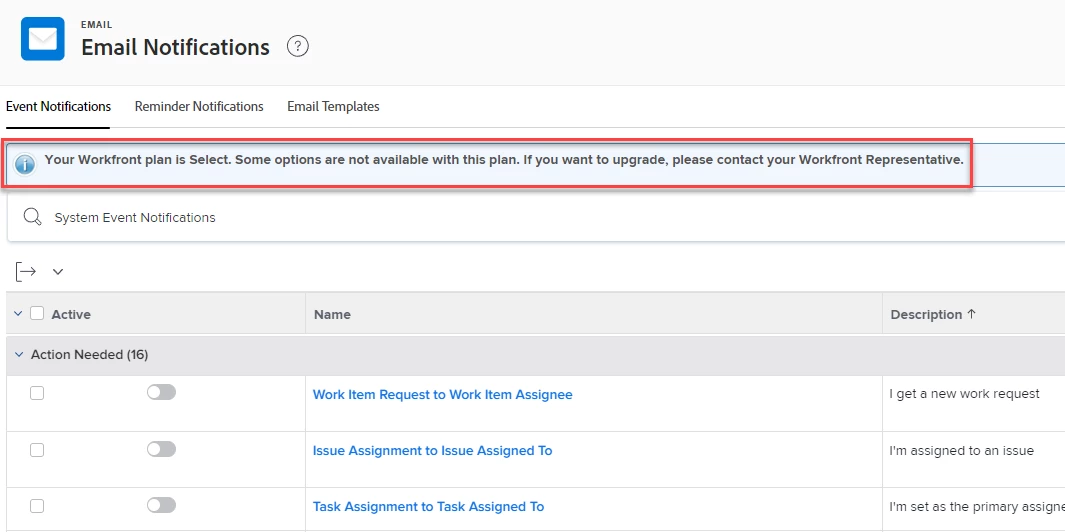
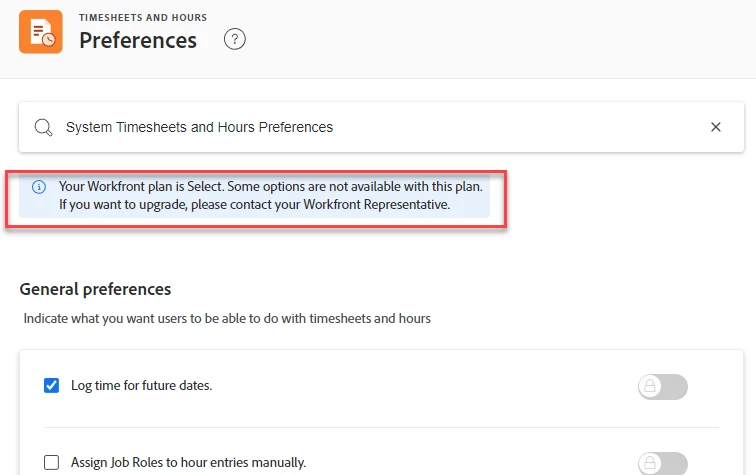
On the "Select" package, which we chose, it was specified as not having "Advanced enterprise controls". When we questioned what "Advanced enterprise controls" meant, we were given a screenshot of and link to the Actions allowed for Group Administrators page, specifically the paragraph at the very bottom of the page saying "The following activities are only available to group and subgroup administrators when their organizations are on the Prime or Ultimate plan.". The activities are:

  • Configure project, task, and issue preferences
  • Configure timesheet and hour preferences
  • Configure event notification emails
  • Create and manage approval processes
  • Create and manage subgroups


What this has actually meant for us, now that we've finished our renewal on the new Select plan, is that system administrators cannot do most of the above activities. We now see an alert when attempting to configure project, task, issue, timesheet & hour, and event notification emails preferences. We also cannot share approval processes to specific groups. Instead, the settings we've previously set for group-level preferences stay intact, but if we try to lock/unlock/change a specific preference, that setting will then default to being set for the entire system. Previous group-level settings will be eliminated.
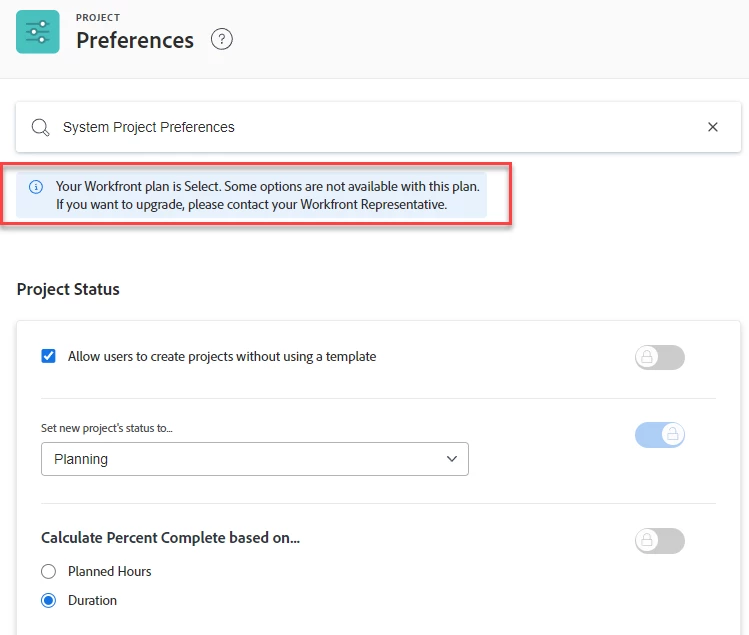
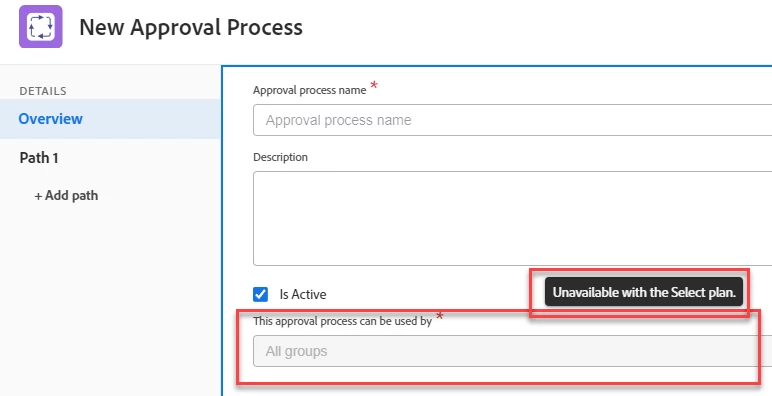


When I called Support (as the content provided to us by our rep made it appear as if these functions were ONLY unavailable to group or subgroup administrators), they said this did not seem right and that we as system administrators should be able to perform these functions. However, after they spoke with Finance, it was made apparent that this was "as expected". As expected by whom, we'll never know!


I hope this saves someone some confusion as they go through their renewal. If you're considering the Select plan, be aware of the potential for reduced functionality compared to what you're currently accustomed to.

_Manish_Singh
Level 9
April 4, 2024

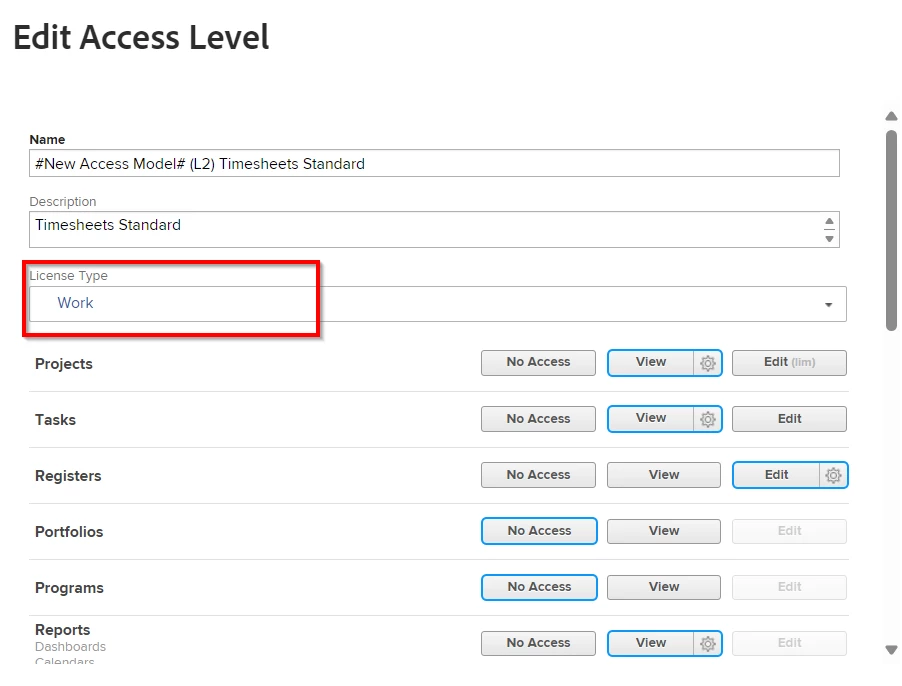
Hi @-jc - We are still using the legacy licensing model. We will switch to the new one starting from next month. Could you please send me a screenshot of the Light license settings? It should look like the one I attached below. I want to check if Light license allows Edit (create/delete) tasks. Thanks!

ChristinaJay
Level 4
December 11, 2024

Hey @_manish_singh  - now that you have been on the new model a few months, how is it going?


Are you finding it functional for your purposes? How has the approval function been working? Are you facing increased upgrades or has it been relatively quiet?


bsedlack
Level 5
April 9, 2024

Adding our voice to the chorus. We're a large company. My team was the first to onboard Workfront in 2015 and since, many teams have joined us, with several new teams interested even this year.

Our problem is we are heavy Work licence users (12 plan to 48 work). All of the other teams in the company are less heavily balanced to Work licences. It seems we as a team will be paying the price for this change in licences since Adobe will creatively price our licences to even out the overall costs (so we've been told -- no quote yet!). So if for example Adobe tries to match the full company spend in the new structure, we as a team will be hit with a huge price increase. To be fair, most other teams may see a discount... if only we could get them to give us their money, but as well all know, that's not how it works.

And that doesn't even take into account having to pay for what was previously FREE -- reviewers!

Honestly, we're already starting to look at competitors. Lots to think about.

-JC
Level 6
May 31, 2024

Wanted to add on to my previous comment on this thread as I'm not sure where else to put it, but hoping it helps someone in their decisions during their renewal period.


I previously said "if you're considering the Select plan, be aware of the potential for reduced functionality compared to what you're currently accustomed to" and we've encountered this again with the upcoming new release of "Sandbox Environment promotion" (a "push to production" function). This was a feature that's been long-awaited by many Workfront users, including my team. We've been hearing about it off and on for what seems like forever!


However, with the announcement email, it specified it was available for "eligible customers", so we reached out to our rep to see what that meant.


Be forewarned that "eligible customers" does not include customers on the Select package, only the Prime and Ultimate packages. I imagine we can expect there to be other functionalities in the future that will also be unavailable to us on the Select package.


Good luck out there!

hrudomin
April 10, 2025

I think this new model is a horrible idea.


I have just started coming across this issue with my account and it's becoming a headache. I send proof to my clients maybe for about a month's time period and then not again until the following year. I may use about 20 proofs per user and it doesn't warrant purchasing these clients a "Light" user account. I think 5 proofs per month is not enough for most companies.


Also the nofification emails that the user is over their limit for the month is extremely annoying. Every admin user on the account gets this notification everytime a person approves a proof. This can clog up an inbox if you have a bunch of proofs someone if approving.


I wish Adobe would take this into condideration when they changes things like this for monotization purposes. I might need to look into other options for proofing instead of Workfront.