Expand my Community achievements bar.

Never miss an update of the Adobe Journey Optimizer Community Lens! Subscribe now to get the latest updates, insights, and highlights delivered straight to your inbox every time a new edition drops.

Mark Solution

This conversation has been locked due to inactivity. Please create a new post.

How to use Object Copy API to export to a file?

Avatar

Level 4

Hello,


I've a question regarding Object Copy API 

I understand that with /exim/snapshots/copy I can copy objects from one sandbox to another. This works fine.

But how can I "dump" an object to a local JSON file? I tried with /exim/snapshots/export but I only get some "correlationId". How can I download my stuff (e.g. a Journey in JSON format) based on this "correlationId"?


Thank you!


2 Replies

Avatar

Employee Advisor

@maggod ,

The "correlationId" you receive when making a request to the /exim/snapshots/export endpoint is a unique identifier for the export job that you initiated. This identifier can be used to check the status of the export job and download the exported data.

You can make a GET request to the /exim/snapshots/export/{correlationId} endpoint, where {correlationId} is the unique identifier for your export job.

If the export job has completed successfully, you can download the exported data by making a GET request to the /exim/snapshots/export/{correlationId}/download endpoint.

This will return the exported data in a JSON format that you can save to a local file.


Avatar

Level 4

Thank you @akshaaga 


I tried, but it doesn't work ...


Step 1: Export - OK

maggod_0-1683035073579.png

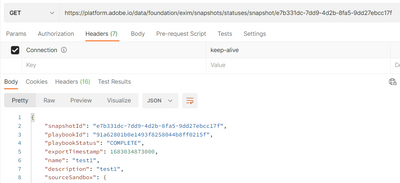
Step 2: check status (I'm using a different URL, not yours) OK

maggod_1-1683035136322.png


Step 3: download. FAIL. 404

maggod_2-1683035193510.png

Any idea what I miss here?


Thanks!