
Show whole rule when editing components | Community
Skip to main content
thebenrobb
Adobe Employee
Adobe Employee
August 18, 2017
New

Show whole rule when editing components

  • August 18, 2017
  • 2 replies
  • 4302 views

Migrated from Alpha

--

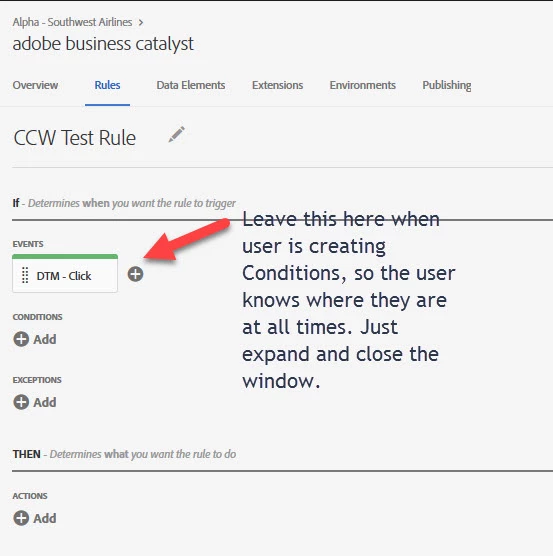
UX Flow of this page needs a little tweeking so the user knows where they are at all times and what they’ve completed.  Leave rule components where they are when creating conditions (events, actions, etc) so the user knows where they are at all times. Just expand and close the window.
2 replies

Level 2
August 30, 2017

Very much agree.  In attempting to complete the initial configuration of Launch, I was interrupted several times.  It was difficult for me to pick up the threads of where I was.  I can see this being more of a challenge when Adobe institutes the lovely session time-out 'feature'.

Level 2
February 23, 2020

Suggested a related idea in case it interests others: "Show the Rule Name at all times" In short, when we open rule components, at least show the rule name so we know what we are editing.