Remove minimum digits requirement in phone number field | Community
Skip to main content
Level 2
October 20, 2022
Solved

Remove minimum digits requirement in phone number field

  • October 20, 2022
  • 2 replies
  • 700 views

My company has just launched a site and is using the telephone number field in one of the forms that can be submitted to us. The site is focused on APAC countries and some of the phone numbers there have only seven or eight digits total. When a user tries to put in one of those numbers, they get an error code that they have to have 10 numbers. My developers tell me the 10-number minimum is baked into AEM, but I'm wondering if there's a way to override that setting so that there is no minimum to the numbers you can post in the telephone number field.


Thank you in advance for any information you can share!
This post is no longer active and is closed to new replies. Need help? Start a new post to ask your question.
Best answer by workflowuser

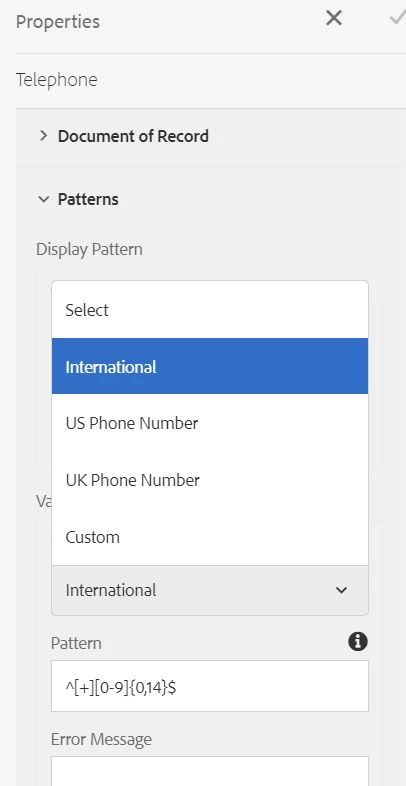
You can easily change the number pattern to Internation/UK or a custom pattern using your own regular expression 


2 replies

workflowuserAdobe EmployeeAccepted solution
Adobe Employee
October 20, 2022

You can easily change the number pattern to Internation/UK or a custom pattern using your own regular expression 


Mayank_Gandhi
Adobe Employee
Adobe Employee
October 26, 2022

@mark_edelstein in phone field the regex is applied by default, you can change it anytime to anything based on your business requirement. You can put your own regex as well