Vlookup formula in List of Functions | Adobe Higher Education
Skip to main content
Level 3
January 18, 2018

Vlookup formula in List of Functions

  • January 18, 2018
  • 4 respuestas
  • 15809 visualizaciones

Hi,

Can I create vlookup or hlookup formula inside our workflow?

The List of Functions under Advanced Parameters doesn't contain either vlookup or hlookup functions:
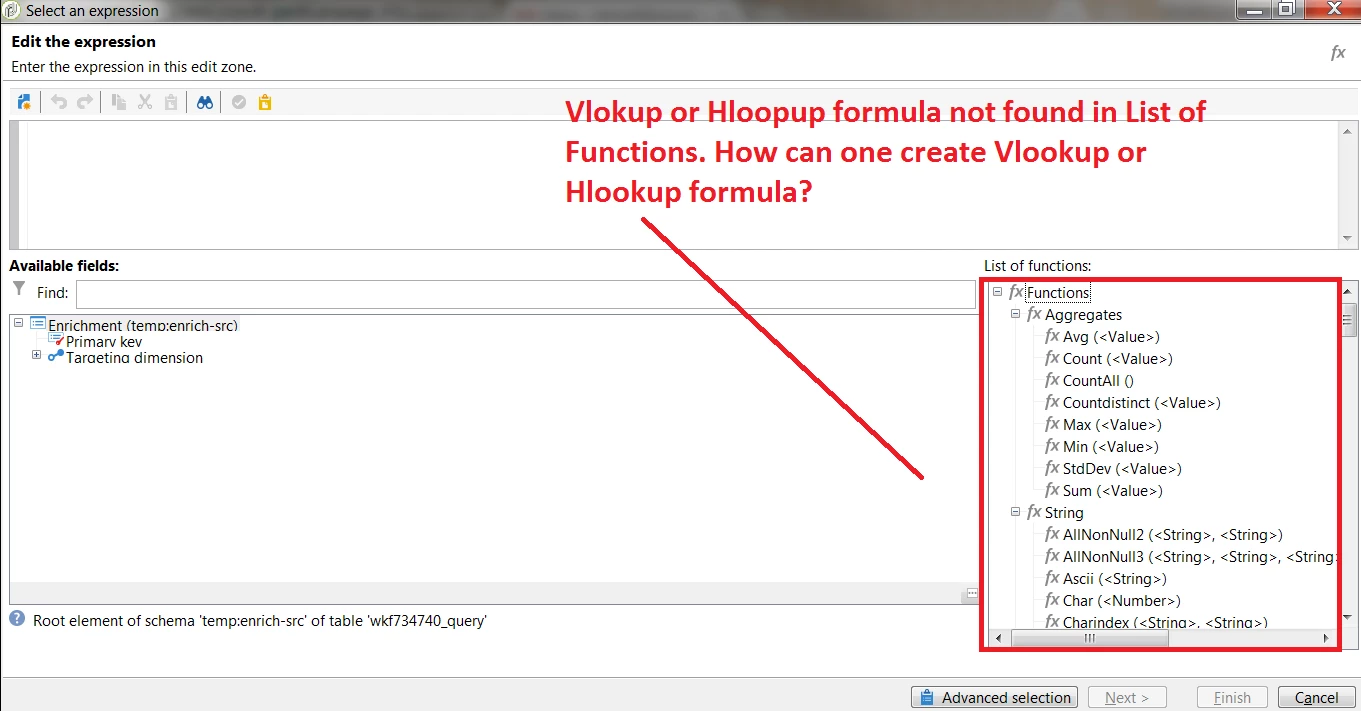
As you know vlookup  (or Vertical lookup) searches down the first column of a range for a key and returns the value of a specified cell in the row found.

Syntax: VLOOKUP(lookup_value, Table_array, Col_index_num, Range_lookup)

So how can we create ad-hoc functions if they are not listed under List of Functions?

Este tema ha sido cerrado para respuestas.

4 respuestas

Level 4
January 18, 2018
Level 3
January 18, 2018

HI,

The link is broken. Can you provide the correct link?

Level 3
January 18, 2018

I found it, the correct link:

Adding additional SQL functions

Level 3
January 18, 2018

Hi,

In the documentation, it points to a repository of functions inside Campaign:

"Further function examples can be found in the predefined package "xtk\datakit\funcList.xml":

Where in Campaign can I find the folder, "xtk\datakit\funcList.xml"; as I can't find "datakit" schema inside the "Data Schemas" folder:

Adhiyan
Adobe Employee
Adobe Employee
January 18, 2018

Hello Jae,

It actually refers to the location in the server where this funclist.xml is present. It's under datakit/xtk/eng folder on the server.

from the console you can simply search for funclist under schemas and it should be there.

Regards.

Adhiyan

Level 3
January 18, 2018

Hi,

I had attempted to search for "funclist" inside schemas folder and nothing shows up:

Also, how can I pull up or show the directory path inside Campaign?

Level 3
January 19, 2018

Hi,

So I followed the documentation and formulated the following XML to be imported as a package into Campaign:

Here is the raw code:

<?xml version="1.0" encoding='ISO-8859-1' ?>

<package

  namespace  = "nms"

  name        = "package-additional-funclist"

  label      = "Additional functions"

  buildVersion= "7.0"

  buildNumber = "8857">

  <entities schema="xtk:funcList">

    <funcList name="myList" namespace="jhl">

      <group name="ehl_functions" label="EHL Functions">

        <function name="vlookup" type="long" args="(&lt;vlookup&gt;)" help="Vertical (v)lookup searches down the first column of a range for a key and returns the value of a specified cell in the row found" minArgs="4" maxArgs="4" display="Vlookup will define based on parameters and arguments">

          <providerPart provider="SQL, MSSQL,Sybase,PostgreSQL" body="vlookup(lookup_value, Table_array, Col_index_num, Range_lookup)"/>

        </function>

      </group>

    </funcList>

  </entities>

</package>

...which follows, I think, the documentation:

Here is the template code Adobe provides in the documentation, those blocks of code to be replaced, I've highlighted in red:

<?xml version="1.0" encoding='ISO-8859-1' ?>

<package

  namespace = "nms"

  name = "package-additional-funclist"

  label = "Additional functions"

  buildVersion= "6.1"

  buildNumber = "10000">

  <entities schema="xtk:funcList">

  <funcList name="myList" namespace="cus">

  <group name="date" label="Personalized date">

  <function name="relativeMaturity" type="long" args="(&lt;Âge&gt;)" help="Returns the difference between a date and 18 years"

  minArgs="1" maxArgs="1" display="Relative maturity of the person born on the date $1">

  <providerPart provider="MSSQL,Sybase,PostgreSQL" body="extract(year from age($1))-18"/>

  </function>

  </group>

  </funcList>

  </entities>

</package>

So my raw code replaces replaces the Adobe's template sample with my own code (in red):

<package

  namespace  = "nms"

  name        = "package-additional-funclist"

  label      = "Additional functions"

  buildVersion= "7.0"

  buildNumber = "8857">

  <entities schema="xtk:funcList">

    <funcList name="myList" namespace="jhl">

      <group name="ehl_functions" label="EHL Functions">

        <function name="vlookup" type="long" args="(&lt;vlookup&gt;)" help="Vertical (v)lookup searches down the first column of a range for a key and returns the value of a specified cell in the row found" minArgs="4" maxArgs="4" display="Vlookup will define based on parameters and arguments">

          <providerPart provider="SQL, MSSQL,Sybase,PostgreSQL" body="vlookup(lookup_value, Table_array, Col_index_num, Range_lookup)"/>

        </function>

      </group>

    </funcList>

  </entities>

</package>

Yet, when I try to load, (import as a package)  I am getting this error:

Can anyone define what's wrong with either the code (presuming someone went there before--loading customized functions into Campaign) or anything else? Did I formulate the <body> tag correctly with the right syntax?

Vlookup syntax is the following: vlookup(lookup_value, Table_array, Col_index_num, Range_lookup)

Level 3
February 1, 2018

So the syntax is relatively simple:

<package>
<entities schema="xtk:funcList">
<funcList name="myList" namespace="jhl">
<group name="ehl_functions" label="EHL Functions">
<function name="vlookup" type="long"
args="(&lt;vlookup&gt;)" help="Vertical (v)lookup
searches down the first column of a range for a key and returns the value of a
specified cell in the row found" minArgs="4"
maxArgs="4" display="Vlookup will define based on four (4)
arguments">
<providerPart provider="SQL, MSSQL,Sybase,PostgreSQL" body="vlookup($lookup_value,
$Table_array, $Col_index_num, $Range_lookup)"/>

Where $lookup_value, $Table_arry, $Col_index_num, $Range_lookup would be the actual xpath fields (i.e., columns or fields) that represents the values ($xpath field (attribute or column) for lookup_value, $xpath field (attribute or column) for Table_array, $xpath field (attribute or column) for Col_index_num, $xpath field (attribute or column) for Range_lookup).

Can someone validate this based on their own experience?

florentlb
Level 10
February 20, 2018

Any update on this?

Florent