Expand my Community achievements bar.

Get ready! An upgraded Experience League Community experience is coming in January.
SOLVED

How to use IF condition to remove blank spaces in email

Avatar

Level 1

Hi,

Is there a way to use the conditional content/IF condition to ensure that if a field is blank, there is no gap in the email?


We're currently using the below as data is pulling through from a file but some of these fields will be blank (e.g. address line 2 or 3) and we'd like to avoid a blank space in the email if possible.


 <%= targetData.Address_1 %> 

 <%= targetData.Address_2_ %> 

 <%= targetData.Address_3 %> 

 <%= targetData.Town %> 

 <%= targetData.Postcode %> 


Sorry if I haven't explained this very well, not very familiar with all of this.


Thanks

Topics

Topics help categorize Community content and increase your ability to discover relevant content.

1 Accepted Solution

Avatar

Correct answer by
Community Advisor

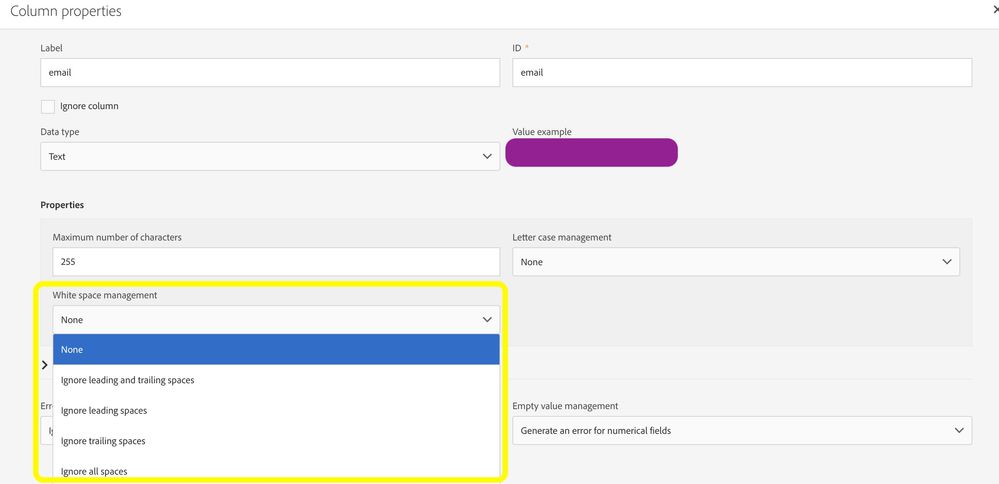
@AmyKi, I would suggest removing whitespaces while loading the data in ACS instead of handling it at the email delivery level. In a file load activity use this option to remove the whitespaces.

acs11.jpg

Another thing you can setup a workflow to update all the profiles to remove the whitespace. You can use the Ltrim/Rtrim function for this purpose.

Thanks, Sathees

View solution in original post

1 Reply

Avatar

Correct answer by
Community Advisor

@AmyKi, I would suggest removing whitespaces while loading the data in ACS instead of handling it at the email delivery level. In a file load activity use this option to remove the whitespaces.

acs11.jpg

Another thing you can setup a workflow to update all the profiles to remove the whitespace. You can use the Ltrim/Rtrim function for this purpose.

Thanks, Sathees