Need to create a chart that shows how many projects a user has been on | Community
Skip to main content
Level 3
June 26, 2025
Solved

Need to create a chart that shows how many projects a user has been on

  • June 26, 2025
  • 3 replies
  • 835 views

I need to be able to create a chart that shows how many projects a user has been on. For example, how many jobs has a designer been on this year?

I have tried various text mode, assignment reports, task reports, project reports and can't get where I need to be.

A designer could have multiple assignments (tasks) on one project, but I can't find a way to essentially report the number of projects a designer was a "user" on.


Anyone solved this riddle? Thank you in advance!

This post is no longer active and is closed to new replies. Need help? Start a new post to ask your question.
Best answer by CelSal01

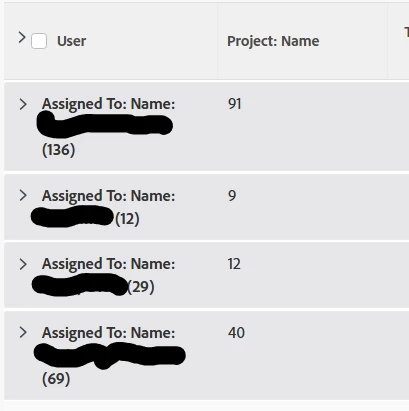
I've done this by creating an Assignment report then:

  • Put a distinct count on the Project name field
aggregator.displayformat=val
aggregator.function=DCNT
aggregator.namekey=project:name
aggregator.valuefield=project:name
aggregator.valueformat=val
displayname=
linkedname=project
namekey=view.relatedcolumn
namekeyargkey.0=project
namekeyargkey.1=name
querysort=project:name
shortview=true
valuefield=project:name
valueformat=HTML
  • Group by "Assigned to: Name" and "Project: Name" 

Result:


3 replies

Sven-iX
Community Advisor
Community Advisor
June 26, 2025

Best I can come up with is this: Work Item report grouped by User, then Project

Sadly we can't report on ProjectUsers. A User has a "workItems" collection that point to projects but there's no way to get a list of unique projects out of it...
Hope this helps! 


ljorr16Author
Level 3
June 27, 2025

Great tip, I'll give that a go and see if it might work.

skyehansen
Community Advisor
June 26, 2025

Workfront has an out of box "projects I'm on" filter, which gives you a clue. It consists of a combination of filters including project users ID, whether you own the project, are a sponsor, or if you created the project.


You can start by using a combination of any of these filters for your own report, but I would focus on the project users ID filter, and then layer in an exists statement to cover whether there are any assignments to that specific user. The reason for the added exists statement is because frequently users may end up as a project user but not be assigned to tasks or issues. This will remove those projects.


You can probably find examples of good exists filters as well, maybe do a search on the words "exists" and "assgn"


Sven-iX
Community Advisor
Community Advisor
June 27, 2025

Right but how do I get to OP's ask of seeing a list of users and which projects they're actually on? 
I can do a project report filter out users without assignments. But I can't make it list users.
I can do a user report and filter out those that aren't project users

What am I missing? 

CelSal01
CelSal01Accepted solution
Level 2
June 27, 2025

I've done this by creating an Assignment report then:

  • Put a distinct count on the Project name field
aggregator.displayformat=val
aggregator.function=DCNT
aggregator.namekey=project:name
aggregator.valuefield=project:name
aggregator.valueformat=val
displayname=
linkedname=project
namekey=view.relatedcolumn
namekeyargkey.0=project
namekeyargkey.1=name
querysort=project:name
shortview=true
valuefield=project:name
valueformat=HTML
  • Group by "Assigned to: Name" and "Project: Name" 

Result:


ljorr16Author
Level 3
June 27, 2025

That did the trick!!


CelSal01
Level 2
June 27, 2025

Awesome! Glad I could help 🙂