I trying to enhance our current WF reports that list out Parent tasks along with all of their children or sub tasks. I have that figured out but I've had a request to enhance reporting where it would show the Parent task but also any upcoming successor tasks(or the next one lin line) and their status. This would help users see which task is next in line or how many children tasks are upcoming.
Solved! Go to Solution.
Views
Replies
Total Likes
Yes. Here's how I do it:
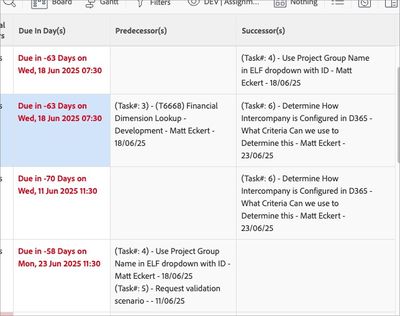
Successor(s)
description=Task#, name, assigned to, planned completion date
displayname=Successor(s)
listdelimiter=<br>
listmethod=nested(successors).lists
styledef.case.0.comparison.icon=false
styledef.case.0.comparison.leftmethod=handoffDate
styledef.case.0.comparison.lefttext=handoffDate
styledef.case.0.comparison.operator=notnull
styledef.case.0.comparison.operatortype=date
styledef.case.0.comparison.righttext=
styledef.case.0.comparison.trueproperty.0.name=bgcolor
styledef.case.0.comparison.trueproperty.0.value=f9f9f9
styledef.case.0.comparison.truetext=
type=iterate
valueexpression=CONCAT("(Task#: ",{successor}.{taskNumber},") - ",{successor}.{name}," - ",{successor}.{assignedTo}.{name}," - ",{successor}.{plannedCompletionDate})
valueformat=HTMLPredecessor(s)
description=Task#, name, assigned to, planned completion date
displayname=Predecessor(s)
listdelimiter=<br>
listmethod=nested(predecessors).lists
styledef.case.0.comparison.icon=false
styledef.case.0.comparison.leftmethod=handoffDate
styledef.case.0.comparison.lefttext=handoffDate
styledef.case.0.comparison.operator=notnull
styledef.case.0.comparison.operatortype=date
styledef.case.0.comparison.righttext=
styledef.case.0.comparison.trueproperty.0.name=bgcolor
styledef.case.0.comparison.trueproperty.0.value=f9f9f9
styledef.case.0.comparison.truetext=
type=iterate
valueexpression=CONCAT("(Task#: ",{predecessor}.{taskNumber},") - ",{predecessor}.{name}," - ",{predecessor}.{assignedTo}.{name}," - ",{predecessor}.{plannedCompletionDate})
valueformat=HTML
TIP: if this solves your problem, I invite you to consider marking it as a Correct Answer to help others who might also find it of use.
If you like my content, please take a moment to view and vote on my Idea Requests: https://tinyurl.com/mysocalledideas
Views
Replies
Total Likes
Yes. Here's how I do it:
Successor(s)
description=Task#, name, assigned to, planned completion date
displayname=Successor(s)
listdelimiter=<br>
listmethod=nested(successors).lists
styledef.case.0.comparison.icon=false
styledef.case.0.comparison.leftmethod=handoffDate
styledef.case.0.comparison.lefttext=handoffDate
styledef.case.0.comparison.operator=notnull
styledef.case.0.comparison.operatortype=date
styledef.case.0.comparison.righttext=
styledef.case.0.comparison.trueproperty.0.name=bgcolor
styledef.case.0.comparison.trueproperty.0.value=f9f9f9
styledef.case.0.comparison.truetext=
type=iterate
valueexpression=CONCAT("(Task#: ",{successor}.{taskNumber},") - ",{successor}.{name}," - ",{successor}.{assignedTo}.{name}," - ",{successor}.{plannedCompletionDate})
valueformat=HTMLPredecessor(s)
description=Task#, name, assigned to, planned completion date
displayname=Predecessor(s)
listdelimiter=<br>
listmethod=nested(predecessors).lists
styledef.case.0.comparison.icon=false
styledef.case.0.comparison.leftmethod=handoffDate
styledef.case.0.comparison.lefttext=handoffDate
styledef.case.0.comparison.operator=notnull
styledef.case.0.comparison.operatortype=date
styledef.case.0.comparison.righttext=
styledef.case.0.comparison.trueproperty.0.name=bgcolor
styledef.case.0.comparison.trueproperty.0.value=f9f9f9
styledef.case.0.comparison.truetext=
type=iterate
valueexpression=CONCAT("(Task#: ",{predecessor}.{taskNumber},") - ",{predecessor}.{name}," - ",{predecessor}.{assignedTo}.{name}," - ",{predecessor}.{plannedCompletionDate})
valueformat=HTML
TIP: if this solves your problem, I invite you to consider marking it as a Correct Answer to help others who might also find it of use.
If you like my content, please take a moment to view and vote on my Idea Requests: https://tinyurl.com/mysocalledideas
Views
Replies
Total Likes
Thank you so much. Somehow I missed your response back in August but I will give this a try.
Views
Replies
Total Likes
Views
Likes
Replies


