Options for detecting mobile devices with Target audiences | Community
Skip to main content
Level 2
February 24, 2020
Solved

Options for detecting mobile devices with Target audiences

  • February 24, 2020
  • 2 replies
  • 6797 views

I'm a bit confused by the options available for detecting mobile devices.


1) What is the difference between "mobile device" and "mobile phone"?


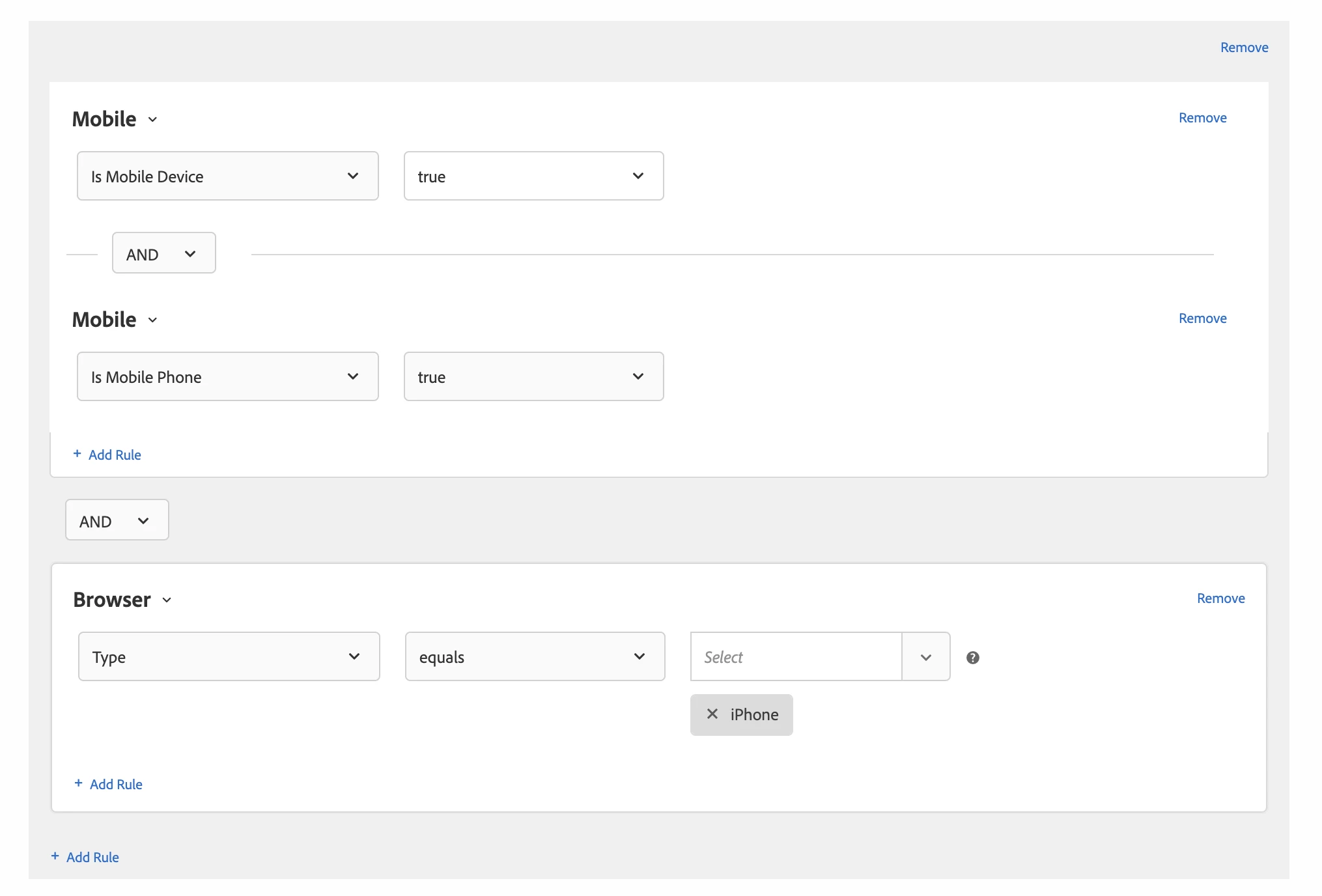
2) Why are "iPhone" and "iPad" listed as types of browsers? What happens when "iPhone" is selected along with "Safari" and "Chrome"?


This post is no longer active and is closed to new replies. Need help? Start a new post to ask your question.
Best answer by MihneaD

@traviss1234 


1.) What is the difference between a "mobile device" and "mobile phone"?

mobile device = iPad, Surface Pro
mobile phone = iPhone, Pixel 4

2.) Why are "iPhone" and "iPad" listed as types of browsers? What happens when "iPhone" is selected along with "Safari" and "Chrome"?

Is it truly available as a pre-recorded option or are you typing it in? I agree that it doesn't make sense in that context. I would stick to the known browsers.

3.) Answer to the implied question. If you are trying to build a mobile audience that includes phones and tablets that come on browser Chrome it would look like this:


Mobile is Mobile Device True
AND
mobile is Mobile Phone True
AND
Browser equals Google Chrome

Mihnea Docea | Technical Support Consultant | Customer Experience | Adobe | 1 (800) 497-0335

2 replies

MihneaD
Adobe Employee
MihneaDAdobe EmployeeAccepted solution
Adobe Employee
February 25, 2020

@traviss1234 


1.) What is the difference between a "mobile device" and "mobile phone"?

mobile device = iPad, Surface Pro
mobile phone = iPhone, Pixel 4

2.) Why are "iPhone" and "iPad" listed as types of browsers? What happens when "iPhone" is selected along with "Safari" and "Chrome"?

Is it truly available as a pre-recorded option or are you typing it in? I agree that it doesn't make sense in that context. I would stick to the known browsers.

3.) Answer to the implied question. If you are trying to build a mobile audience that includes phones and tablets that come on browser Chrome it would look like this:


Mobile is Mobile Device True
AND
mobile is Mobile Phone True
AND
Browser equals Google Chrome

Mihnea Docea | Technical Support Consultant | Customer Experience | Adobe | 1 (800) 497-0335
Level 2
February 25, 2020

@mihneadThanks for your help, and for guessing my implied question. 🙂


Regarding #2, yes those device names show up in the browser Type dropdown. I plan to avoid using them in the future, but here's a screenshot in case you're curious what I'm seeing.

tszat
Level 3
October 12, 2020

@mihnead I'm curious about this too. Are you saying mobile phones are not inclusive of the 'mobile device' setting? I assumed mobile device included phones and tablets. Based on your response, it sounds like you were saying to get phones and tablets you would have to use IS mobile device + mobile phone?

March 21, 2024

Hi 
Just confused about this audience for mobile app, Need to assign audience only for the mobile apps and which should not include the mobile browsers..can someone help me on this