Only show content once per a customer | Community
Skip to main content
Level 2
May 3, 2022
Solved

Only show content once per a customer

  • May 3, 2022
  • 3 replies
  • 4308 views

We are setting up some simple experiences controlled by Adobe Target.  However some of it we want to only show once to each customer (for example, there is a new feature available and we want to highlight it to the customer, but only once).  What is the recommended approach to achieving this?

This post is no longer active and is closed to new replies. Need help? Start a new post to ask your question.
Best answer by Rajneesh_Gautam_

@jchabot86  - if you are trying to achieve profile sync across multiple devices then consider using mbox3rdPartyId (https://experienceleague.adobe.com/docs/target/using/audiences/visitor-profiles/3rd-party-id.html?lang=en


Step 1: Pass the user-id of your internal user as mbox parameter "mbox3rdPartyId" to create a cross-device profile. Note that the user will have to login on every device they use to enable cross-device syncing. 


Step 2: Pass a profile parameter corresponding to the experience being delivered. I have given an example using trackEvent below.

adobe.target.trackEvent({
"mbox": "target-global-mbox",
"params": {
"mbox3rdPartyId": "<your-user-id>",

"profile.my_exp_viewed": "true"
}
}); 


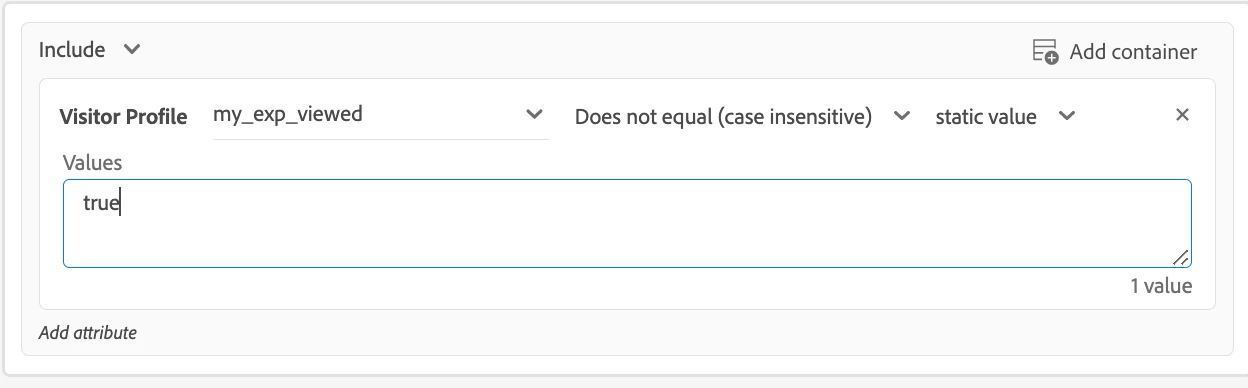
Step 3: Create an audience using this profile-attribute so that the experience is only shown when the value is not true
Hope this helps,

Rajneesh

3 replies

Level 4
May 4, 2022

Option 1: Easiest option is to use "Recency and Frequency" (when you have audience manager) 
See the documents 
Option 2: Use of profile parameters (when you don't have Audience manager)

You can use this example setup 


Thanks

Abu

jchabot86Author
Level 2
May 6, 2022

How about logged in users across multiple devices?  Are we able to count impressions per a user ID (our internal user ID)?

May 6, 2022

in our company website we are using "Recency and Frequency".

jchabot86Author
Level 2
May 6, 2022

Thank you for the replies...currently we don't have Audience Manager so will have to look into using profile scripts

Rajneesh_Gautam_
Community Advisor
Rajneesh_Gautam_Community AdvisorAccepted solution
Community Advisor
May 7, 2022

@jchabot86  - if you are trying to achieve profile sync across multiple devices then consider using mbox3rdPartyId (https://experienceleague.adobe.com/docs/target/using/audiences/visitor-profiles/3rd-party-id.html?lang=en


Step 1: Pass the user-id of your internal user as mbox parameter "mbox3rdPartyId" to create a cross-device profile. Note that the user will have to login on every device they use to enable cross-device syncing. 


Step 2: Pass a profile parameter corresponding to the experience being delivered. I have given an example using trackEvent below.

adobe.target.trackEvent({
"mbox": "target-global-mbox",
"params": {
"mbox3rdPartyId": "<your-user-id>",

"profile.my_exp_viewed": "true"
}
}); 


Step 3: Create an audience using this profile-attribute so that the experience is only shown when the value is not true

Hope this helps,

Rajneesh

jchabot86Author
Level 2
July 21, 2022

Thanks!  This is very helpful.  Is there a way to get the user profile attributes using adobe target sdk?