Esta conversación ha sido bloqueada debido a la inactividad. Cree una nueva publicación.
Nivel 1
Nivel 2
Iniciar sesión en la comunidad
Iniciar sesión para ver todas las insignias
Esta conversación ha sido bloqueada debido a la inactividad. Cree una nueva publicación.
Hi Dears, I write to you because I haven't found any documents that can help me. In practice, I have a table where I insert the positions added by SAP Cloud for customer. Once I generate the summary, however, I need to hide some specific positions (the common factor between these items is that they are not billable, so they should not be in the summary) do u know if it is possibile?
Thanks
Kind regards
¡Resuelto! Ir a solución.
Vistas
Respuestas
Total de me gusta
You can add a calculate script to the rows, that checks the value of a specific cell and sets the presence of the row.
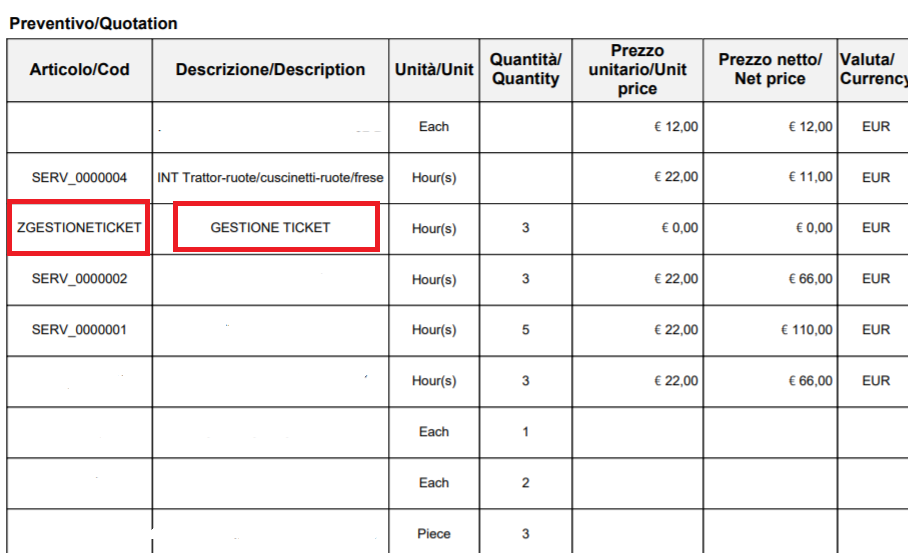
this.presence = this.Description.rawValue === "GESTIONE TICKET" ? "hidden" : "visible";
Vistas
Respuestas
Total de me gusta
Hi,
If you table has a row that repeats you can use something like this code;
Table1.resolveNode("Row1[5]").presence = "hidden";
Which will hide the 6th row.
Regards
Bruce
Vistas
Respuestas
Total de me gusta
Maybe I need to be clearer. I don't have to hide a specific row but I have to hide the itemsthat have specific information in some columns (like cod and description).
This is my table.I have to hide the items that have a specif Cod or Description.
Vistas
Respuestas
Total de me gusta
You can add a calculate script to the rows, that checks the value of a specific cell and sets the presence of the row.
this.presence = this.Description.rawValue === "GESTIONE TICKET" ? "hidden" : "visible";
Vistas
Respuestas
Total de me gusta
Thanks Radzmar. Now it works well !!!
Vistas
Respuestas
Total de me gusta
Vistas
me gusta
Respuestas
Vistas
me gusta
Respuestas
Vistas
me gusta
Respuestas