Problem with Profile link / button under TouchUI user avatar - top right of screen - broken link / button broken - link checker 'invalid link' complaint | Community
Skip to main content
this-that-the-otter
Level 4
June 5, 2022

Problem with Profile link / button under TouchUI user avatar - top right of screen - broken link / button broken - link checker 'invalid link' complaint

  • June 5, 2022
  • 2 replies
  • 1205 views

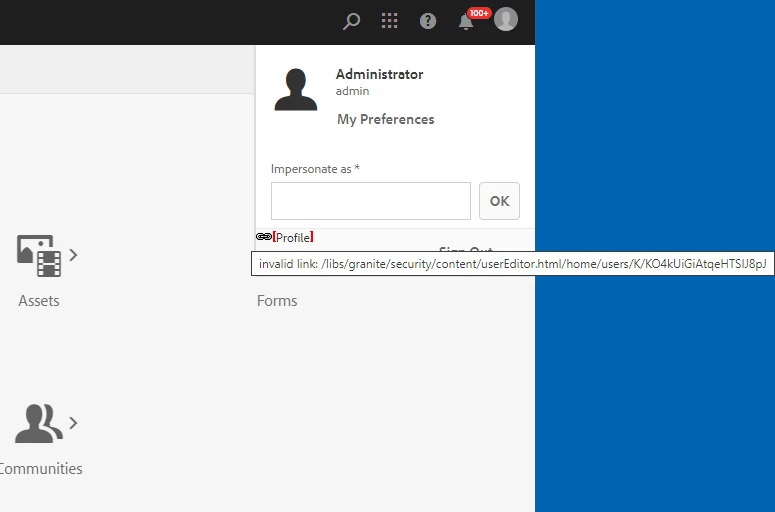
I have an AEM 6.3 to 6.5.13.0 upgraded instance that's showing a broken link for the profile button under the user's avatar (at top right of TouchUI screen).

The link shown in the hover text is invalid - it's missing v2 and the case of userEditor.html also causes the link to break and no Profile button to appear -


 i.e. - /libs/granite/security/content/userEditor.html/home/users/x/yy

but this link works:

/libs/granite/security/content/v2/usereditor.html/home/users/x/yy

- note v2 and case change of usereditor.html. I noticed the correct URL format when viewing users in /security/users.html.


This happens for all users. In this case admin logged in via:

/libs/granite/core/content/login.html

but also happens when users login via SAML 2.0.


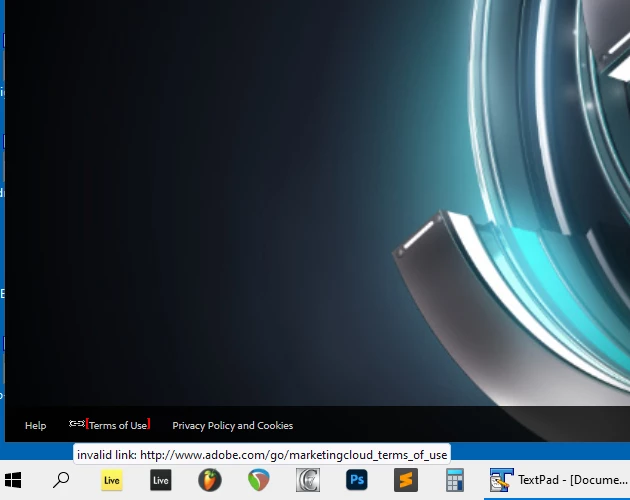
I also see a broken Adobe link on the login screen.

I know it's possible to turn off the link checker, but I'd like to resolve potential issues first.


Thanks for any help!


This post is no longer active and is closed to new replies. Need help? Start a new post to ask your question.

2 replies

SantoshSai
Community Advisor
Community Advisor
June 5, 2022

Hi @this-that-the-otter ,


Please check this links which gives steps how to mark link as a valid https://experienceleague.adobe.com/docs/experience-cloud-kcs/kbarticles/KA-16563.html?lang=en


Hope that helps you!


Regards,

Santosh

Santosh Sai
this-that-the-otter
Level 4
June 5, 2022

Hi @santoshsai,

Thanks for the info. However, I mentioned I do not want to turn off the link checker just yet.

I.e. - "I know it's possible to turn off the link checker, but I'd like to resolve potential issues first."

I want to resolve the underlying issue.

I assume if I turned off the link checker the link wouldn't appear broken but it would still be broken.

It seems like something is fundamentally off. I want to resolve any issue before turning off the link checker.


Thanks for any help!


arunpatidar
Community Advisor
Community Advisor
June 6, 2022

Hi,

The issue could be that Network/dispatcher may be blocking this request from AEM/Linkchecker and links are resolved as broken.


Arun Patidar
this-that-the-otter
Level 4
June 6, 2022

I worked with Adobe support and the issue is now resolved! Our parent pom.xml referenced uber-jar 6.5.0.

Updating it to match the cfp we're on (i.e. cfp13), as well as removing the <classifier>apis</classifier> block from the uber-jar definition in our parent pom.xml, seems to have resolved the issue!

The issue did not affect our Dev and QA instances which took a slightly different upgrade path (i.e. 6.3 to 6.5 --> 6.5 to 6.15.11 --> 6.5.11 to 6.5.12) from this instance which went from 6.3 to 6.5 and 6.5 to 6.5.13. The Dev & QA instances did not have this issue though used uber-jar 6.5.0 with <classifier>apis</classifier> block present in parent pom.xml to build our code.

I'm not sure if the upgrade path spared Dev & QA the issue, or if there is something different in cfp13 that necessitates using the matching uber-jar - which apparently is recommended or required?