Question
Nested Multifield is not working in aem 6.5
Hi,
I have created one header banner with button component here button is .hidden component so i can use when ever i required button component just i use it. however I am facing an issue
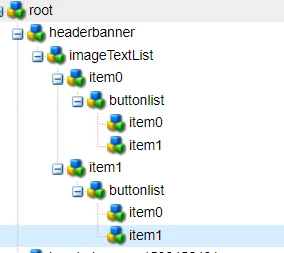
here we have button list if author in first multifield in item0 inside that button we have some drop down values if i select URL
one URL path field will be visible and next authoring next multifield inside that we have again button multifield if author now anchor one anchor field will open but issue is that which i author in last anchor is author field is getting opened in first multifield.
(function(document, $) {
    "use strict";
    // when dialog gets injected
    $(document).on("foundation-contentloaded", function(e) {
        // if there is already an inital value make sure the according target element becomes visible
        showHideHandler($(".cq-dialog-dropdown-showhide-multi", e.target));
        showHideContHandler($(".cq-dialog-dropdown-height-selection", e.target));
    });

    function showHideContHandler(el) {
        el.each(function(i, element) {
            Coral.commons.ready(element, function(component) {
                showHideCont(component, element);
                component.on("change", function() {
                    showHideCont(component, element);
                });
            });
        })
    }

    $(document).on("selected", ".cq-dialog-dropdown-showhide-multi", function(e) {
        showHideHandler($(this));
    });

    $(document).on("click", "button[coral-multifield-add]", function(e) {
        showHideHandler($(".cq-dialog-dropdown-showhide-multi"));
        showHideContHandler($(".cq-dialog-dropdown-height-selection"));

    });

    function showHideHandler(el) {
        el.each(function(i, element) {
            if ($(element).is("coral-select")) {
                // handle Coral3 base drop-down
                Coral.commons.ready(element, function(component) {
                    showHide(component, element);
                    component.on("change", function() {
                        showHide(component, element);
                    });
                });
            } else {
                // handle Coral2 based drop-down
                var component = $(element).data("select");
                if (component) {
                    showHide(component, element);
                }
            }
        })
    }

    function showHide(component, element) {
        // get the selector to find the target elements. its stored as data-.. attribute
        //var target = $(element).data("cqDialogDropdownShowhideTarget");
        var target = $(element).data("cq-dialog-dropdown-showhide-target");
        var $target = $(target);
        var elementIndex = $(element).closest('coral-multifield-item').index();

        if (target) {
            var value;
            if (component.value) {
                value = component.value;
            } else {
                value = component.getValue();
            }


            $(element).closest('coral-multifield-item').find(target).each(function(index) {
                var tarIndex = $(this).closest('coral-multifield-item').index();
                if (elementIndex == tarIndex) {
                    $(this).not(".hide").addClass("hide");

                    $(this).filter(function() {
                        return $(this).closest('.showhidetargetmulti').data('showhidetargetmultivalue').replace(/ /g, '').split(',').includes(value);
                    }).removeClass("hide");

                    // $(this).filter("[data-showhidetargetmultivalue='" + value + "']").parent().removeClass("hide");
                }
            });

        }


    }

    function showHideCont(component, element) {
        // get the selector to find the target elements. its stored as data-.. attribute
        var target = $(element).data("cqDialogDropdownShowhideTarget");
        var $target = $(target);

        if (target) {
            var value;

            if (typeof component.value !== "undefined") {
                value = component.value;

            } else if (typeof component.getValue === "function") {
                value = component.getValue();
            }

            if (value === 'm-hbanner--small') {
                $target.each(function() {
                    $(this).not(".hide").addClass("hide");
                    var label = $(this).attr("aria-labelledby").split(" ")[0];
                    var desc = $(this).attr("aria-labelledby").split(" ")[1];
                    var labelEl = document.getElementById(label);
                    var descEl = document.querySelectorAll('[aria-describedby="' + desc + '"]');
                    $(labelEl).not(".hide").addClass("hide");
                    $(descEl).not(".hide").addClass("hide");
                });
            } else {
                $target.each(function() {
                    $(this).removeClass("hide");
                    var label = $(this).attr("aria-labelledby").split(" ")[0];
                    var desc = $(this).attr("aria-labelledby").split(" ")[1];
                    var labelEl = document.getElementById(label);
                    var descEl = document.querySelectorAll('[aria-describedby="' + desc + '"]');
                    $(labelEl).removeClass("hide");
                    $(descEl).removeClass("hide");

                });
            }
        }
    }


})(document, Granite.$);
Please can any help me. I am stuck on this.