
In AEM ,how to add color to the text component | Community
Skip to main content
vinnieyb
June 8, 2023
Solved

In AEM ,how to add color to the text component

  • June 8, 2023
  • 6 replies
  • 6715 views

Hello everyone,I am a beginner in AEM. I want to know how to add color to the text component.Hope to get replies from you guys

This post is no longer active and is closed to new replies. Need help? Start a new post to ask your question.
Best answer by Sady_Rifat

Hello @vinnieyb ,

The best way to add color to the text component you can add color-picker widget. The output will be like this if you want to add text color.
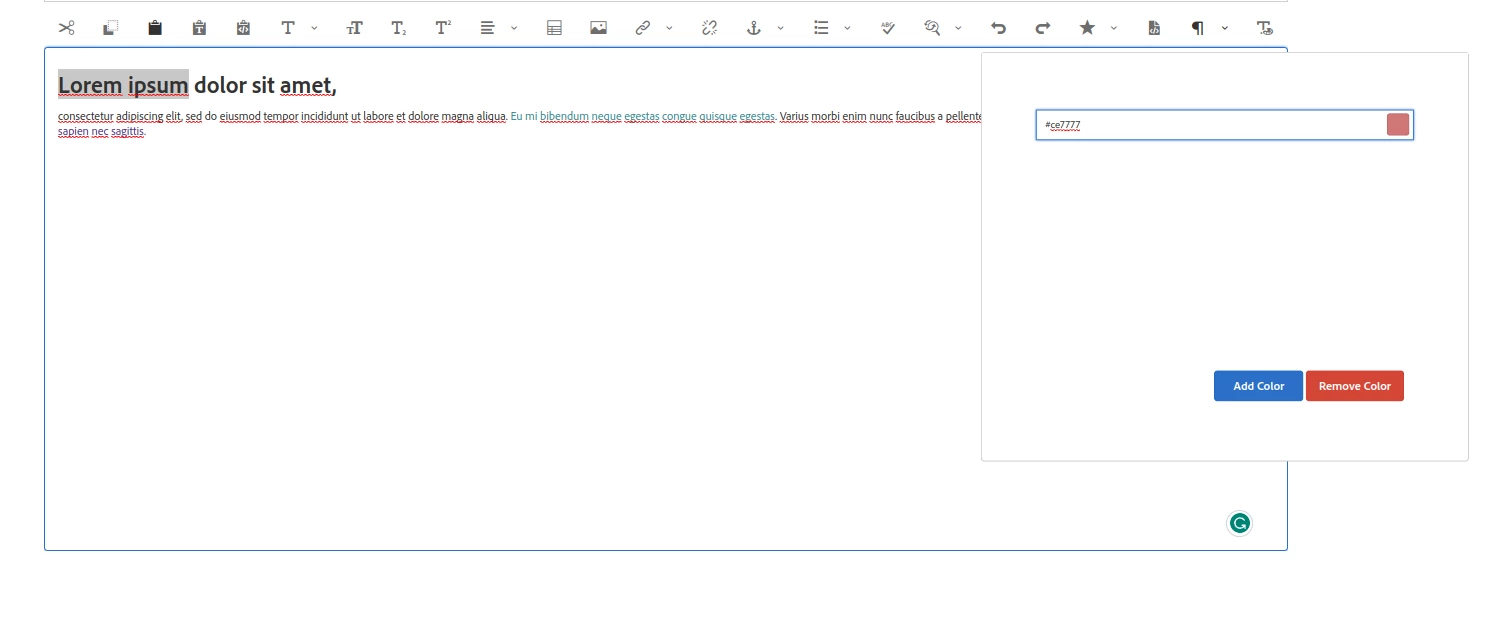

 

To add this you can follow this article: http://experience-aem.blogspot.com/2019/04/aem-65-touch-ui-rte-rich-text-editor-dialog-color-picker-plugin.html 

If you face any trouble in time of implement this, follow this thread: https://experienceleaguecommunities.adobe.com/t5/adobe-experience-manager/rte-color-picker-not-working/m-p/381444 


Hope it will help you.

Thanks


6 replies

Umesh_Thakur
Community Advisor
Community Advisor
June 8, 2023

what do you mean by adding colour to the text component?

if you mean adding one text colour option to the dialog, you can simply add dropdown with colour option(or any type of filed suitable to your requirement) based on the value passed thru this new field apply css class for the same.

normally people use CSS class name this field.

Hope this helps

Umesh Thakur 

Community Advisor
June 8, 2023

@vinnieyb , It is worth exploring Style System to achieve this.
Doc: Style System | Adobe Experience Manager

aanchal-sikka
Community Advisor
Community Advisor
June 8, 2023

Hello @vinnieyb 


As @shubhanshusi2 and @umesh_thakur  suggested, we should ideally use Style System (css classes) for controlling UI properties(text color, font size etc).


Reasons:

1. Consistency: By using a style system, you can establish consistent design patterns and ensure that text elements across your AEM pages have a unified look and feel. This helps in maintaining brand consistency.

2. Ease of maintenance: When you define styles for the Text component, you can easily update and modify them in a centralized manner. This means that if you want to change the color or any other visual property of a text element, you can do so by updating the corresponding style rule, and the changes will be reflected automatically wherever that style is used. 

3. Separation of concerns: By using the style system, you separate the visual aspects of text styling from the content itself. This separation of concerns allows content authors to focus on creating and managing the content without worrying about the visual presentation. Designers can define the styles independently, ensuring a clear separation between content and presentation layers.


If for some reason, you still need to add colors to components, You might want to control, which colors are allowed. You can use a dropdown or Swatch pallet. Please have a look at following posts:

https://levelup.gitconnected.com/aem-creating-a-color-picker-with-a-predefined-palette-c4a03c1eddc5 

http://experience-aem.blogspot.com/2019/04/aem-65-touch-ui-rte-rich-text-editor-dialog-color-picker-plugin.html 

https://jdhrnndz.wordpress.com/2016/06/27/color-picker-in-aem-component-dialog/ 


I hope it helps

Aanchal Sikka
Sady_Rifat
Community Advisor
Sady_RifatCommunity AdvisorAccepted solution
Community Advisor
June 8, 2023

Hello @vinnieyb ,

The best way to add color to the text component you can add color-picker widget. The output will be like this if you want to add text color.


To add this you can follow this article: http://experience-aem.blogspot.com/2019/04/aem-65-touch-ui-rte-rich-text-editor-dialog-color-picker-plugin.html 

If you face any trouble in time of implement this, follow this thread: https://experienceleaguecommunities.adobe.com/t5/adobe-experience-manager/rte-color-picker-not-working/m-p/381444 


Hope it will help you.

Thanks


ManviSharma
Adobe Employee
Adobe Employee
June 8, 2023

Hi,


To add color to a text component in AEM:

  1. Identify the CSS class or ID of the text component.
  2. Define a CSS style for the text color using a class or inline style.
  3. Apply the style to the text component in the markup or dialog.
Jagadeesh_Prakash
Community Advisor
Community Advisor
June 8, 2023

@vinnieyb  have this custom plugin sample which adds for both inline and dialog http://experience-aem.blogspot.com/2017/06/aem-63-touch-ui-rte-rich-text-editor-color-picker-plugin-inplace-dialog-edit.html


and also u can have a look at below link to understand to try manually overlaying the StyleTextEditor.js file under /apps  -


https://experienceleaguecommunities.adobe.com/t5/adobe-experience-manager/configuring-rte-plugin-for-content-fragment-editor/td-p/230868