Solved
create component with subcomponent and display it correctly in the content tree
I have created a component and inside it have a text and a multifield with text. in the .html it shows the text components as a title component and in this way allows users a more personalized management once it is displayed in edit mode if they wish. this is the .xml of my component:
<?xml version="1.0" encoding="UTF-8"?>
<jcr:root xmlns:sling="http://sling.apache.org/jcr/sling/1.0" xmlns:cq="http://www.day.com/jcr/cq/1.0" xmlns:jcr="http://www.jcp.org/jcr/1.0"
    cq:isContainer="{Boolean}true"
    jcr:primaryType="cq:Component"
    jcr:title="test"
    sling:resourceSuperType="foundation/components/parbase"
    componentGroup="WKND.Content"/>
<?xml version="1.0" encoding="UTF-8"?>
<jcr:root xmlns:sling="http://sling.apache.org/jcr/sling/1.0" xmlns:cq="http://www.day.com/jcr/cq/1.0" xmlns:jcr="http://www.jcp.org/jcr/1.0" xmlns:nt="http://www.jcp.org/jcr/nt/1.0"
    jcr:primaryType="nt:unstructured"
    jcr:title="Menu"
    sling:resourceType="cq/gui/components/authoring/dialog">
    <content
        jcr:primaryType="nt:unstructured"
        sling:resourceType="granite/ui/components/foundation/container">
        <items jcr:primaryType="nt:unstructured">
            <container
                jcr:primaryType="nt:unstructured"
                sling:resourceType="granite/ui/components/foundation/container">
                <items jcr:primaryType="nt:unstructured">
                    <externTitle
                        jcr:primaryType="nt:unstructured"
                        sling:resourceType="granite/ui/components/foundation/form/textfield"
                        fieldLabel="Extern Title"
                        name="./title/jcr:title"/>
                    <nestedTitle
                        jcr:primaryType="nt:unstructured"
                        sling:resourceType="granite/ui/components/coral/foundation/form/multifield"
                        composite="{Boolean}true">
                        <field
                            jcr:primaryType="nt:unstructured"
                            sling:resourceType="granite/ui/components/coral/foundation/form/fieldset"
                            name="./internTitles">
                            <items jcr:primaryType="nt:unstructured">
                                <container
                                    jcr:primaryType="nt:unstructured"
                                    jcr:title="Titles"
                                    sling:resourceType="granite/ui/components/foundation/container">
                                    <layout
                                        jcr:primaryType="nt:unstructured"
                                        sling:resourceType="granite/ui/components/foundation/layouts/collapsible"/>
                                    <items jcr:primaryType="nt:unstructured">
                                        <internTitle
                                            jcr:primaryType="nt:unstructured"
                                            sling:resourceType="granite/ui/components/foundation/form/textfield"
                                            fieldLabel="Intern title"
                                            name="./title/jcr:title"/>
                                    </items>
                                </container>
                            </items>
                        </field>
                    </nestedTitle>
                </items>
            </container>
        </items>
    </content>
</jcr:root>
this is my html
Hello
<div data-sly-use.placeholderTemplate="core/wcm/components/commons/v1/templates.html">
	<div data-sly-resource="${'title' @ resourceType='wknd/components/content/title'}">
	</div>
	<div data-sly-resource="${'internTitles/item{0}/title' @ format=0,resourceType='wknd/components/content/title'}">
	</div>
	<div data-sly-resource="${'internTitles/item{0}/title' @ format=1,resourceType='wknd/components/content/title'}">
	</div>
</div>
This code is adapted and simplified to show the problem, so it only shows two nested titles and their main title.
Here is the content tree and what I want.
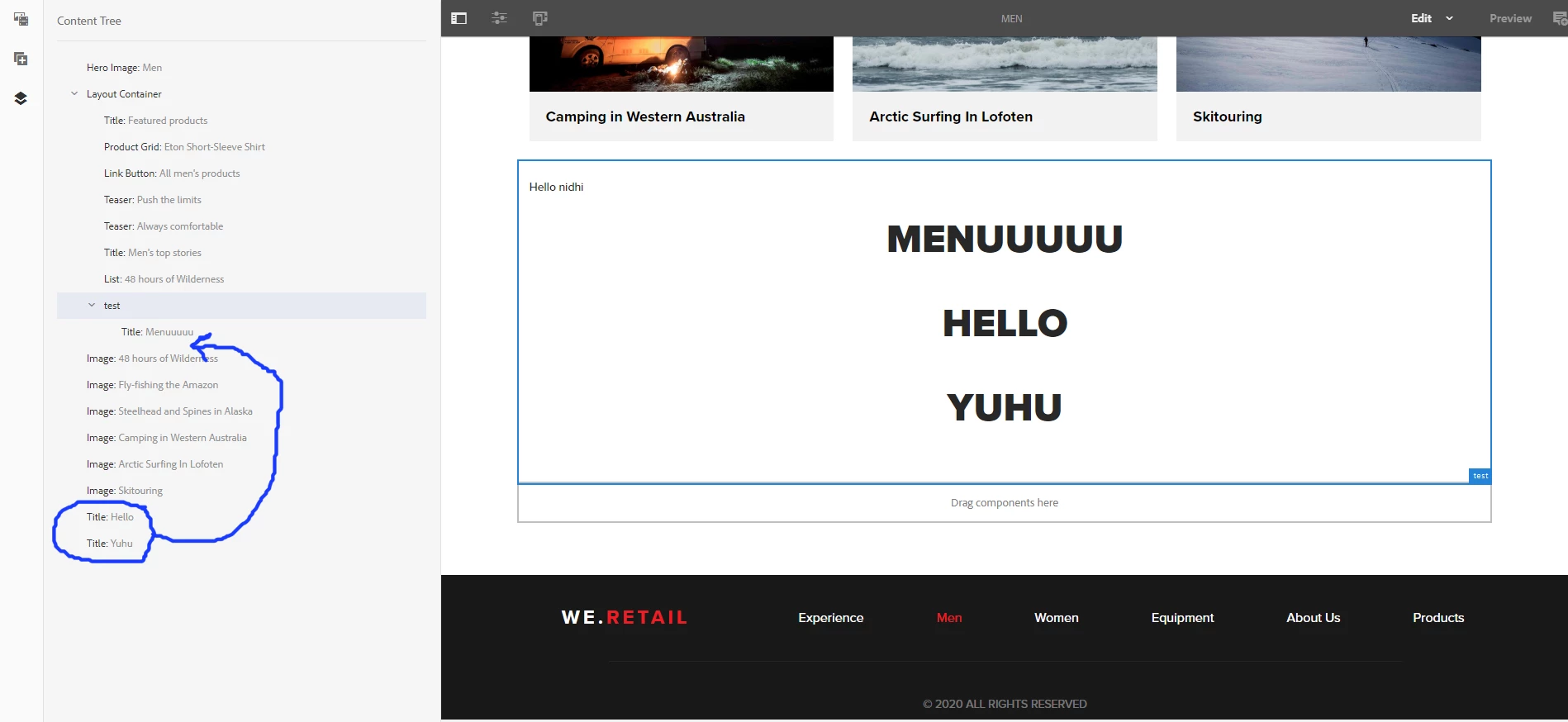
once displayed, the title components can be treated like a title component, but they are outside their main component in the content tree. I hope my problem is understood, thanks for the answers