
Replacement for Crypto library | Community
Skip to main content
Milan_Vucetic
Level 9
December 4, 2019
Solved

Replacement for Crypto library

  • December 4, 2019
  • 1 reply
  • 2038 views

Hi everyone,

I am looking for similar function on AC for Crypto library.

So, this piece of code should be adapted/translated to run on AC Classic:

...

const crypto = require('crypto');

sig = crypto.createHmac('sha1', appsecret).update(text).digest('bin');

...

I have found this AC function below but not sure is that good replacement.
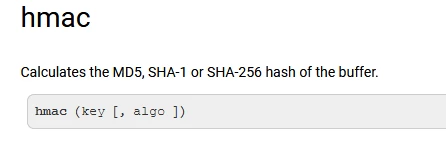
Any suggestion?

Regards,

Milan
This post is no longer active and is closed to new replies. Need help? Start a new post to ask your question.
Best answer by Florian_Courgey

Hi,

You may use hmac as follow (hmacStr is deprecated):


var appsecret = "SECRET" var text = "hello" //var sig = hmacStr(text, appsecret, 'SHA1'); // @2371202 var mbKey = new MemoryBuffer(); // init memory buffer for the key mbKey.fromString(appsecret, "utf-8"); // convert from string var mbSignature = new MemoryBuffer(); // init memory buffer for the signature mbSignature.fromString(text, "utf-8"); // convert from string var sig = mbSignature.hmac(mbKey, 'SHA1'); // compute SHA-1 HMAC with key logInfo('text:', text); // "hello" logInfo('sig:', sig); // rAqO5eBQ+Z8pPOhAPsaztYNsKxQ=


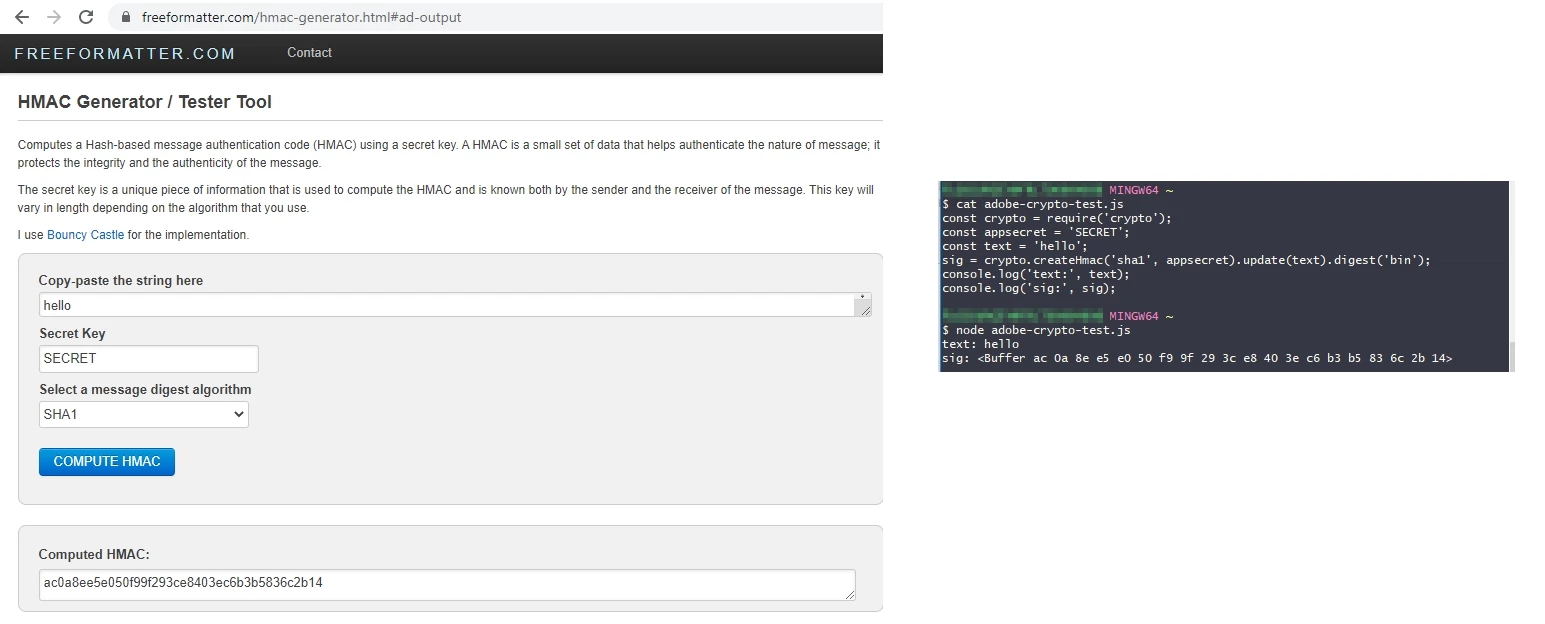
However, it's not the digest in hexadecimal format as in nodeJS:


To do get the hex hmac, you have to use an external library, like jshashes:

loadLibrary('vendor:jshashes_1.0.8'); var appsecret = "SECRET"; var text = "hello"; var SHA1 = new Hashes.SHA1; logInfo('SHA1: ' + SHA1.hex_hmac(appsecret, text)); // "SHA1: ac0a8ee5e050f99f293ce8403ec6b3b5836c2b14"

Follow this link to import a js library in adobe campaign.

Best

Florian

1 reply

Florian_Courgey
Florian_CourgeyAccepted solution
Level 4
September 29, 2020

Hi,

You may use hmac as follow (hmacStr is deprecated):


var appsecret = "SECRET" var text = "hello" //var sig = hmacStr(text, appsecret, 'SHA1'); // @2371202 var mbKey = new MemoryBuffer(); // init memory buffer for the key mbKey.fromString(appsecret, "utf-8"); // convert from string var mbSignature = new MemoryBuffer(); // init memory buffer for the signature mbSignature.fromString(text, "utf-8"); // convert from string var sig = mbSignature.hmac(mbKey, 'SHA1'); // compute SHA-1 HMAC with key logInfo('text:', text); // "hello" logInfo('sig:', sig); // rAqO5eBQ+Z8pPOhAPsaztYNsKxQ=


However, it's not the digest in hexadecimal format as in nodeJS:


To do get the hex hmac, you have to use an external library, like jshashes:

loadLibrary('vendor:jshashes_1.0.8'); var appsecret = "SECRET"; var text = "hello"; var SHA1 = new Hashes.SHA1; logInfo('SHA1: ' + SHA1.hex_hmac(appsecret, text)); // "SHA1: ac0a8ee5e050f99f293ce8403ec6b3b5836c2b14"

Follow this link to import a js library in adobe campaign.

Best

Florian