Count URL clicks on specific label for multiple deliveries (for a report) | Adobe Higher Education
Skip to main content
January 8, 2025
Respondido

Count URL clicks on specific label for multiple deliveries (for a report)

  • January 8, 2025
  • 1 resposta
  • 608 Visualizações

Hi all, 


I implemented a workflow that queries several KPIs from past deliveries (like delivery date, number of recipients, open rate etc) and creates a report, which is uploaded to an SFTP server.


As we have 2 different unsubscription links in our newsletters, the number of optouts found in ACC delivery indicators is not sufficient (it fetches the sum of both links). I would like to add the number of clicks (and derived click rates) per each of the links to the report - and that's where I struggle.


The label for the links is always the same, so I thought I can just add a field that counts the clicks per URL label for each of the deliveries, but I don't know how to fetch the data. 
I might need some count-function with a condition to only count the clicks on the URL with the according label, but don't know how to integrate it into my workflow.


(also I am not particularly skilled with JavaScript, which might have limited my efforts)


Grateful for any ideas from the crowd, also let me know if I more information is required.

Cheers!
Melhor resposta por ParthaSarathy

Hi @carolin_ru ,

Create a new Query > Targeting and filtering dimension as TrackingLogRcp > Query as below,

[url/@type] equal to opt-out

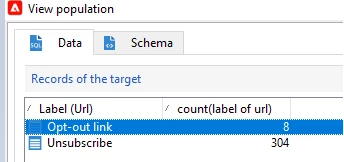
In Query > Add data > add below 2 columns,

[url/@label]

count([url/@label])

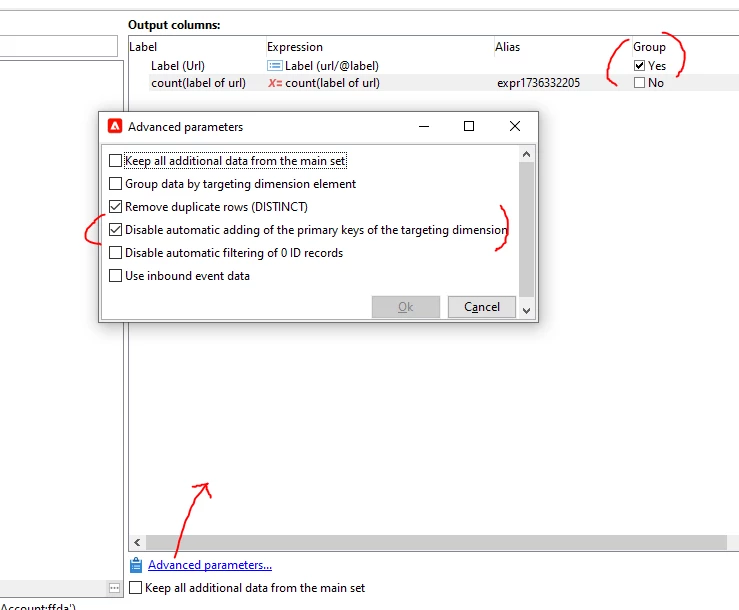
and select Group check box for [url/@label]

Then, Advanced parameter > check 'Disable automatic adding of the primary key' and Run the workflow

1 Resposta

ParthaSarathy
Community Advisor
Community Advisor
January 8, 2025

Hi @carolin_ru ,

Create a new Query > Targeting and filtering dimension as TrackingLogRcp > Query as below,

[url/@type] equal to opt-out

In Query > Add data > add below 2 columns,

[url/@label]

count([url/@label])

and select Group check box for [url/@label]

Then, Advanced parameter > check 'Disable automatic adding of the primary key' and Run the workflow

~  ParthaSarathy S~  Click here to join ADOBE CAMPAIGN USER GROUP for Quarterly In-person | Hybrid | Virtual Meetups
January 8, 2025

Thank you so much, great description, problem solved! 😃