
Message Center logon to get session token | Community
Skip to main content
RodneyLewis
Level 2
October 22, 2020
Solved

Message Center logon to get session token

  • October 22, 2020
  • 3 replies
  • 8082 views

Hello, Thanks in advance for your help. I've been using Campaign classic for 1 year for regular email but have never used Message Center.


I would like to use message center to send a real time "Thank you" email on our website. Is this possible? (User enters email address on a form and instantly receives an email with special instructions.)


I'm following the help article but cannot create the session token or get the mc credentials to work. I also don't know when to use the rt server vs the regular campagin url. The documentation mentions using http://hostname/nl/jsp/schemawsdl.jsp?schema=nms:rtEvent for accessing the schema and other articles on this forum mention using https://hostname/nl/jsp/soaprouter.jsp.


The documentation link I'm using is here: https://docs.adobe.com/content/help/en/campaign-classic/using/transactional-messaging/introduction/event-description.html

Also using this link: https://docs.adobe.com/content/help/en/campaign-classic/using/configuring-campaign-classic/api/web-service-calls.html


I believe I've followed all steps but still having trouble with.


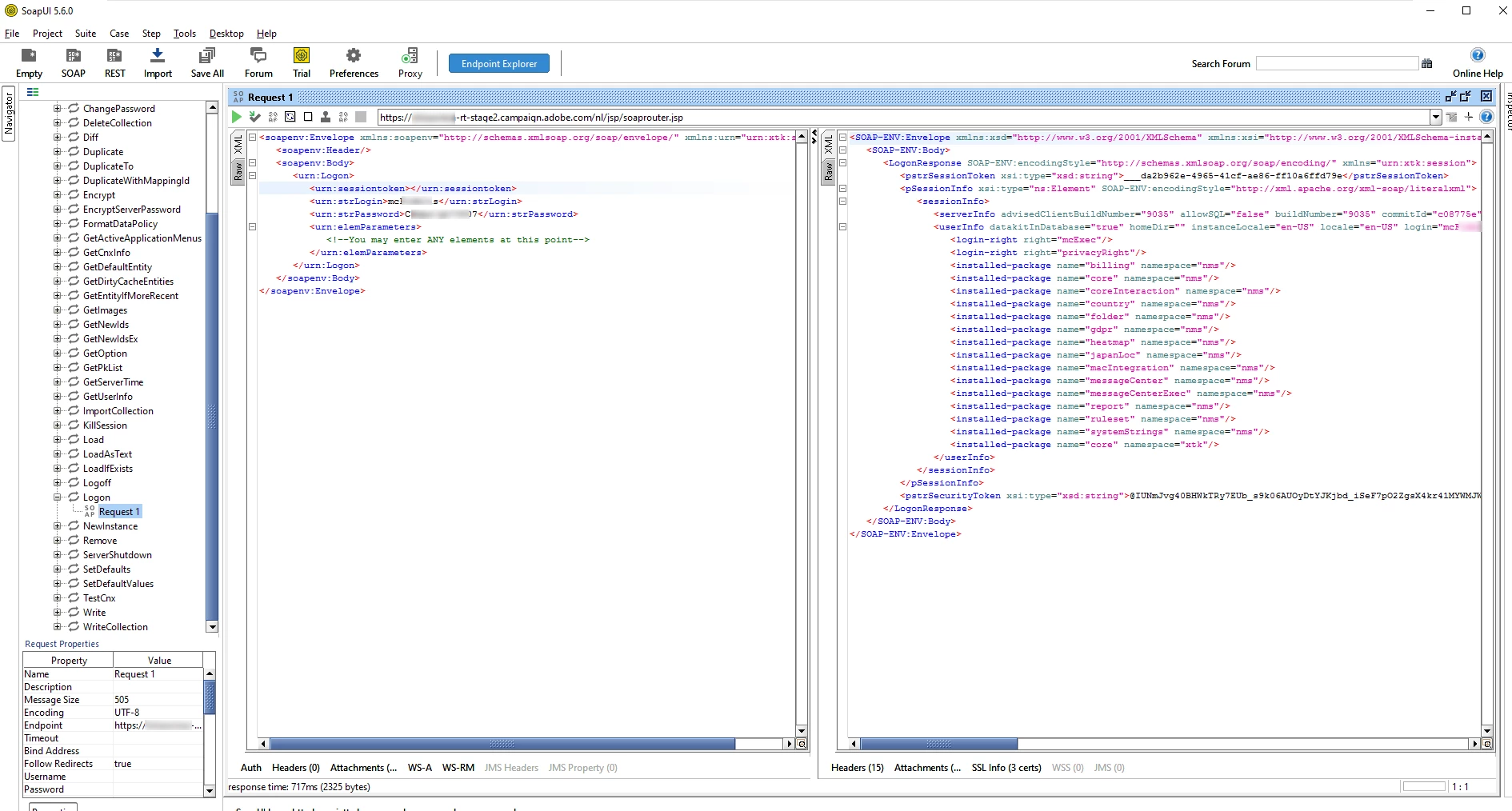
1: "To retrieve the session token, perform a logon SOAP call, then a get token followed by a logoff."

Q: Is there a sample or snipper for how to login and actually retrieve the token?


2: Using Wizdler or SOAPUI, I can POST using my ACC credentials instead of the MC/xxxx password provided by support. (They provided mc creds and tracking creds and neither worked here.)

Q: How can I use this in HTML on my website (already whitelisted)? Is there a sample code for reaching the ACC API from another website form?
This post is no longer active and is closed to new replies. Need help? Start a new post to ask your question.
Best answer by DavidKangni

Hi Rodney,


You need to get the xtk:session WSDL too.


URL syntax for generating the session and rtEvent WSDL's.

  1. Generate session token WSDL http://hostname/nl/jsp/schemawsdl.jsp?schema=xtk:session
  2. Generate rtEvent WSDL http://hostname/nl/jsp/schemawsdl.jsp?schema=nms:rtEvent

Then you can use the session WSDL first to request the logon method

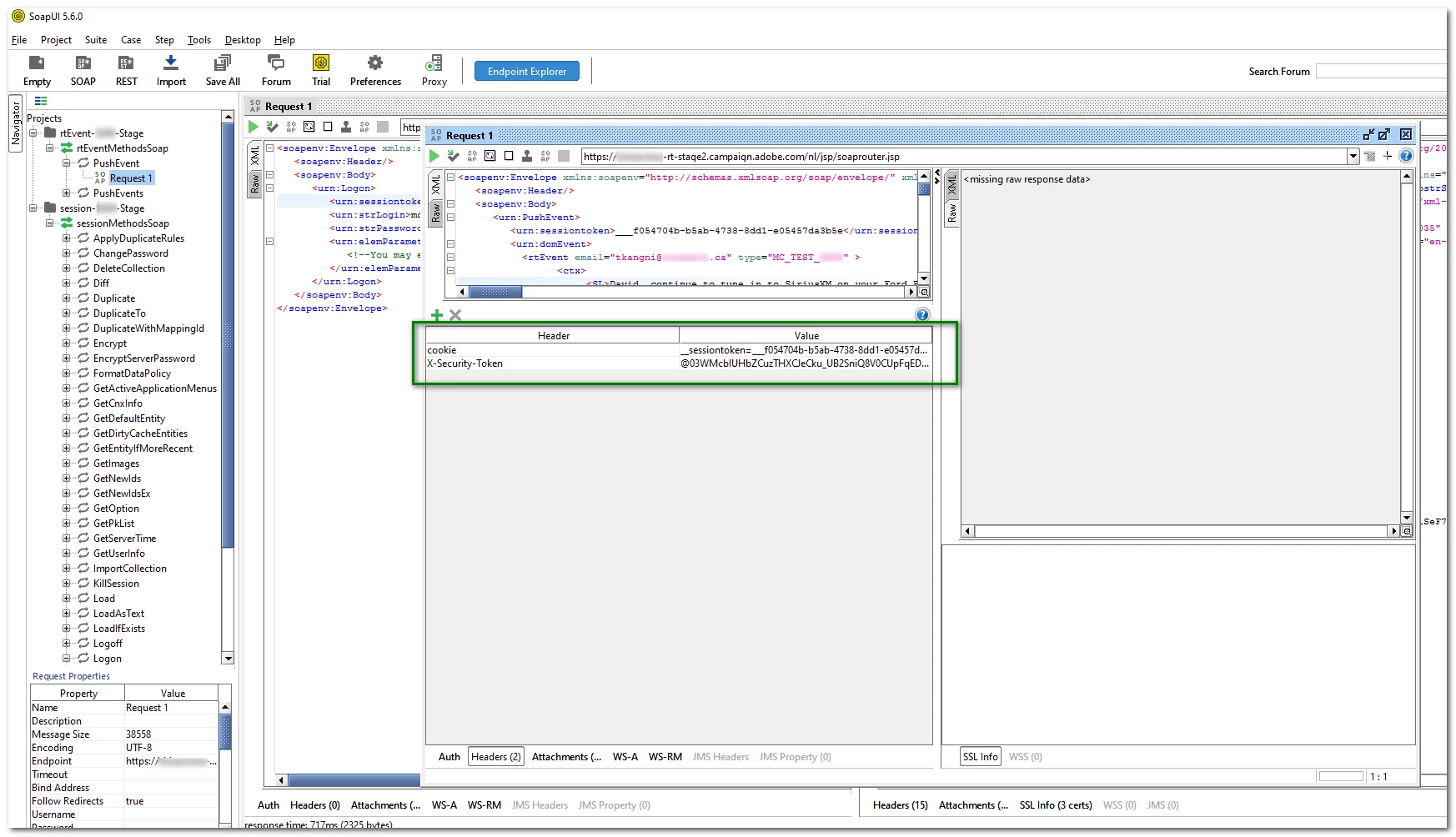
Once you log in, you will need two information for your rtEvent call header: sessionToken and SecurityToken (pstrSessionToken and pstrSecurityToken from your logon response)

Add the header as in the screenshot below

  1. cookie  __sessiontoken={pstrSessionToken}
  2. X-Security-Token {pstrSecurityToken} 


Just a reminder, you need some pre requirements in ACC to make the successfully. 

  1. create an event Type that will be used as type in your payload
  2. create and publish a template using your event type

Thanks

David


3 replies

October 22, 2020

Hi @rodneylewis ,


1: "To retrieve the session token, perform a logon SOAP call, then a get token followed by a logoff." Q: Is there a sample or snipper for how to login and actually retrieve the token?

a. You can use xtk:session#Logon method available in the WSDL downloaded from http://hostname/nl/jsp/schemawsdl.jsp?schema=nms:rtEvent. Import the WSDL into SOAPUI and use credentials to send SOAP call.


2: Using Wizdler or SOAPUI, I can POST using my ACC credentials instead of the MC/xxxx password provided by support. (They provided mc creds and tracking creds and neither worked here.) Q: How can I use this in HTML on my website (already whitelisted)? Is there a sample code for reaching the ACC API from another website form?

a. You've to use xtk:session#Logon method to get session token

b. Then you've to use the WSDL created to make SOAP call from the website to the https://localhost/nl/jsp/soaprouter.jsp.


RodneyLewis
Level 2
October 22, 2020

Hi, I'm VERY new to APIs. The part I'm not sure about is where to use xtk:session#Logon. Does it go inside the <PushEvent xmlns="urn:nms:rtEvent"> before or after the <sessiontoken>user/pass</sessiontoken>?


I'm pretty sure that would be before the domevent, right?


Any way you can post a full example or steps?


I have this so far.

<Envelope xmlns="http://schemas.xmlsoap.org/soap/envelope/">
<Body>
<PushEvent xmlns="urn:nms:rtEvent">
<sessiontoken>user/pass</sessiontoken>
<domEvent>
<!-- Any elements -->
</domEvent>
</PushEvent>
</Body>
</Envelope>


RodneyLewis
Level 2
October 22, 2020

ok. I just tried adding the following BEFORE the sessiontoken and and it seems I'm getting closer. <xtk:session#Logon></xtk:session>


Now I'm seeing the following result: 

<faultcode>SOAP-ENV:Client</faultcode>
<faultstring xsi:type='xsd:string'>SOP-330010 The XML SOAP message is invalid (service 'PushEvent', method 'nms:rtEvent').</faultstring>

<detail xsi:type='xsd:string'>(4:25) : Expected an attribute name
XML-110018 Error while parsing XML string..


Is this a good sign? 

DavidKangni
Community Advisor
DavidKangniCommunity AdvisorAccepted solution
Community Advisor
October 23, 2020

Hi Rodney,


You need to get the xtk:session WSDL too.


URL syntax for generating the session and rtEvent WSDL's.

  1. Generate session token WSDL http://hostname/nl/jsp/schemawsdl.jsp?schema=xtk:session
  2. Generate rtEvent WSDL http://hostname/nl/jsp/schemawsdl.jsp?schema=nms:rtEvent

Then you can use the session WSDL first to request the logon method

Once you log in, you will need two information for your rtEvent call header: sessionToken and SecurityToken (pstrSessionToken and pstrSecurityToken from your logon response)

Add the header as in the screenshot below

  1. cookie  __sessiontoken={pstrSessionToken}
  2. X-Security-Token {pstrSecurityToken} 


Just a reminder, you need some pre requirements in ACC to make the successfully. 

  1. create an event Type that will be used as type in your payload
  2. create and publish a template using your event type

Thanks

David


David Kangni
RodneyLewis
Level 2
October 23, 2020
Since you know, please answer one more question for me. I am also working on using the Campaign API to insert new recipients from my website (newsletter subscribers.) I assume the same session token and logon is required on the campaign server, but I'll need other methods to write the data. Do you have examples of how to achieve this? Scenario: User enters email address on web form. (godaddy hosted) Web form inserts new recipient into campaign Workflow sends them a welcome email. note: I have already whitelisted the godaddy server. Thanks