visitor level explanation | Community
Skip to main content
September 4, 2023
Solved

visitor level explanation

  • September 4, 2023
  • 1 reply
  • 613 views

Hi I am creating a segment that visitors visited the website within 30 days with no purchase history.


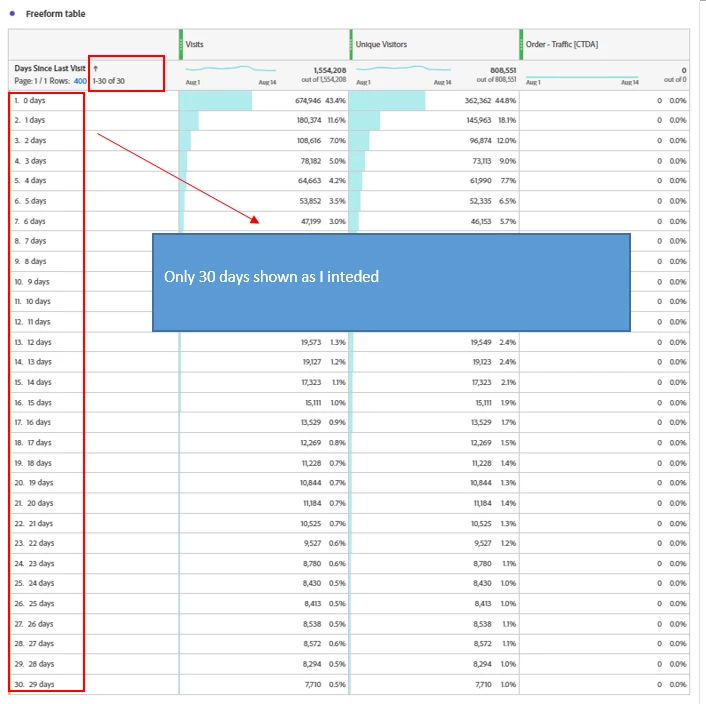
When I set the condition

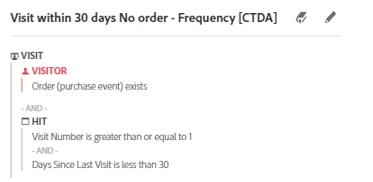
case1
- no orders in visitor level
- day since last visit less than 30 in visit or hit level

then it shows the correct days including only 30 days


but when I set it like two cases below

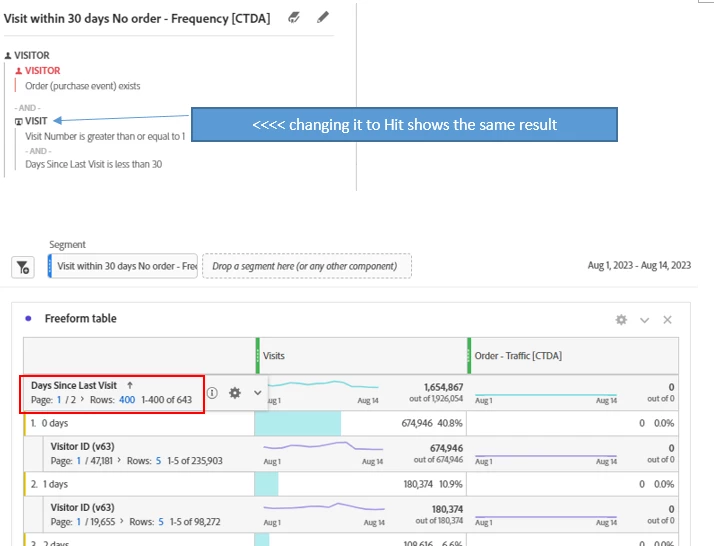
- case 2: whole containers in visitor level or 

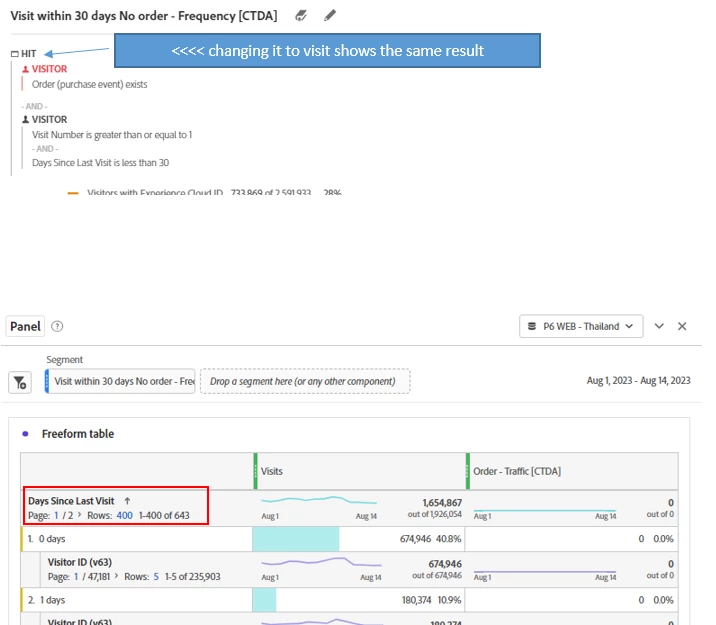
- case 3: day since last visit less than 30 in visitor level


they shows over 30 days like 643 days


case2: whole containers in visitor level
 

case3: day since last visit less than 30 in visitor level
 

I am getting confused with visitor containers. as far as I understand, 

case1 is that I want to see "day since last visit (how many days past between current visit and last visit)" amongst hit traffic having conditions below
- visit exists
- day since last visit is less than 30 days
- orders never generated


case2 is that I want to see "day since last visit (how many days past between current visit and last visit)" amongst visitors who have conditions below
- visit exists
- day since last visit is less than 30 days
- orders never generated


case3 is that I want to see "day since last visit (how many days past between current visit and last visit)" amongst hit traffic of visitors having conditions below
- visit exists
- day since last visit is less than 30 days
- orders never generated


These cases seem all same to me.
Could you explain me why case2 and case3 are incorrect?



This post is no longer active and is closed to new replies. Need help? Start a new post to ask your question.
Best answer by MandyGeorge

In your second example, when you put your overall segment at "visitor" it's going to bring in all information for any visitor that meets the other two conditions. So if you have someone that visited in the last 30 days, it will bring in ALL of their visits, even outside that time frame. 

The reason it doesn't in the first segment is because it's at a visit level overall, and it will only bring in those visits, which based on the condition have to happen within 30 days.

For the third example, it's a hit that belongs to a visitor with those conditions. So it's going to bring in any hit that belongs to a matching visitor, regardless of when the hit occurred. Also, because they're in a visitor segment, it means they could be separate hits or even separate visits. If they have more than one visit, and a visit in the last 30 days, they get included.


Your best bet is to just stick with using "visits" instead of "visitor" for this.

1 reply

MandyGeorge
Community Advisor and Adobe Champion
MandyGeorgeCommunity Advisor and Adobe ChampionAccepted solution
Community Advisor and Adobe Champion
October 12, 2023

In your second example, when you put your overall segment at "visitor" it's going to bring in all information for any visitor that meets the other two conditions. So if you have someone that visited in the last 30 days, it will bring in ALL of their visits, even outside that time frame. 

The reason it doesn't in the first segment is because it's at a visit level overall, and it will only bring in those visits, which based on the condition have to happen within 30 days.

For the third example, it's a hit that belongs to a visitor with those conditions. So it's going to bring in any hit that belongs to a matching visitor, regardless of when the hit occurred. Also, because they're in a visitor segment, it means they could be separate hits or even separate visits. If they have more than one visit, and a visit in the last 30 days, they get included.


Your best bet is to just stick with using "visits" instead of "visitor" for this.