Recency and Frequency Report | Community
Skip to main content
David_Jerome
Level 6
March 16, 2018
Solved

Recency and Frequency Report

  • March 16, 2018
  • 1 reply
  • 1651 views

Hi there,

I think that this must be one of those things that is possible but I have given it a good couple of hours with no luck.

I am trying to create a Freeform table in workspace that essentially shows the following for number of visitors:

                                                       Has not purchased in last 30 days          Has not purchased in last 60 days

Purchased Once last year               500 visitors                                             300 visitors

Puchased Twice last year               400 visitors                                             400 visitors

I fully understand the time based segments and I am clearly getting stuck with the nested segments somewhere.

If anybody can shed any light that would be great.

Thanks

Dave

This post is no longer active and is closed to new replies. Need help? Start a new post to ask your question.
Best answer by Urs_Boller

Hi davidj85759080

Don't know if the question is already solved in the meantime, but there was a "challenge" on measure slack to answer this question

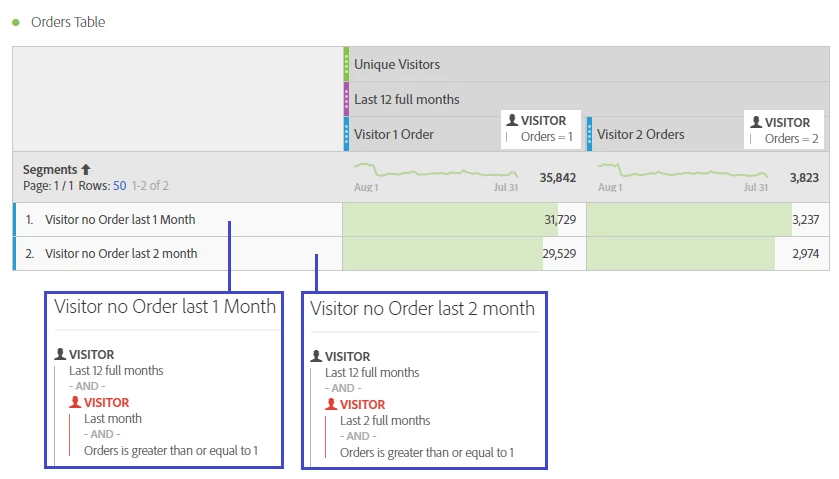
I just tried to create a table as desired - or something similar. Since it was easier for me to create, I changed the Columns/Rows compared to what you described. So first how my result looks like:

As you can see I created the following items

  • Header (Columns) - show last 12 full month
    Using the timetrame for last 12 full month would include all traffic for this timerange.
    To see Visitors who made 1 or 2 orders, I just created two simple segments (see small screenshot from segment preview)
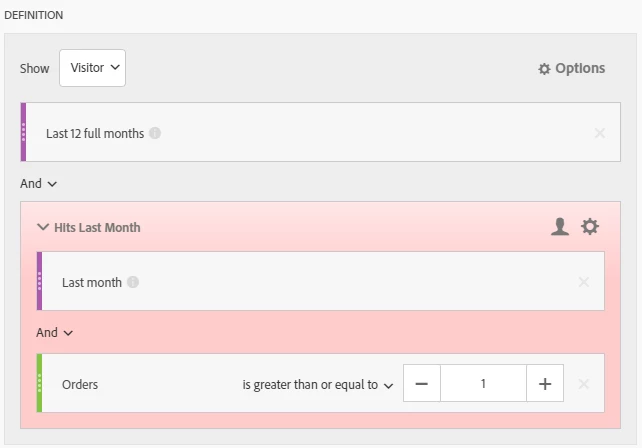
  • Rows - Show behavior for last few monthsYou need a trick here to get the desired result: you need to select all Visitors who had any traffic in the last 12 month and then exclude those visitors who had orders in the last 1 or 2 month. If you do not add the "last 12 month", it will only show visitors from the last 1 or 2 month who visited the website without order, skip data from visitors before! (let me know if you need to more information about that...)

To make it more ease to recreate, I show you the full segment I created for one of the rows. The following screenshot show the segment "Visitors no Order last 1 Month":

I hope you can use this answer to create your own table. let me know if you need more explanation.

Regards Urs

1 reply

Urs_Boller
Community Advisor
Urs_BollerCommunity AdvisorAccepted solution
Community Advisor
August 8, 2018

Hi davidj85759080

Don't know if the question is already solved in the meantime, but there was a "challenge" on measure slack to answer this question

I just tried to create a table as desired - or something similar. Since it was easier for me to create, I changed the Columns/Rows compared to what you described. So first how my result looks like:

As you can see I created the following items

  • Header (Columns) - show last 12 full month
    Using the timetrame for last 12 full month would include all traffic for this timerange.
    To see Visitors who made 1 or 2 orders, I just created two simple segments (see small screenshot from segment preview)
  • Rows - Show behavior for last few monthsYou need a trick here to get the desired result: you need to select all Visitors who had any traffic in the last 12 month and then exclude those visitors who had orders in the last 1 or 2 month. If you do not add the "last 12 month", it will only show visitors from the last 1 or 2 month who visited the website without order, skip data from visitors before! (let me know if you need to more information about that...)

To make it more ease to recreate, I show you the full segment I created for one of the rows. The following screenshot show the segment "Visitors no Order last 1 Month":

I hope you can use this answer to create your own table. let me know if you need more explanation.

Regards Urs