Pass Query String to Global Report Suite | Community
Skip to main content
balakrishnad200
Level 3
August 3, 2018
Solved

Pass Query String to Global Report Suite

  • August 3, 2018
  • 1 reply
  • 2173 views

Hi All,

I have an Admin related Implementation Question with regards to Processing Rules. In my client Implementation I have an Global Report Suite and Site wise Report suites.

I have a new Implementation request that I need to Pass  query string 'SID' explicitly only to my Global Report Suite and I need to assign an 'X' Variable to it. Can some one  help me how to track this using 'Processing Rules'. I'm completely beginner to Processing rules. I have gone through the Vidoe and documentation but I couldn't able to get the required outcome.

https://XYZcom/cptj/Fulltext/2018/07000/The_Functional_Difficulties_Questionnaire___A_New.4.aspx?SID=TW

I would be very thankful if someone can help me out on the same.

Thanks in Advance !!

Thanks,

Balakrishna
This post is no longer active and is closed to new replies. Need help? Start a new post to ask your question.
Best answer by Hyder_Ziaee

Hi Balakrishna,

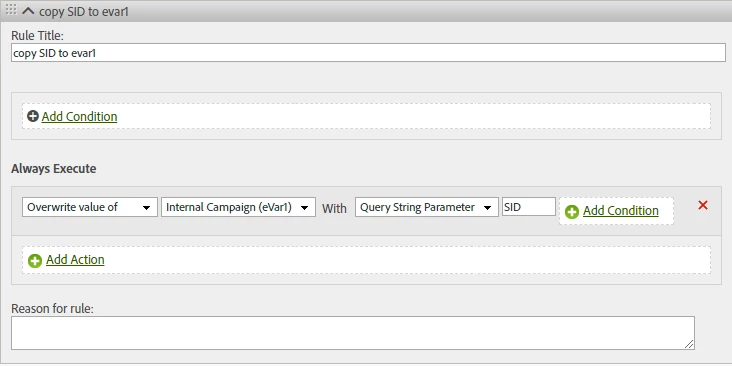
You will have to create a processing rule in this manner:

However, since processing rules affect data collection, I would recommend testing everything out in dev/test report suite first to understand and confirm that the change is exactly what you are looking for.

Another thing to check is for case sensitivity with the query params, and if multiple actions are required for other cases.

1 reply

Hyder_Ziaee
Adobe Employee
Hyder_ZiaeeAdobe EmployeeAccepted solution
Adobe Employee
August 3, 2018

Hi Balakrishna,

You will have to create a processing rule in this manner:

However, since processing rules affect data collection, I would recommend testing everything out in dev/test report suite first to understand and confirm that the change is exactly what you are looking for.

Another thing to check is for case sensitivity with the query params, and if multiple actions are required for other cases.