Marketing Channel Overview Report - First Touch/Last Touch | Community
Skip to main content
dolphy5
July 1, 2017
Solved

Marketing Channel Overview Report - First Touch/Last Touch

  • July 1, 2017
  • 1 reply
  • 820 views

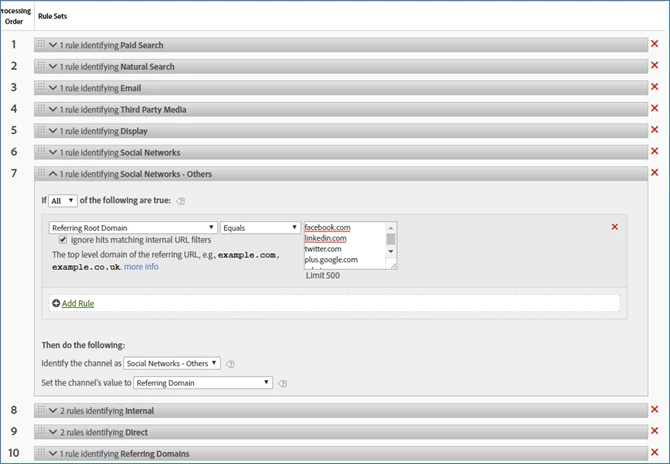
I have the Marketing Channel Overview Report set up with rules in the screenshot below, with Facebook.com and Instagram.com being under the "Social Networks - Others". However, I am seeing a "l.instagram.com" conversion (under First Touch and Last Touch) and "m.facebook.com" conversion (under First Touch) both under "Referring Domains" instead of "Social Network - Others".

In addition, the one Referring Domains - "m.facebook.com" First Touch conversion also appears under the Social Networks - Others Last Touch conversion (meaning, the single Facebook conversion was recorded under Referring Domains for First Touch, but then was recorded under Social Networks - Others for Last Touch).   I am very confused as to why these conversions are recorded separately under different channels. Does anyone know why this is happening, or see similar issues?  Thank you!
This post is no longer active and is closed to new replies. Need help? Start a new post to ask your question.
Best answer by jantzen_b

Since this is an older post, I'm assuming you've solved this issue. Incase others find this post, I'll post the link to the documentation below:

https://experienceleague.adobe.com/docs/analytics/admin/admin-tools/marketing-channels-admin.html?lang=en#admin-tools

1 reply

jantzen_b
Adobe Employee
jantzen_bAdobe EmployeeAccepted solution
Adobe Employee
March 5, 2021

Since this is an older post, I'm assuming you've solved this issue. Incase others find this post, I'll post the link to the documentation below:

https://experienceleague.adobe.com/docs/analytics/admin/admin-tools/marketing-channels-admin.html?lang=en#admin-tools