
Scheduling Reports with Already Existing Distribution Lists in *NEW* Report Builder | Community
Skip to main content
pwolly-cr
Level 2
March 10, 2025
Solved

Scheduling Reports with Already Existing Distribution Lists in *NEW* Report Builder

  • March 10, 2025
  • 1 reply
  • 524 views

Hello,


I moved to the new version of report builder.  I have an existing daily dashboard that's been running daily for 5 years and I just made an update to the Excel file.  I want to replace the old file with the new file and schedule it to the same distribution list as previously and using the same cadence, etc.  Is this possible or do I need to recreate the entire thing (distribution list, cadence, file, etc) in the new report builder?  Thanks!

-Peter
 

Best answer by FarazHusain

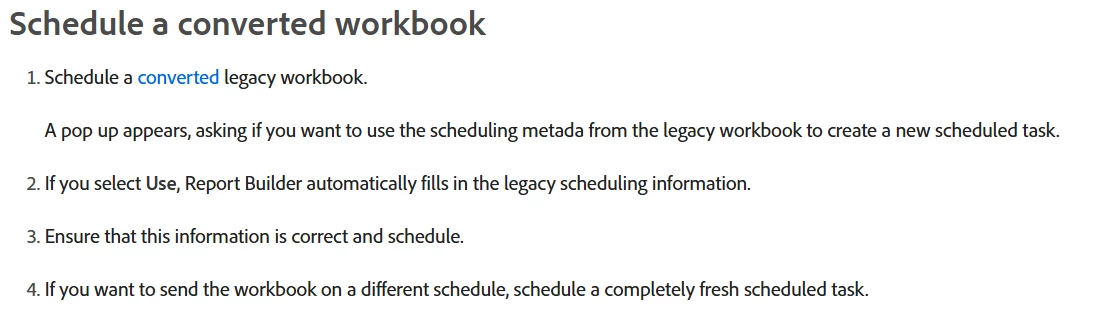
Hey @pwolly-cr, Based on the below, it seems for converted workbook, you should see a pop-up to use existing scheduling metadata from your legacy workbook:

Please see - https://experienceleague.adobe.com/en/docs/analytics/analyze/report-builder/schedule-reportbuilder


1 reply

FarazHusain
Adobe Employee
FarazHusainAdobe EmployeeAccepted solution
Adobe Employee
March 11, 2025

Hey @pwolly-cr, Based on the below, it seems for converted workbook, you should see a pop-up to use existing scheduling metadata from your legacy workbook:

Please see - https://experienceleague.adobe.com/en/docs/analytics/analyze/report-builder/schedule-reportbuilder


pwolly-cr
pwolly-crAuthor
Level 2
March 12, 2025

Thank you - I must have missed that article.  Unfortunately when I convert my legacy workbook I'm not seeing a pop that appears.  Do I need to contact client care directly or can you help me off line?  Thanks.

FarazHusain
Adobe Employee
Adobe Employee
March 13, 2025

Hey, @pwolly-cr, I tested this, and in my case, I do see the option for the same. I got this option once I upgraded my legacy ongoing report builder scheduled report and post upgrade when I clicked on 'Send Workbook', I got the pop-up: