how to allow input form to add integer data type for one field | Adobe Higher Education
Skip to main content
Level 4
March 14, 2024
Resuelto

how to allow input form to add integer data type for one field

  • March 14, 2024
  • 2 respuestas
  • 635 visualizaciones

@Parvesh_Parmar ,@AkshayAnand 

,@isahore ,@AndreaBriceno,@ParthaSarathy

,@ParthaS ,@Craig_Thonis ,@Manoj_Kumar_ ,@Amine_Abedour ,@Marcel_Szimonisz,@DavidKangni 

,@Amit_Kumar,@ShashankNigam02,@Ganesh5067, @Jonathon_wodnicki

@Denis_Bozonnet 

hi all,

how can we do wrong data type error pop displayed in input from


iexample

i Have store id column(integer type) in store schema

but i want to restrict if someone enters value in store id column as string

since I Have store id column as integer type in store schema when entering value as string type in store id column

it will automatically throw error or


or what do we need to add anything in input form to show error pop up for wrong data type entered

Este tema ha sido cerrado para respuestas.
Mejor respuesta de isahore

Hi @dishasharma,


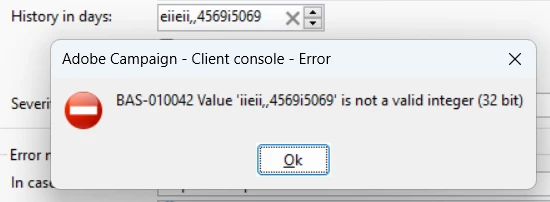
For an integer type field, the corresponding input element in the input form would not let you enter a string.

If you do so, it will automatically give you an error.


BR,

Ishan

2 respuestas

isahore
Community Advisor
isahoreCommunity AdvisorRespuesta
Community Advisor
March 15, 2024

Hi @dishasharma,


For an integer type field, the corresponding input element in the input form would not let you enter a string.

If you do so, it will automatically give you an error.


BR,

Ishan

Level 6
March 15, 2024

Hi @dishasharma ,

As Ishan mentioned, it won't let you put another data type in integer field. If you would like to add more validation can use leave tag and retrun some error.

https://experienceleague.adobe.com/en/docs/campaign-classic/using/configuring-campaign-classic/input-forms/form-structure#:~:text=The%20context%20of%20the%20form,%3E%20and%20tags.&text=The%20and%20%3Cleave,and%20%E2%80%9Ciconbox%E2%80%9D%20types).


Thanks,

Deb