コミュニティアチーブメントバーを展開する。

Mark Solution

この会話は、活動がないためロックされています。新しい投稿を作成してください。

解決済み

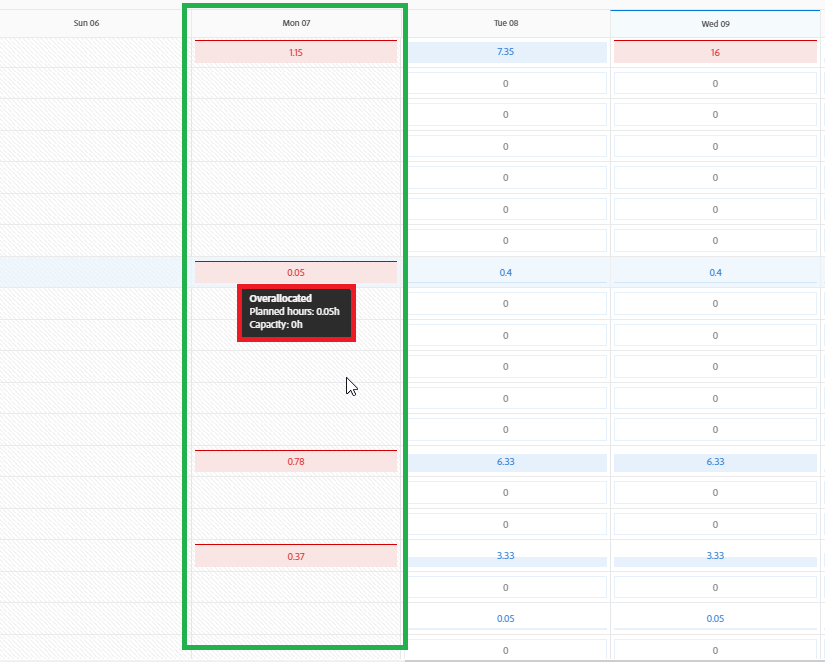
0 Hour Capacity on Monday

Avatar

Level 4

How do we change the capacity days in Workfront? It appears that our week begins on Tuesday. This affects our capacity since the system will read that all Mondays have a 0 hour capacity, which will lead to overallocation on Mondays. How to change the start date to Monday?0 Capacity on Monday.PNG

1 受け入れられたソリューション

Avatar

正解者
Community Advisor

Not only, PC time zone is one thing, but specifically WB is also suspect to your browser settings, e.g. depending on your language settings it will be either Monday or Sunday that will appear as first day of the week in WB.

元の投稿で解決策を見る

5 返信

Avatar

Community Advisor

This is a result of how your schedule is setup. It seems that Monday has been configured as non-working day.


If you have system admin account, go to setup, schedules, find schedule you/your team are/is assigned to and edit as needed,e.g.:
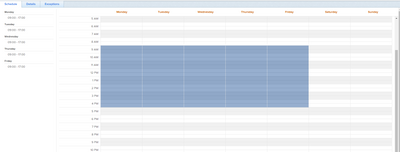
Rafal_Bainie_0-1667991874412.png

If you don't know what schedule you are on, than you can look it up in user profile.
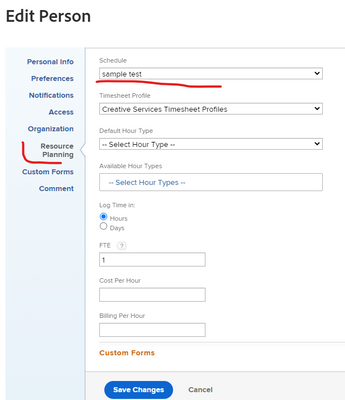
Rafal_Bainie_1-1667991996989.png


Avatar

Level 4

Hi Rafal,


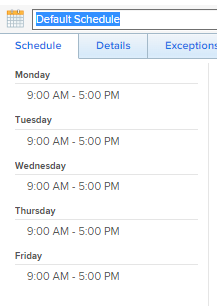
Thank you for your response, however our schedule already set between Monday to Friday but our Monday still showing 0 hour capacity

Schedule.PNG

Avatar

Community Advisor

1 more thing comes to my mind: on details tab of the schedule - make sure that correct timezone is selected

Avatar

Level 4

The problem appears to be with the PC's local time zone. Workfront is following the timezone on your local PC, not the timezone setup on your profile.

Avatar

正解者
Community Advisor

Not only, PC time zone is one thing, but specifically WB is also suspect to your browser settings, e.g. depending on your language settings it will be either Monday or Sunday that will appear as first day of the week in WB.