Email Event Notifications: Subject line customization | Community
Skip to main content
Level 2
January 11, 2024

Email Event Notifications: Subject line customization

  • January 11, 2024
  • 1 reply
  • 1583 views

Hi everyone,

Our team would like to customize the subject line of the "All Predecessor Task Completion to Task Dependents" email event notification to show the name of the task that is ready to be worked on vs the completed predecessor task name? Below is a snapshot of the Email Notification in question.
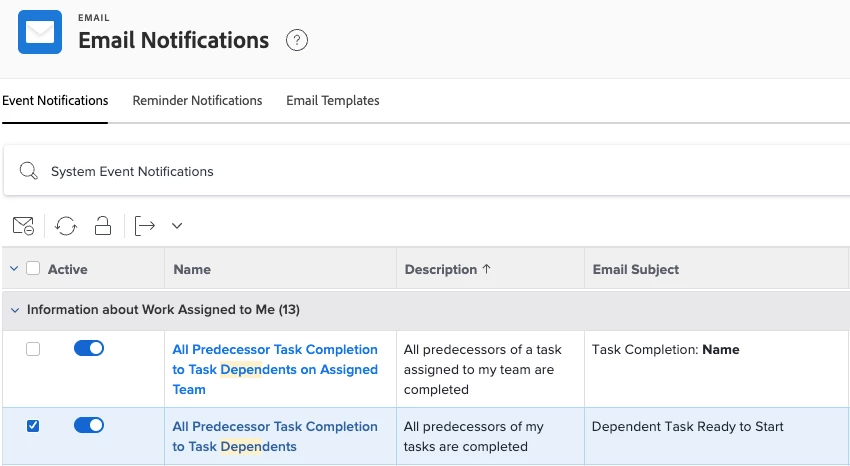
The email you receive from this notification displays the Task Name that is ready to start in the body of the email, but there does not seem to be an option to choose this field to display in the subject line. Any ideas or is this just not a possibility at this time?

Thanks in advance for your assistance.

_jonathan

This post is no longer active and is closed to new replies. Need help? Start a new post to ask your question.

1 reply

Madalyn_Destafney
Community Advisor
Community Advisor
January 12, 2024

You're able to modify the subject line of the notifications by clicking on the notification name itself. I'm not sure how to accomplish the specifics you're looking for with text mode but have you tried this area out? Not sure if you knew that functionality existed so wanted to start there.
https://experienceleague.adobe.com/docs/workfront/using/administration-and-setup/manage-wf/emails/custom-email-subjects-event-notification.html?lang=en#customize-email-subject-lines-for-event-notifications 

If this helped you, please mark correct to help others : )
Level 2
January 12, 2024

@madalyn_destafney Thanks for your suggestion. We started where you suggested with the customization. Unfortunately, I am not seeing any successor fields to use, which is what I think is needed.