Datastream: how to select different event datasets programmatically from Mobile SDK | Community
Skip to main content
November 6, 2023
Solved

Datastream: how to select different event datasets programmatically from Mobile SDK

  • November 6, 2023
  • 3 replies
  • 2027 views

Hi,

we are tracking events in our mobile app via the sendEvent function of the Mobile SDK (https://developer.adobe.com/client-sdks/home/getting-started/track-events/).

The function automatically writes the data on the primary event dataset configured in the datastream.
I'd like to understand, given a datastream with 2 events datasets configured as in the picture below, whether it is possible to switch/change the target destination datasets programmatically from the Adobe Mobile SDK.
The use case is if we need to track some events in a datasets, and some other events in another dataset. Thus we cannot always switch primary dataset, because both would be used at the same time, according to the event being tracked.
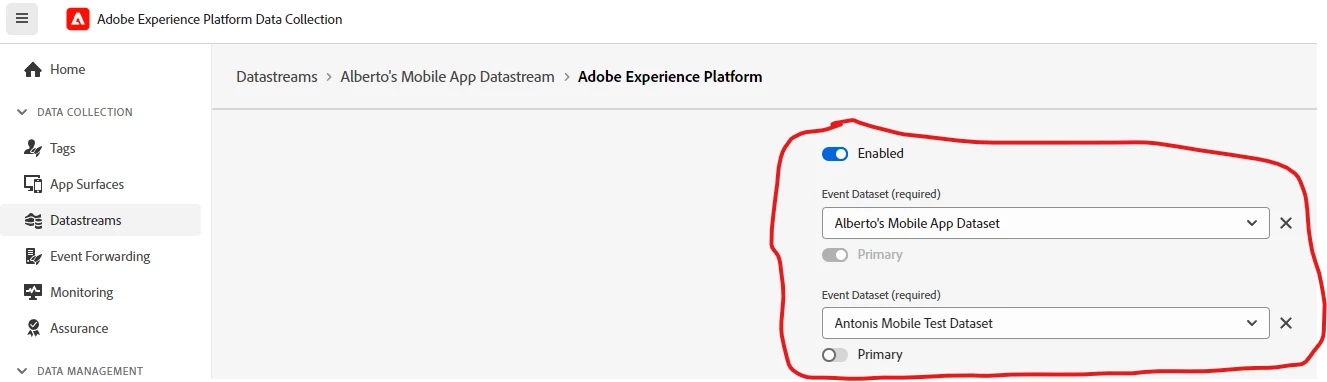


Many thanks,

Alberto

This post is no longer active and is closed to new replies. Need help? Start a new post to ask your question.
Best answer by nnakirikanti

Yes you can overwrite the dataset with all the ways of sending data to edge,

Particular for native apps use below method

https://experienceleague.adobe.com/docs/experience-platform/datastreams/overrides.html?lang=en#send-overrides-mobile-sdk

3 replies

Anil_Umachigi
Adobe Employee
Adobe Employee
November 8, 2023

@alben I doubt that's possible, however there is another option you could consider which might be much better to maintain and make changes without any developer involvement in the future. Here's how i would do it 


  1. Create a event dataset, call it master event and send all required events for both the use cases and name the attributes with good conventions. Do not enable this for profile 
  2. Use query service to pick and choose attributes and format as required and write it to two separate datasets which can then be enabled for profile. 
  3. Update query as new requirements arise from business 

Hope that helps 

Anil

albenAuthor
November 8, 2023

Hi Anil,
thanks for answering.

I understand you advice. I have a couple of questions, just for curiosity:

1) From a technical standpoint, your solution would work also enabling the master event dataset for profile, right? I mean, it might be useless, but I want to understand whether I am missing some limitations.

2) Which is the point of allowing multiple event datasets to be added to a datastream, if just the primary one can be used, and only a primary dataset is allowed? It seems like the only dataset which is primary is the enabled one, while all the other non-primary are disabled.

Anil_Umachigi
Adobe Employee
Adobe Employee
November 11, 2023

@alben Yes you sure can enable it to profile, this will end up giving you all the events written to profile. 

I think it eventually boils down to the purpose of why you were setting up two different dataset and choose specific events to be sent there, it is usually to filter attributes i.e keep noise out and enable it for profile. 

arijitg
Adobe Employee
Adobe Employee
November 13, 2023
nnakirikanti
Community Advisor
nnakirikantiCommunity AdvisorAccepted solution
Community Advisor
November 17, 2023

Yes you can overwrite the dataset with all the ways of sending data to edge,

Particular for native apps use below method

https://experienceleague.adobe.com/docs/experience-platform/datastreams/overrides.html?lang=en#send-overrides-mobile-sdk