what is the recommended way to override aem ootb stylesheet? | Community
Skip to main content
Level 3
July 19, 2019
Solved

what is the recommended way to override aem ootb stylesheet?

  • July 19, 2019
  • 8 replies
  • 8529 views

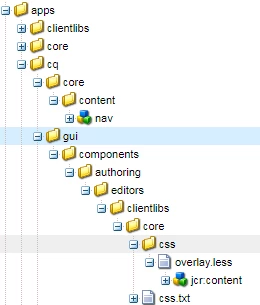
I have override /libs/cq/gui/components/authoring/editors/clientlibs/core/css/overlay.less to apps/cq/gui/components/authoring/editors/clientlibs/core/css/overlay.less. and i have change changed background color like below.

/* placeholder */

.cq-Overlay--placeholder {

    color: rgba(0,0,0,.3);

    border-color:  rgba(0,0,0,.3);

  /* background-color: rgba(255,255,255,.05);*/

     background-color: rgba(255,255,255,.25);

    border-style: solid;

    border-width: 0.125rem;

    margin: -0.125rem;

}

Still i am getting old values. what is the recommended way to override aem ootb stylesheet?

Thanks,

Kiran
This post is no longer active and is closed to new replies. Need help? Start a new post to ask your question.
Best answer by kiranv40650953

It is working fine. I have override the /libs/cq/gui/components/authoring/editors/clientlibs/core/css/overlay.less into apps and declared in css.txt. After that it is working fine. Previously i have not added css.txt.

Thanks for your help.

8 replies

arunpatidar
Community Advisor
Community Advisor
July 19, 2019

I think we cannot overlay clientlibs in aem,  all clientlibs which has same category will be loaded.

If you just want to change a single style then create a new clientlibs with category cq.authoring.dialog and add css rule for background

/* placeholder */

.cq-Overlay .cq-Overlay--placeholder {

     background-color: rgba(255,255,255,.25);

  }

Arun Patidar
Level 3
July 19, 2019

Hi Arun,

I have created a new clientlibs, under that created new less file and add the above code.

cq.authoring.dialog i have added as dependency in my clientlibs, but still it is loading from libs.

Please let me know  how to resolve this issue.

Thanks,

Kiran

arunpatidar
Community Advisor
Community Advisor
July 19, 2019

could you please let me know which page you are checking?Is it site console or editing page?

I am checking page edit

Arun Patidar
Level 3
July 22, 2019

Hi Arun,

Thank you for looking into this issue. I am checking at page edit. If you need any further information let me know?

Thanks,

Kiran

arunpatidar
Community Advisor
Community Advisor
July 22, 2019

I am trying in 6.3, works for me.

It could be caching issue, could you please clear browser cache or try in incognito mode.

If doesn't work try with

?debugClientLibs=true

Arun Patidar
kiranv40650953AuthorAccepted solution
Level 3
July 29, 2019

It is working fine. I have override the /libs/cq/gui/components/authoring/editors/clientlibs/core/css/overlay.less into apps and declared in css.txt. After that it is working fine. Previously i have not added css.txt.

Thanks for your help.

Adobe Employee
October 14, 2019

Agreed with Arun. Instead of overlaying file, creating a custom clientlib is cleaner approach. That way you would be upgrade safe.

Adobe Employee
October 14, 2019

kiranv43511543​ Overlaying of OOTB should be avoided to reduce tech debt to AEM upgrades . Recommended way is to create a separate client lib with just one css as mentioned by arunpatidar26​. Just make sure, the client lib category is same as of the OOTB client lib which you want to change. As long as you follow it, it will work for you. For this case, the correct category is - cq.authoring.editor.core, cq.authoring.editor