
Sightly: set locale to 'pt-br' doesn't work. | Community
Skip to main content
lif66417554
Level 2
April 26, 2018

Sightly: set locale to 'pt-br' doesn't work.

  • April 26, 2018
  • 2 replies
  • 3328 views

If I set local to "de", "es", "fr", "it", "ja", I can use Sightly to get I18n value. But if I set local to "pt-br", "zh-cn", "zh-tw", "ko-kr", Sightly can't get I18n value.

For exemple:

${'Default Value' @ i18n, locale='es'}  is displaying "Valor predeterminado". It is displaying as expected.

${'Default Value' @ i18n, locale='pt-br'} is displaying "Default Value", but it should be displayed to "Valor padrão".
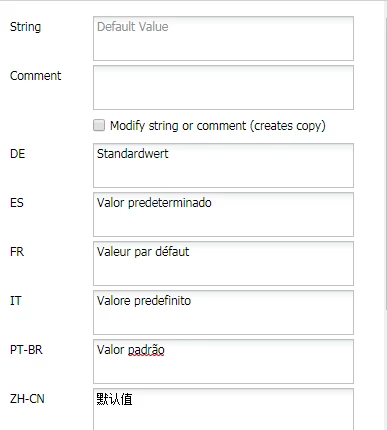
Does't anyone know how to fix it?

Thanks.

This post is no longer active and is closed to new replies. Need help? Start a new post to ask your question.

2 replies

smacdonald2008
Level 10
April 26, 2018

See "Internationalization" in this doc topic -- HTL Expression Language

smacdonald2008
Level 10
April 26, 2018

Also - so this can be reproduced - please state all of the steps that you did here.

December 31, 2018

Hi,

We met with the same issue which when we set the locale to 'zh-cn' or any language with '-', it displayed default value.

I found it maybe because ````Locale l = LocaleUtils.toLocale(locale);``` in I18NRuntimeExtension.java. The method 'toLocale' will throw an exception if we pass 'zh-CN' as parameter. Any ideas?

lif66417554
Level 2
July 19, 2018

I am not sure why ${'Default Value' @ i18n, locale='pt-br'} doesn't work. I used another way fixed it.

I changed the language in the page properties and it is working.