Setting Default Policies for Text Component to always enable RTE | Community
Skip to main content
joshrnorton75
September 4, 2019

Setting Default Policies for Text Component to always enable RTE

  • September 4, 2019
  • 1 reply
  • 2168 views

I am having an issue when authoring an Editable template.

When I add a text component to the Structure, I am able to set the policy to the RTE Enabling policy that I have.

I have a parsys component (Well) that is used for authors to be able to add their own content like text components etc.

When authoring a page with the template above, adding a text component results in the author not having access to the RTE.

How can I set up a default policy for text components that are added to pages using this template?

Ver: AEM 6.4.2
This post is no longer active and is closed to new replies. Need help? Start a new post to ask your question.

1 reply

joshrnorton75
September 5, 2019

Was able to find the fix.

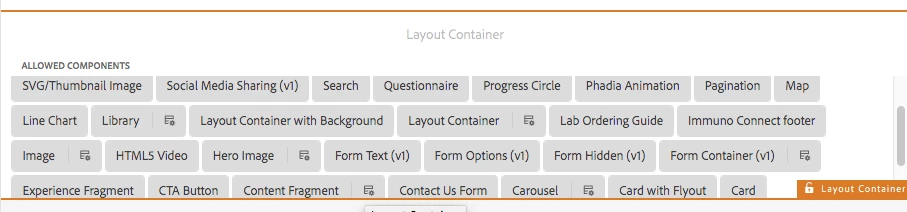
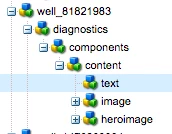
Turns out our custom parsys containers do not show the allowed components and their policies so I had to go into CRX and add the policies under the containers that were unlocked. The structure is as follows

I was able to find this because our other container "Layout Container" does this properly

sreedobe
Level 4
December 21, 2020

Hi @joshrnorton75  could you please answer this question as well. Not sure, if I understood your fix.


https://experienceleaguecommunities.adobe.com/t5/adobe-experience-manager/container-component-allowed-components/qaq-p/391634