Esta conversación ha sido bloqueada debido a la inactividad. Cree una nueva publicación.

Nivel 1

Nivel 2
Iniciar sesión en la comunidad
Iniciar sesión para ver todas las insignias



Esta conversación ha sido bloqueada debido a la inactividad. Cree una nueva publicación.

Hi all,
I am using AEM 6.2 SP1 CFP9. I am running in to issues with rich text editor in multi field. I copied richtext present at /libs/cq/gui/components/authoring/dialog/richtext in to apps. I created a component with multi field using ACS AEM Commons multi field widget, i have rich text in mutifield.
The problem is when i create link in RTE and save for the first time, link will be working. If i open the dialog and save RTE again even with out editing, It is removing href and saving the data.
For example: if i have link as <a href="https://forums.adobe.com/content/geo/a.html" target="_self">Link 1</a> in the first save. If i open the dialog and save it again, it is transforming to
<a target="_self">Link 1</a>"
Any thoughts on this issue would be helpful.
Thanks
Vistas
Respuestas
Total de me gusta

This is a bug. Please open a support ticket to it can be fixed.
Vistas
Respuestas
Total de me gusta
Tomorrow - i am going to test Coral/Granite MF for 6.3 on same use case.
Vistas
Respuestas
Total de me gusta
How are you writing out the value of the RTE in HTL?
Vistas
Respuestas
Total de me gusta
Hi,
Thanks for the reply. As we are using ACS AEM commons multifiled, we are storing RTE data in JSON. We use WcmUsePojo to get the property in to back end, process the JSON and use that in output in HTL.
I added loggers in Java and checked also, the property value is not having href at all there also. I think the issue is occurring as soon as you open the dialog, it is stripping out href.
Hope this answered your question.
Thanks
Vistas
Respuestas
Total de me gusta
I am doing this use case right now to verify if i can reproduce your results on AEM 6.2.
Vistas
Respuestas
Total de me gusta
I tested on 6.2 and see the LINK in the RTE -
WHen i close the page and reopen it - the link is still there and renders to the page --
I am not seeing your issue. Like i said earlier - looks like a bug in your system.
Vistas
Respuestas
Total de me gusta
The JSON in the prop at /content/mfHTL62/en/jcr:content/par/touchmulti is this format:
"title":"Scott2",
"path":"Scott4",
"flag":"Flag22",
"text":"<p>Hello There - this is <a href=\"http://www.cnn.com\">CNN</a></p>\n"
}
You can see the href is still there.
Vistas
Respuestas
Total de me gusta
Hi,
Thanks for trying. Could you be able to provide the code in a package? I will install that package in our AEM instances and check whether i can re-produce or not.
Thanks for your help.
Vistas
Respuestas
Total de me gusta
I will update our MF 6.2 article and put in all the code and package. Check back in a day or so to see this article updated with RTE that works -- Scott's Digital Community: Creating an AEM 6.2 HTML Template Language component that uses a Multi-Fi...
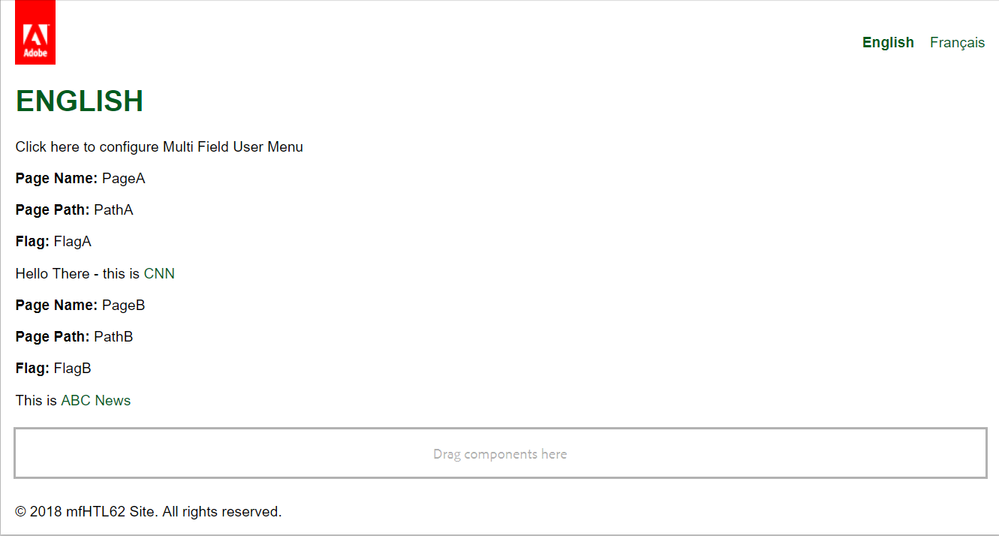
Package is updated with output that includes links from a RTE -- as shown here:
Vistas
Respuestas
Total de me gusta
Thanks for taking the effort to test it in your instances.
I installed the package that is present in the link to test the RTE. At first it worked as expected with link and everything. Once i open the dialog and save it again, HREF got removed. This determines it is definitely system issue of ours.
I ran out of ideas to debug. I was wondering is there a configuration somewhere which would think HREF is invalid and removing it when clicked on Save?
Thanks for any thoughts or suggestions.
Vistas
Respuestas
Total de me gusta
Can you post here the output you see.
Vistas
Respuestas
Total de me gusta
Also - try testing on a fresh AEM 6.2 instance so you can see it working
Vistas
Respuestas
Total de me gusta
Hi,
I am seeing the below HTML in page source.
<div>
<p><b>Page Name:</b> PageA</p>
<p><b>Page Path:</b> PathA</p>
<p><b>Flag:</b> FlagA</p>
<p>Hello There - this is <a>CNN</a></p>
<p><b>Page Name:</b> PageB</p>
<p><b>Page Path:</b> PathB</p>
<p><b>Flag:</b> FlagB</p>
<p>This is <a target="_blank">ABC News</a></p>
</div>
If you notice that there is no HREF.
Thanks
Vistas
Respuestas
Total de me gusta
Can you test on a fresh AEM 6.2 instance. I want to know if you see this working on a fresh AEM 6.2 instance.
On your original instance - there is something that is manipulating the JSON.
Vistas
Respuestas
Total de me gusta
I tried on a clean AEM instance by installing ACS AEM Commons and the RTE package. In the instance it did worked as expected.
HREF did not got removed after saving.
Vistas
Respuestas
Total de me gusta
OK - now we are getting some where. IN your instance where IT DOES NOT work - when you look at the props under content -- here:
/content/mfHTL62/en/jcr:content/par/touchmulti
Are you seeing the link removed from the props?
Vistas
Respuestas
Total de me gusta
Hi,
Yes, the link is removed from the properties. As i saw until now, HREF is getting removed when clicked on Save after modifying the content. The JSON call to the backend is going without HREF.
Thanks
Vistas
Respuestas
Total de me gusta
Do you have a link modifier service active that would account for this - something is modifying that RTE prop. As you can also see - that something is not turned on by default as it works on the Fresh instance. See -- Linkchecker removing href value
Vistas
Respuestas
Total de me gusta
One possible reason on your instance is the XSS filter stripping out the HRef -- XSS Filter issue with the target attribute of the a tag
Vistas
Respuestas
Total de me gusta
Hi,
I kind of looked in to the XSS part. I am going to try few more things here but the thing is when you save the first time it works but it does not work the second time you open and save the dialog.
If there is any XSS issue, it should not have saved when clicked first time. This is happening i believe after the upgrade to 6.2 but we did not noticed it until now. So, looking in to any multi field related JS files.
I tried without multi field and RTE works as expected. I think this is because of some Multi Filed issue with Acs commons.
Thanks
Vistas
Respuestas
Total de me gusta

Vistas
me gusta
Respuestas
Vistas
me gusta
Respuestas
Vistas
me gusta
Respuestas
Vistas
me gusta
Respuestas