Repositioning Help Icon | Community
Skip to main content
July 19, 2019
Solved

Repositioning Help Icon

  • July 19, 2019
  • 6 replies
  • 3988 views

Hi all!

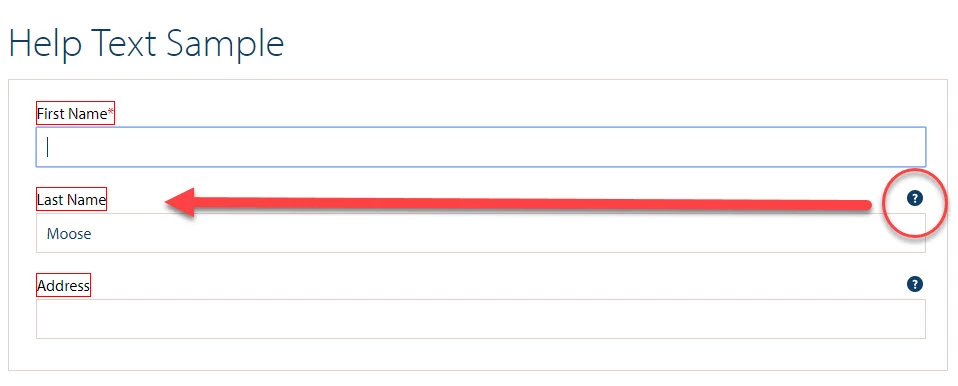
I'm wondering if it is possible to reposition the Help icon from the far right to directly after the text in a question label? My customers are worried that users may not see the help icon when it is so far away and might be a usability issue.

I'm trying a combination of CSS and jQuery, but my form does not seem to be responding well to my .each() statements. Is there a more OOTB way of moving this icon without a CSS/jQuery hack?

Thanks!

This post is no longer active and is closed to new replies. Need help? Start a new post to ask your question.
Best answer by baronforo

Arun,

I've tried both, and I'm having the issues you noted with Ravi's solution, and possible similar ones with the solution you gave. Longer text labels will throw off as well, probably because characters are more than a pixel wide.

So if the label text length is 60, and add 60 for spacing, the icon will be 120 px from the left, but the actual text may be 120 px wide depending on letters used.

However, I think I may have found an answer!

For testing purposes, I just made CSS changes in jQuery, and then appended the icon to the .guideFieldLabel div.

$(".guideFieldLabel label").css("border","1px solid red").css("width","fit-content").css("display","inline-block");

$(".guideHelpQuestionMark").css("position","relative").css("display","inline-block").css("top","0").css("right","0").css("margin-left","10px");

  $("div.guideFieldNode").each(function(index) {
    var label = $(this).find("div.guideFieldLabel");
   var icon = $(this).find("div.guideHelpQuestionMark");

$(label).append(icon);
  });

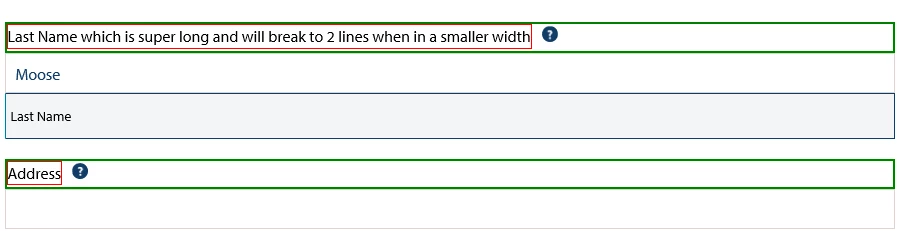
This moves it from beneath the field and into the label container itself.
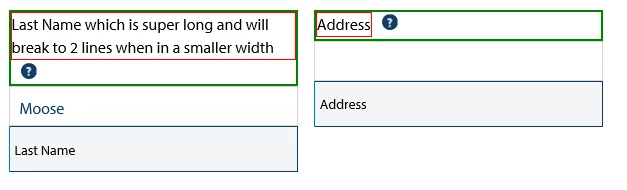
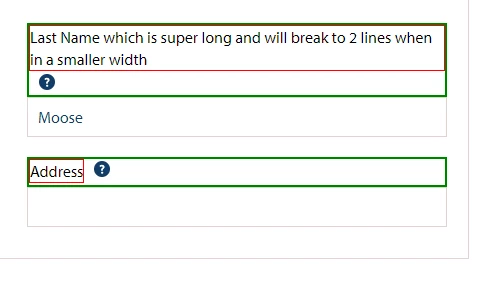
The main drawback is in responsive mode for phones, if the label breaks lines, the icon will be below the label, but still better than nothing. I've tried putting into the <label> itself, but that does not work - I think I'd have to wrap all the label text in a span, and that would get messy.
Please let me know what you think!

6 replies

arunpatidar
Community Advisor
Community Advisor
July 20, 2019

Hi,

I don't think there is OOTB feature to move this.

but you can set left css property to move icon left. but moving icon left will move tooltip left too and result in description cropped.

$(".cq-dialog-content .coral-Form-fieldwrapper").each(function( index ) {

  var label = $(this).find("label.coral-Form-fieldlabel");

var left = 60+$(label).text().length;

var icon = $(this).find("coral-icon.coral-Form-fieldinfo");

$(icon).css("left", left+"px");

});

Arun Patidar
Ravi_Pampana
Community Advisor
Community Advisor
July 20, 2019

Hi,

You can also adjust the icon using css file and adding it to cq.authoring.editor.hook like below

Sample CSS:

span.coral-Form-fieldinfo.coral-Icon.coral-Icon--infoCircle.coral-Icon--sizeS {
  1.    left: 100px;

If changes need to be applied for only 1 or few cq:dialog then we can add css class to cq:dialog node and apply css based on that class.

Using below css classes we can restrict the styles to be applied only in a specific view if needed

Floating dialog:

.cq-dialog-floating span.coral-Form-fieldinfo.coral-Icon.coral-Icon--infoCircle.coral-Icon--sizeS {

  1.    left: 100px;

Full Screen dialog

.coral3-Dialog--fullscreen span.coral-Form-fieldinfo.coral-Icon.coral-Icon--infoCircle.coral-Icon--sizeS {

  1.    left: 100px;

Hope this helps!

arunpatidar
Community Advisor
Community Advisor
July 21, 2019

Hi Ravi,

I would not recommend using CSS in this particular case because if the label text length is more then icon would overlay with text.

e.g.

Arun Patidar
baronforoAuthorAccepted solution
July 21, 2019

Arun,

I've tried both, and I'm having the issues you noted with Ravi's solution, and possible similar ones with the solution you gave. Longer text labels will throw off as well, probably because characters are more than a pixel wide.

So if the label text length is 60, and add 60 for spacing, the icon will be 120 px from the left, but the actual text may be 120 px wide depending on letters used.

However, I think I may have found an answer!

For testing purposes, I just made CSS changes in jQuery, and then appended the icon to the .guideFieldLabel div.

$(".guideFieldLabel label").css("border","1px solid red").css("width","fit-content").css("display","inline-block");

$(".guideHelpQuestionMark").css("position","relative").css("display","inline-block").css("top","0").css("right","0").css("margin-left","10px");

  $("div.guideFieldNode").each(function(index) {
    var label = $(this).find("div.guideFieldLabel");
   var icon = $(this).find("div.guideHelpQuestionMark");

$(label).append(icon);
  });

This moves it from beneath the field and into the label container itself.

The main drawback is in responsive mode for phones, if the label breaks lines, the icon will be below the label, but still better than nothing. I've tried putting into the <label> itself, but that does not work - I think I'd have to wrap all the label text in a span, and that would get messy.

Please let me know what you think!
arunpatidar
Community Advisor
Community Advisor
July 23, 2019

HI,

You can write responsive CSS to adjust that icon to the rightmost by allowing fixed width and position, relative to label .

But still can you see complete description when you click on help icon? Is it now going left and outside dialog?

Arun Patidar
baronforoAuthor
July 23, 2019

Arun,

I think that if we implement this (the current form is a proof of concept), we'd probably update the CSS with responsive because at the smaller breakpoints, distance won't be such an issue. For proving concept and testing I did the CSS changes with jQuery for ease and to not conflict with in-flight work.

The icon is relative-positioned, so seems to be working well. Long description is showing fine.

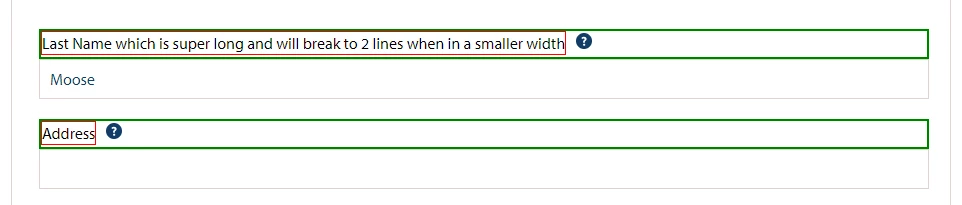
Full-width:

Multi-column: