Redirect Rule redirecting HTTPS request to HTTP | Community
Skip to main content
Rohan_Garg
Community Advisor
Community Advisor
August 17, 2022
Solved

Redirect Rule redirecting HTTPS request to HTTP

  • August 17, 2022
  • 3 replies
  • 7744 views

Hi AEM Community,


I have the below redirect rule - 

RewriteRule ^/content/brandA/us/en/(.*).html$ /$1 [R=302,L,QSA]


In my network trace, the below redirects are happening -

Request 1 - https://www.brandA.com/content/brandA/us/en/index.html

This request has a 302 redirect with response.location set to http://www.brandA.com/index.html 


Request 2 - http://www.brandA.com/index.html

This request also a 302 redirect with response.location set to https://www.brandA.com/index.html


Request 3 - https://www.brandA.com/index.html


As we see this 2nd request is not necessary and should not be there.

Currently I am using a workaround for this by modifying my rewrite rule to below - 

Thanks @mohit_kbansal for the below suggestion-

RewriteRule ^/content/brandA/us/en/(.*).html$ https://%{SERVER_NAME}/$1 [R=302,L,QSA]


I wanted to know why https to http and then again http to https redirection is happening by default.

I referred to the below link on "AEM redirects user back to http when accessed through SSL/TLS terminated load balancer" -

https://experienceleague.adobe.com/docs/experience-cloud-kcs/kbarticles/KA-16936.html?lang=fr-FR


I updated the below configuration in my vhost - 

RequestHeader set X_FORWARDED_PROTO 'https' env=HTTPS

and then added the below OSGi configuration as the above blog suggested - 
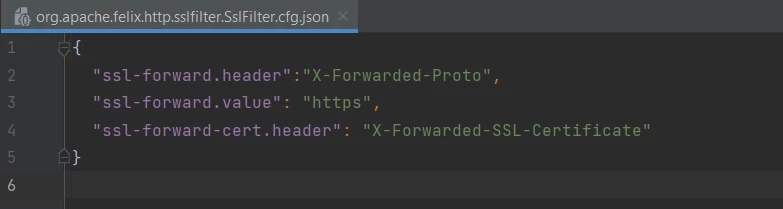
 

This didn't work either.

 

Any suggestions for troubleshooting this issue ?

@joerghoh , @albinis1 , @arunpatidar , @mohit_kbansal , @kautuk_sahni 


Thanks,

Rohan Garg

This post is no longer active and is closed to new replies. Need help? Start a new post to ask your question.
Best answer by Rohan_Garg

Hi All,


The best solution other than the alternate redirect suggested in question above is below -

Enable HSTS (HTTP Strict-Transport-Security) in dispatcher configuration.

HSTS ensures that the browsers always connect to a website over HTTPS.


The file is located at the below location -

/src/conf.d/rewrites/default_rewrites.rules.


Uncommenting this rule in our custom rewrite rules ensured the HTTPS connection.

3 replies

arunpatidar
Community Advisor
Community Advisor
August 17, 2022

Could you please share your all redirect rules?

I believe you have too many redirect and all could be PT or you should considering to add 

http to https as first rule without PT.

Arun Patidar
Rohan_Garg
Community Advisor
Community Advisor
August 17, 2022

Hi Arun, I have refactored my redirects to the below ones - 


#Rule 1 for root redirection

RewriteRule "^/?$" "/content/brandA/us/en/home.html" [PT,L]

#Rule 2 for non content pages and cross domain requests handling

RewriteCond %{REQUEST_URI} ^/content
RewriteCond %{REQUEST_URI} !^/content/dam/${CONTENT_FOLDER_NAME}
RewriteCond %{REQUEST_URI} !^/content/experience-fragments/${CONTENT_FOLDER_NAME}
RewriteRule !^/content/brandA/us/en - [R=404,L,NC]

 #Rule 3 for robots.txt

#Redirecting robots.txt based URLs to DAM resource path
RewriteRule ^/robots.txt$ /content/dam/brandA/robots.txt [NC,PT,L]

 #Rule 4 for sitemap.xml

#Redirecting sitemap.xml based URLs to Root Yourgi Sitemap XML
RewriteRule ^/sitemap.xml$ /content/brandA/us/en.sitemap.xml [NC,PT,L]

 #Rule 5 for handling non friendly full /content URLs

## If there are URLs that are not friendly urls, then this will shorten up and redirect
RewriteRule ^/content/brandA/us/en/(.*).html$ /$1 [R=302,L,QSA]

 This above redirect rule is giving the issue


#Rule 6 for passing full request to Publish

## Handle the HTML content page
RewriteCond %{REQUEST_URI} !^/apps
RewriteCond %{REQUEST_URI} !^/bin
RewriteCond %{REQUEST_URI} !^/content
RewriteCond %{REQUEST_URI} !^/etc
#RewriteCond %{REQUEST_URI} !^/home
RewriteCond %{REQUEST_URI} !^/libs
RewriteCond %{REQUEST_URI} !^/saml_login
RewriteCond %{REQUEST_URI} !^/system
RewriteCond %{REQUEST_URI} !^/tmp
RewriteCond %{REQUEST_URI} !^/var
RewriteRule ^/(.+)$ /content/brandA/us/en/$1.html [PT,QSA,L]

We can add redirect rule for converting http to https but ideally there should not be a need to do so I think. Is that not correct ? 

Mohit_KBansal
Adobe Employee
Adobe Employee
August 18, 2022

Hello @rohan_garg 


The only reason I see is that your webserver's virtual host support HTTP protocol. Now, saying this, CDN to Apache communication is happening on 80 port instead of 443 port, which converts HTTPS protocol to HTTP, and this cause any apache redirection happening on HTTP protocol. 


Please check and make sure, that CDN to apache communication is happening on HTTPS protocol. 

Rohan_Garg
Community Advisor
Community Advisor
August 18, 2022

Thanks @mohit_kbansal for the response! Couple of queries in this -


1. CDN to Apache communication is happening on 80 port instead of 443 port.

If this is true then where is the SSL offloading happening ? At CDN ?
I was assuming that the SSL offloading was happening in Load Balancers on the cloud. 

So CDN to Load Balancer might be on HTTPs but Load Balancer to Apache stands to reason might be on HTTP. 

If so, setting X-Forwarded-Proto in request headers to https should have helped I think. 


2. How can I verify on which protocol is the communication happening between different entities ?

Say Fastly CDN to Load Balancers or LBs to Webserver ?


Thanks for your response again.

Mohit_KBansal
Adobe Employee
Adobe Employee
August 18, 2022

1. Yes, in this case, offloading may be happening on LB. Regarding X-Forwarded-Proto, i believe, it needs to be configured on LB and not apache.


2. You have to check with Cloud Manager support team to confirm this.

Rohan_Garg
Community Advisor
Rohan_GargCommunity AdvisorAuthorAccepted solution
Community Advisor
October 20, 2022

Hi All,


The best solution other than the alternate redirect suggested in question above is below -

Enable HSTS (HTTP Strict-Transport-Security) in dispatcher configuration.

HSTS ensures that the browsers always connect to a website over HTTPS.


The file is located at the below location -

/src/conf.d/rewrites/default_rewrites.rules.


Uncommenting this rule in our custom rewrite rules ensured the HTTPS connection.

October 20, 2022

@rohan_garg - Does this mean that the SSL termination is not happening at Load Balancer anymore ?

Rohan_Garg
Community Advisor
Community Advisor
October 20, 2022

No, The SSL certificates are still installed in the load balancer/cloud instance.

As we don't have any ssl cert keys defined in our vhost configuration yet the site is served correctly over https implies the offloading at LB is happening correctly.

The Dispatcher/Web Server and AEM are now not accessed with http:// but https://.

As per below article the backend connection was http:// based. This is not the case anymore.

https://experienceleague.adobe.com/docs/experience-cloud-kcs/kbarticles/KA-16936.html?lang=en